

What Is Data Validation and Why Your Business Needs It

You're probably dealing with this already. A supplier invoice lands in your inbox, someone keys it into Excel or Xero, and everything looks fine until the VAT return, year-end accounts, or a management report starts showing numbers that don't quite line up. The date format is wrong. A tax code doesn't match the transaction type. A customer address is incomplete. One tiny input mistake turns into a slow, expensive tidy-up job.
That's where data validation earns its keep.
For accountants and business owners, data validation is the set of checks that stops bad data getting into your records in the first place, or flags it before you rely on it. Think of it as a gate at the point of entry. Instead of discovering problems when HMRC submissions are due or when your bookkeeper is reconciling the month, you catch them at the moment someone enters the data.
The practical value is simple. Better validation means fewer avoidable corrections, cleaner reports, and less stress when deadlines arrive. It also means your figures are more trustworthy when you're making decisions about cash flow, margins, payroll, VAT, or tax planning.
Introduction to Data Validation
A familiar accounting problem starts with something small.
A member of staff enters an invoice date as text instead of a date. Another chooses the wrong VAT category from a drop-down. A landlord's spreadsheet has one property coded under two slightly different names. None of those mistakes looks dramatic on the day. But later, the VAT return won't reconcile cleanly, the self-assessment working papers need untangling, or the year-end accounts require manual correction.
That's why what is data validation matters far beyond IT teams. In a finance setting, it's a basic control. It checks whether data is in the right shape, complete enough to use, and sensible in context before it moves deeper into your bookkeeping or reporting process.
The gatekeeper idea
The easiest way to understand data validation is to think of a locked gate. Only entries that meet the rules can pass through. If a field requires a date, a date must be entered. If a nominal code must come from an approved list, free typing shouldn't be allowed. If a VAT code only applies to certain transactions, the system should flag a mismatch.
Without that gate, errors spread. A single bad entry can feed into reports, tax returns, dashboards, and forecasts.
Practical rule: Fixing data at the entry stage is usually easier than correcting it after the data has flowed through several reports and submissions.
Why accountants care
Accountants don't just want neat ledgers. They need records that stand up to scrutiny. If your records feed HMRC submissions, Companies House filings, payroll runs, or management accounts, validation helps reduce the chance of preventable issues.
It also changes how teams work. Instead of relying on memory, people follow built-in rules. Instead of spotting errors randomly, the business checks data consistently.
This represents a fundamental shift: Data validation isn't just a technical feature in software. It's a way of protecting the quality of your financial information before bad assumptions become bad decisions.
Understanding Key Concepts
Data validation means checking whether data meets a set of predefined rules before you accept or use it. In plain English, you're asking three questions.
- Is it complete
- Is it in the correct format
- Does it make logical sense

The customs officer analogy
A good analogy is a customs officer checking passports at a border desk. The officer doesn't ask whether you seem trustworthy. They check whether the passport is valid, complete, and matches the rules for entry.
Data validation works the same way.
| Check | What it means in accounting | Example |
|---|---|---|
| Format | The value must look right | Date entered as 31/01/2026, not January-ish |
| Completeness | Required fields must be filled in | Supplier name, invoice date, amount, tax code |
| Logic | One field must make sense with another | VAT code should fit the type of sale or purchase |
Why it's more than a spot check
Many small firms do some checking already, but often in an ad hoc way. Someone glances at a report. A bookkeeper notices something odd. An accountant catches a mismatch at quarter end. That's useful, but it's not the same as systematic validation.
Systematic validation applies the same rules every time. That consistency matters. It reduces dependence on memory, experience, and luck.
The idea scales far beyond small businesses. In the UK's Census 2021, data validation was the critical process of evaluating the accuracy of population estimates by comparing them against a range of comparator sources, ensuring that final data met high standards of plausibility and reliability, as outlined by the Office for National Statistics methodology.
That's a national example, but the principle is identical in a small business. You compare what's been entered against rules or trusted references, then investigate anything that doesn't fit.
If you also want to see how reliable records support accountability after data is entered, this guide to what an audit trail is is a helpful companion.
Clean data and a clear audit trail work together. Validation helps stop bad entries. Audit trails help explain what happened afterwards.
Types of Validation Rules
Different problems need different rules. A date error needs one kind of check. A tax-code mismatch needs another. Good validation doesn't rely on a single rule. It combines several.
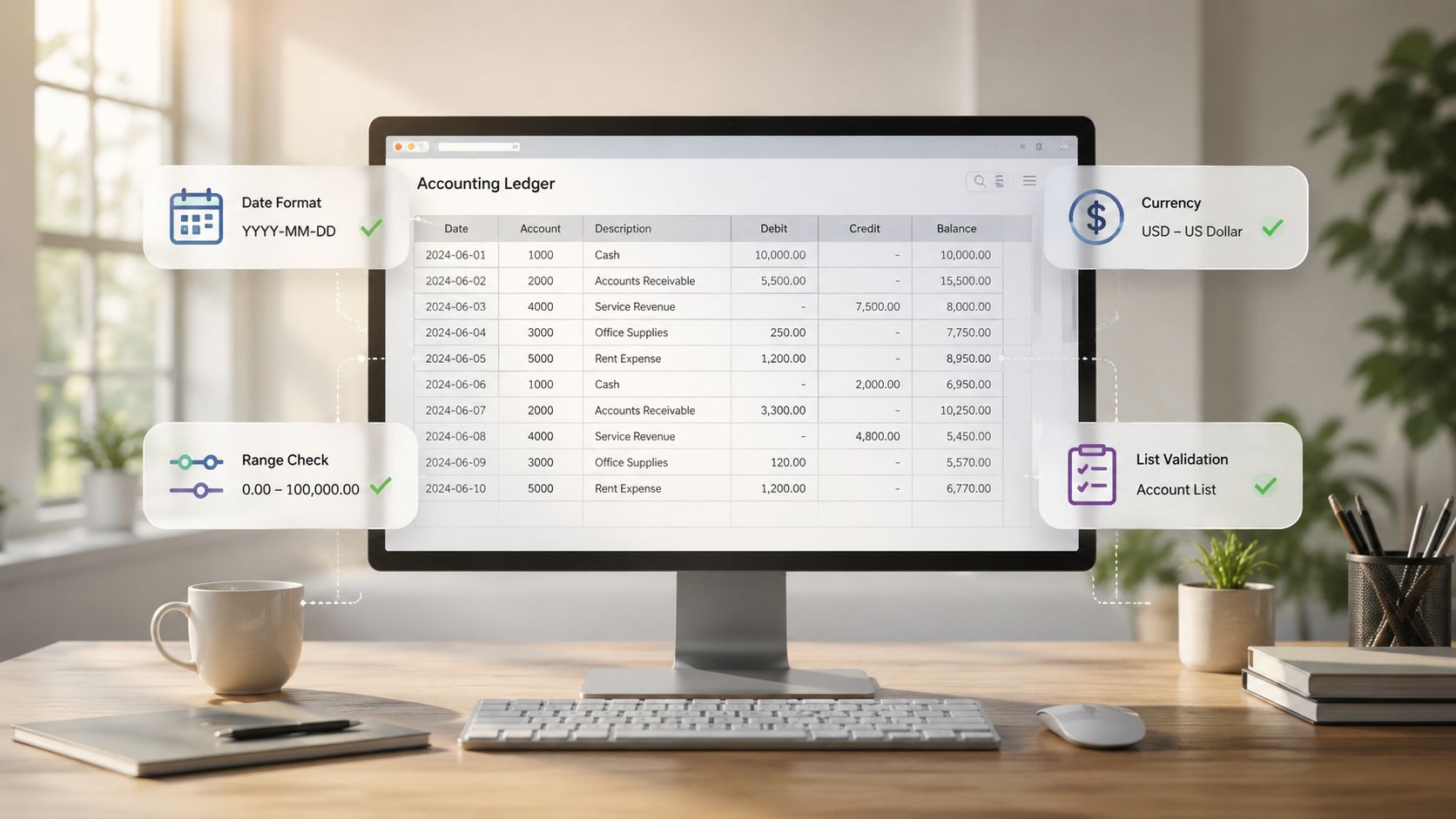
Format rules
Format rules check whether data looks the way it should.
A posting date should be a real date. A VAT number field should follow the structure your team expects. A decimal amount should be entered as a number, not as text with extra symbols. These checks stop software from treating values inconsistently.
For UK compliance work, format errors often create friction because reports and submissions expect predictable structures.
List rules
List validation limits entries to approved options.
This is one of the most practical controls in bookkeeping. Instead of letting users type anything into a category field, you give them a controlled list such as “Standard Rated”, “Zero Rated”, “Exempt”, or your internal departmental codes. That reduces variation and avoids spelling-based duplicates.
This same logic applies beyond finance. If your records include customer or supplier addresses, a tool like SelfServe address validation can help standardise entries before those details move into invoicing or customer records.
Logic rules
Logic rules ask whether the entry makes sense in context.
The UK public sector's Programme and Project Data Standard states that validation rules should confirm information is entered in the right format, uses correct categories, and meets logical requirements to ensure accuracy and consistency for submissions, which you can see in the Programme and Project Data Standard.
That matters in accounting because some entries are only valid when other fields agree with them.
Examples include:
- VAT logic: A tax code should match the transaction type.
- Payroll logic: A starter date shouldn't fall after a leaving date.
- Sales ledger logic: A credit note shouldn't be coded as a standard sales invoice.
- Property records: A rent receipt should link to an existing property and tenant.
Range and cross-field checks
Some rules test whether a number falls within an acceptable range. Others compare one field with another.
Here's a simple comparison:
| Rule type | What it checks | Accounting example |
|---|---|---|
| Range check | Value sits inside a permitted boundary | Discount can't exceed an internally approved level |
| Cross-field check | Two values must agree | VAT code must fit the ledger account |
| Formula or script | More detailed custom logic | Flag transaction if supplier type and tax treatment conflict |
These checks don't remove the accountant's judgment. They remove obvious avoidable mistakes before judgment is needed.
Data Validation in Excel and Xero
For many SMEs, validation starts in two places. Spreadsheets and cloud bookkeeping software. If you use both, you need controls in both.
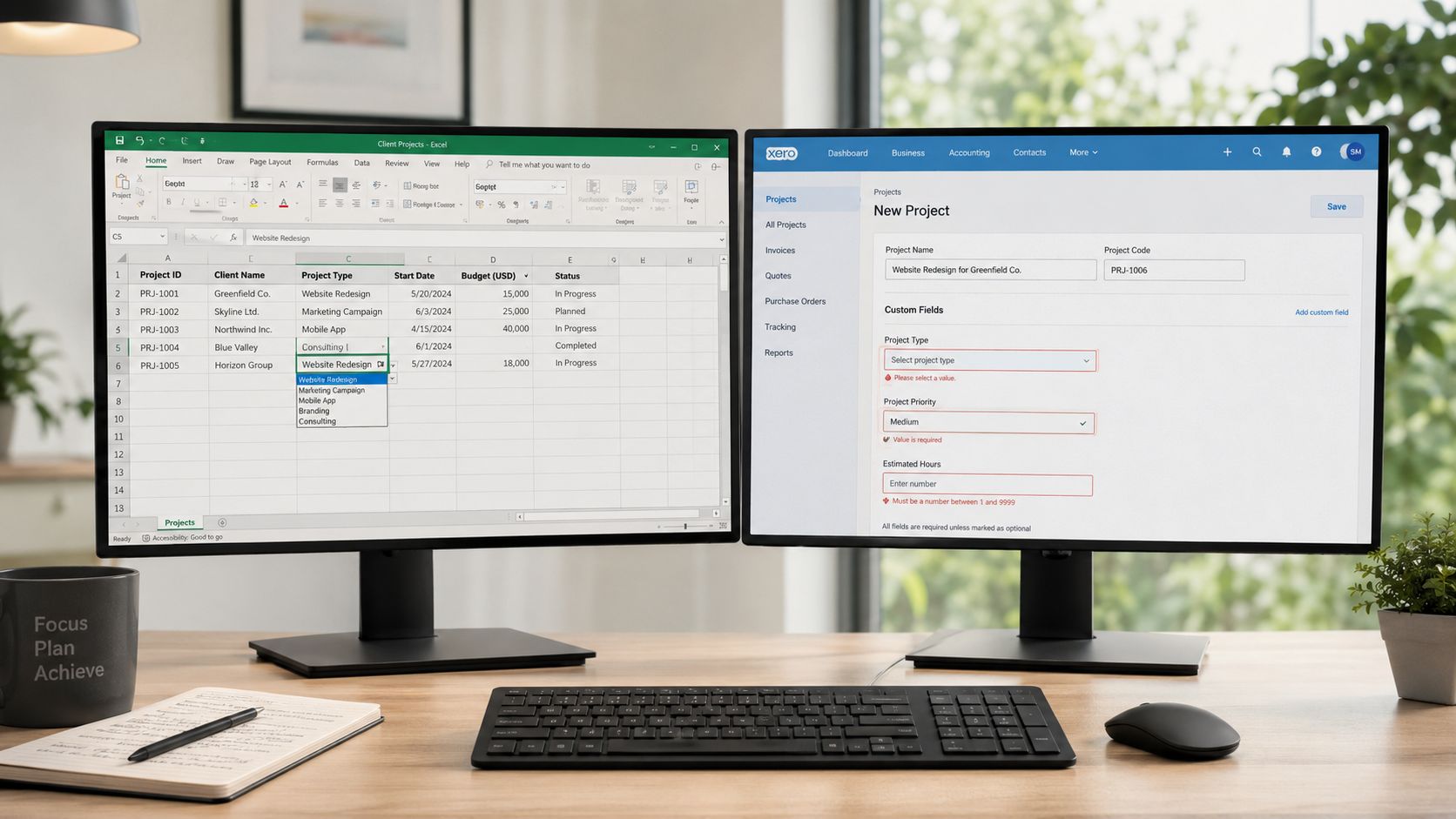
Using Excel without letting it become a free-for-all
Excel has built-in data validation tools that many businesses underuse. You can apply them in a few minutes.
A practical setup often looks like this:
- Select the cells where users enter data, such as VAT category or invoice date.
- Open Data Validation in Excel.
- Choose the rule type, such as list, date, whole number, or decimal.
- Add an input message so users know what belongs in the field.
- Set an error alert so Excel rejects invalid entries or warns the user.
This is especially useful for recurring templates. Cash flow sheets, expense logs, landlord rent schedules, and director loan account trackers all benefit from controlled entry fields.
If a spreadsheet matters enough to base tax or cash decisions on, it matters enough to validate.
Using Xero to improve consistency
Xero works differently because much of the validation sits inside workflow choices rather than individual spreadsheet cells. You can improve quality by tightening how people enter transactions.
Focus on areas such as:
- Bank rules: Standardise coding for repeated transactions.
- Contacts: Keep naming consistent so duplicates don't creep in.
- Tracking categories: Use approved categories only, with clear internal guidance.
- Draft review routines: Let automation suggest, but review exceptions before posting.
One reason this matters now is adoption. Only 15% of UK SMEs currently use Making Tax Digital-ready cloud systems despite HMRC's 2026 mandate, leaving many vulnerable to validation errors in VAT and self-assessment submissions, according to this government guidance note.
That doesn't mean cloud software fixes everything by itself. It means businesses that haven't moved to structured systems are often relying on looser, more error-prone processes.
If you want a practical walkthrough of getting better results from the platform, this guide to Xero training and support in the UK is worth reading.
Where people get stuck
Many users assume validation means making data entry harder. Usually, it does the opposite. The right drop-down list, alert, or pre-set rule speeds things up because people don't have to guess what the business expects.
The trick is to validate the entries that create real downstream problems, not every tiny detail.
Benefits and Best Practices
The main benefit of data validation is confidence. You trust the numbers more because the business has checked them before using them.
That confidence matters when you're filing returns, reviewing margins, planning cash flow, or deciding whether to hire. Bad data makes every one of those decisions shakier than it needs to be.

Two metrics worth tracking
In UK data quality pipelines, teams often track Error Rate and Completeness Score to quantify data quality before reporting, as described in this overview of the importance of data validation in research.
You don't need a complex dashboard to use those ideas.
- Error Rate: How many records fail your validation checks.
- Completeness Score: How many required fields are populated.
Even a simple monthly review can reveal patterns. Maybe one staff member keeps missing tax codes. Maybe a particular import process leaves reference fields blank. Those patterns tell you where to improve the system.
Best practices that work in real businesses
Some habits make validation much more effective:
- Build rules at the start: Add validation when you create a template, report, or workflow, not after errors appear.
- Keep a central rule list: Document your key rules so staff know what the system is checking and why.
- Review exceptions regularly: The rejected items often teach you more than the clean ones.
- Focus on high-risk fields first: Dates, VAT treatment, customer details, categories, and totals usually deserve priority.
Key takeaway: A good validation process doesn't aim to catch everything. It aims to catch the errors that would otherwise waste the most time or create the most risk.
For businesses already using cloud bookkeeping, a Xero bookkeeping health check can help identify where validation rules and review routines need tightening.
Common Mistakes and Fixes
Some businesses assume the answer is simple. Automate more. Add more rules. Remove the human from the loop.
That sounds efficient, but it can backfire.
A 2025 UK Finance Technology Institute study found that over-automating validation in accounting workflows increased error rates by 22%, while a hybrid approach with accountant review reduced HMRC rejection rates by 31%, according to the published summary on NICE.
Mistake one: trusting full automation too much
Automation is excellent at repetitive checks. It's less reliable when an unusual case needs context. A software rule may reject a valid exception or allow an invalid entry that technically fits the format.
Fix: keep human review for exceptions, unusual transactions, and edge cases. Let the system do the first pass, then let an accountant review what doesn't fit the normal pattern.
Mistake two: writing rigid rules that block legitimate work
A validation rule can be too strict. For example, a drop-down list might exclude a category your business needs, or a cross-field rule might reject a one-off adjustment that is perfectly valid.
That frustrates staff, who then look for workarounds.
Fix: create an exception route. Don't abandon the rule. Add a controlled override process with review and notes.
Mistake three: ignoring the exception log
Some firms set up validation and think the job is done. But if no one checks the rejected items, the same problems repeat.
A recurring exception often points to one of three issues:
| Problem revealed by exceptions | What it usually means | Better response |
|---|---|---|
| Same field fails repeatedly | Staff need clearer guidance | Adjust training or labels |
| Same valid transaction gets blocked | Rule is too narrow | Refine the validation logic |
| Exceptions pile up unresolved | No review owner exists | Assign daily or weekly ownership |
The strongest setup is usually hybrid. Automation handles routine checks quickly. A person handles judgment, exceptions, and rule tuning.
Next Steps for Quick Implementation
You don't need a large finance team or a major software project to start. Most businesses can improve validation within an hour if they focus on the highest-risk data first.
A simple implementation checklist
Review your current input points
Look at spreadsheets, Xero entry screens, imported files, and any forms staff use. Identify where bad data first enters the process.Pick your top five rules
Don't start with everything. Choose the checks that would prevent the most painful errors. Dates, VAT codes, contact names, categories, and totals are often the right starting point.Add controls in the tools you already use
In Excel, use drop-down lists, date restrictions, and error alerts. In Xero, tighten bank rules, contact naming, and review workflows for draft transactions.Create an exception routine
Decide who reviews flagged entries and how often. Daily is ideal for active bookkeeping. Weekly may be enough for lighter workflows.Train the people entering the data
Validation works best when staff know why the rule exists. If users understand the business logic, they make fewer mistakes and fewer workarounds.
Keep the first version modest
The best first system is usually not the most elaborate one. It's the one people will use. Start with a few controls that protect VAT, year-end reporting, and cash reporting. Then improve gradually as you learn where errors still appear.
Start where mistakes are expensive, not where the software makes validation easiest.
Data validation is one of those controls that looks small on the surface. In practice, it shapes the quality of every report, submission, and decision built on your records.
If you want help tightening your bookkeeping controls, cloud accounting processes, or HMRC-facing data workflows, Stewart Accounting Services can help you put practical validation steps in place without overcomplicating the day-to-day work.