

How to prepare for MTD for income tax: Thresholds and quarterly filing rules

TL;DR: Sole traders and landlords must prepare for MTD for Income Tax by adopting HMRC-compatible software for quarterly reporting starting April 2026.
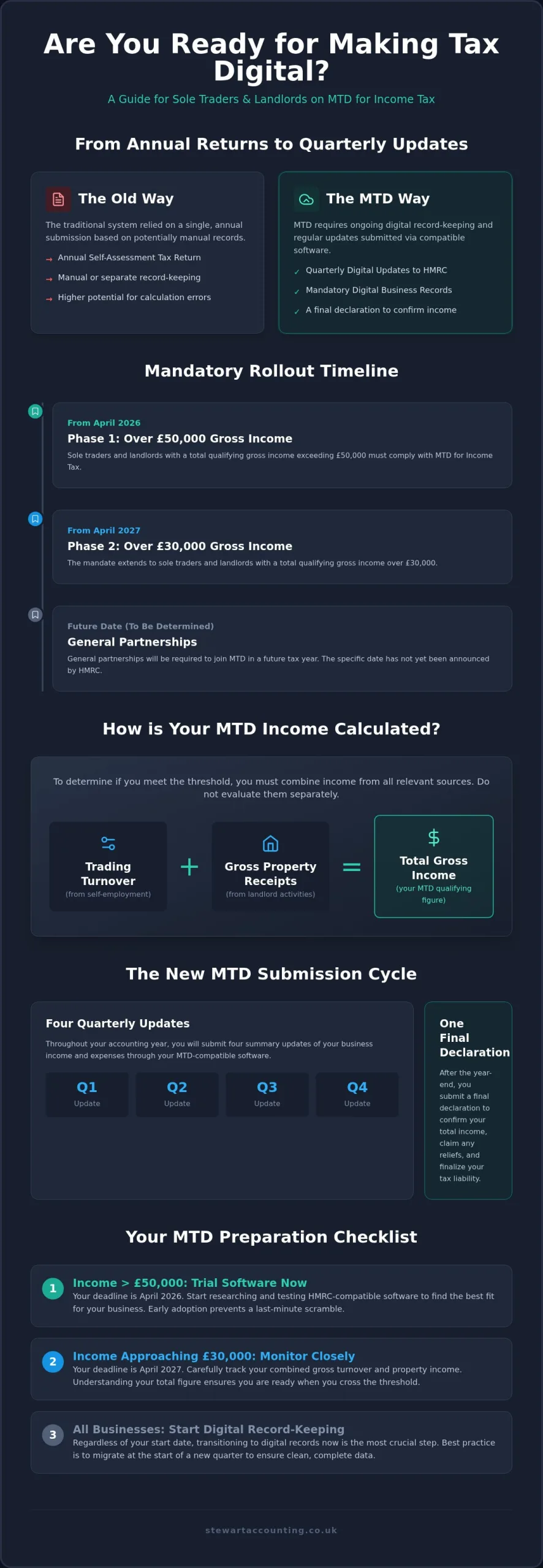
- Gross income thresholds of £50,000 apply from April 2026 and £30,000 from April 2027.
- Except when income is below £30,000, as these individuals currently remain outside the mandate.
- Best-for spreadsheet users to adopt bridging software to minimize disruption to existing record-keeping habits.
- The calculation that determines eligibility requires adding gross property receipts to trading turnover together.
Under Making Tax Digital (MTD) for Income Tax Self Assessment, eligible UK landlords and sole traders must submit quarterly income reports through approved digital software. Thresholds begin at 50,000 GBP in gross income from April 2026, dropping to 30,000 GBP in April 2027. You must keep digital records of all business transactions to meet these upcoming UK tax requirements.
The decisions that shape your preparation are practical ones: which income threshold puts you in the first or second wave, which software path fits the records you already keep, and how you will file quarterly updates without disrupting daily work. The sections below take those questions in order so you can plan against fixed HMRC dates rather than react to them.
MTD eligibility varies across three common business setups
Depending on whether your business is structured as a sole trader, partnership, or limited company, Making Tax Digital (MTD) for Income Tax Self Assessment enforces different rules. Understanding your specific trading structure prevents costly filing errors. Missing your qualifying threshold or deadline triggers penalties from HMRC.
Three setups we meet often, each with a concrete next step drawn from the rules above:
- Sole trader already above £50,000 gross: begin software trials now so April 2026 filings run on tested data.
- Landlord whose combined property and trading receipts sit near £30,000: watch the April 2027 threshold and add gross receipts, not profits.
- General partnership still waiting on HMRC timing: keep digital records voluntarily so a later mandate does not force a rushed migration.
| Business Setup | MTD Income Threshold | Expected Mandatory Start |
|---|---|---|
| Sole Traders | Over £50,000 | April 2026 |
| Sole Traders | Over £30,000 | April 2027 |
| General Partnerships | TBD | Future tax year |
If you are looking for accountants in Alloa, Stirling, getting early advice simplifies your setup. Starting a new venture often creates confusion about tax obligations, and unclear filing rules add stress; professional guidance helps you comply.
A commenter in an online thread on accountants for startups and affordable support from £23.70 a month:
"As a first-year sole trader, I was a little unsure about the accounting side of things, but James has been incredibly helpful throughout the whole process." (source)
This feedback shows how steady support resolves early confusion about self-employment tax duties and makes the move to new accounting systems manageable for first-year sole traders.
Making Tax Digital replaces annual returns with quarterly digital reports
Landlords and sole traders subject to Making Tax Digital for Income Tax Self Assessment must maintain electronic accounting records while submitting quarterly submissions to HMRC. It replaces the traditional annual self-assessment tax return with digital reporting software.
According to a Making Tax Digital Wikipedia article from 2026, the UK government introduced this initiative to reduce errors from manual calculation. You will submit four summary updates every year, followed by a final declaration to confirm your total income.
This shift changes your workflow. Managing quarter-by-quarter submission rules matters if you explore Passive Income UK: Tax Rules & Income Ideas Explained to build your property portfolio.
Using compatible software keeps you compliant, and moving across before your mandatory year reduces pressure when the first deadline arrives.
Your gross income total sets your exact MTD start date
Your gross qualifying income determines the exact date you must join Making Tax Digital (MTD) for Income Tax Self Assessment.
Calculating this total involves adding together your total self-employment turnover and gross property earnings. Many taxpayers find calculating thresholds complex, as accounting work feels stressful without proper support. An easily overlooked detail: determining if you cross the threshold means adding your gross property receipts to your trading turnover, instead of evaluating each income source separately. You can review our Rental Income Archives to understand how property earnings impact your total figure.
Missing this distinction creates confusion, and the calculation gets tricky fast. Working out your total gross turnover correctly early on ensures you choose the right time to transition, so checking your total income now helps you avoid last-minute panic.
Mandatory rollout dates leave little room for last-minute setup
Making Tax Digital for Income Tax Self Assessment arrives in phases starting April 2026. Delaying your setup risks HMRC non-compliance penalties.
In accounting practice, business owners routinely underestimate the time needed to transition their record-keeping software. Early preparation prevents a last-minute scramble before your official start date.
From April 2026, sole traders and landlords with gross income over £50,000 must comply. The threshold drops to £30,000 in April 2027. Missing these firm HMRC deadlines causes immediate stress. Treating software setup as a dry run makes the eventual transition easier.
Looking for accountants in Alloa, Stirling can help you audit your current turnover to pinpoint your exact start year. Choosing early adoption fits higher earners who want to test their digital filing systems without pressure.
Compatible software bridges spreadsheets or full accounting systems
You must select HMRC-compatible software to submit your digital income tax records directly. Bridging software suits businesses using spreadsheets, while full accounting packages fit growing teams wanting automated workflows. Bridging software acts as a digital adapter for an older spreadsheet process.
Choosing standalone software early saves hours of painful migration later. Picking an integrated system keeps your digital records organised across every quarter.
You can grant your accountant authorization to handle submissions on your behalf through your digital agent services account. This option fits busy founders who prefer delegating administrative tasks entirely.
The right choice depends on your current record-keeping setup and internal team capacity. Talk to our advisors for a personalised quote based on your specific operational needs.
Digital record keeping works when you migrate at quarter start
Transitioning to digital record keeping requires a clear, step-by-step migration process to keep your financial data safe. Switching software at the start of a fresh quarter works better than a mid-quarter move, which creates duplicate entries and unnecessary confusion.
Run your old spreadsheet system alongside your new software for thirty days to spot missing transactions early. This double-check protects your accounting records during the shift.
Unresolved tax setup issues often trigger intense anxiety for business owners trying to stay compliant. Working with an expert helps remove that panic.
A commenter in an online thread on accountants for startups and affordable support from £23.70 a month:
"He is very knowledgeable, patient, and took the time to guide me through everything, making it much less stressful than I expected." (source)
Dedicated support during software migration removes the fear of costly compliance mistakes and turns an administrative transition into a manageable process.
Four quarterly updates follow five clear submission steps
You must submit quarterly updates using compatible software every three months to stay compliant with HM Revenue and Customs rules. Managing digital tax records functions much like keeping a digital ledger for your monthly household bills, where every entry updates your live balance automatically. You can review government documentation standards under the Open Government Licence v3.0 (2014).
Follow these steps to submit your information smoothly:
- Check records: Ensure all income and business expenses are fully categorised.
- Review totals: Check your summary figures inside the accounting software before sending.
- Connect HMRC: Authorise your software to communicate directly with official systems.
- Send update: Submit the quarterly summary by the strict deadline.
- Save confirmation: Keep the digital receipt number for your permanent files.
Submitting quarterly updates on time prevents late penalties, because small errors compound quickly. Stewart Accounting Services helps keep your digital filings accurate throughout the tax year.
Agents need early digital authorisation to protect clients
Agents must set up an Agent Services Account to manage Making Tax Digital for Income Tax on behalf of their clients.
Clients can be left without adequate help by a previous accountant, facing complex filing deadlines and messy tax situations alone. Setting up delegated authority early prevents this sudden drop in support.
Switching representatives right before a deadline causes extreme stress. Securing digital authorization early ensures a clean transition without missed submissions.
You need access arranged before pressure hits, not during a filing week. Request digital links from your clients so your firm can access their software smoothly, rather than waiting for HMRC reminders to start linking accounts.
Digital transition costs rise when software choice mismatches turnover
Failing a digital transition usually stems from unexpected software expenses and manual correction overhead.
Costs compound rapidly when sole traders buy incompatible tools. Unplanned subscription upgrades often push overall operational spending far beyond initial projections.
Basic software gets you moving, yet heavier transaction volumes need a broader upgrade. Your qualifying gross income drives software requirements up or down. Ask providers for figures that match your situation: higher turnover usually demands complete, end-to-end accounting suites.
For simple setup needs, basic free-tier tools fit best, while complex businesses require tailored packages.
Tip: Assess your total qualifying gross income across both self-employment and property before choosing software.
Frequently asked questions
When must I sign up?
You should sign up before your first quarterly submission deadline. Preparing your accounting setup early prevents last-minute panic.
What counts as qualifying income?
Qualifying income includes gross earnings from self-employment and property. You calculate this total before deducting any business expenses. Sum both sources together.
What software do I need?
You must use compatible software that connects directly to HMRC systems. Digital tools transmit your quarterly records automatically. Choosing software depends on your record volume and accounting needs; ask for figures that reflect your exact software setup costs.
Who does MTD apply to?
It applies to self-employed individuals and landlords with qualifying income above the statutory threshold. General partnerships will join in a later phase. Sole traders must comply first.
When does MTD apply from?
Making Tax Digital for Income Tax takes effect from April 2026. Higher earners start first, followed by lower income brackets in later years. Plan your transition with those dates in mind.
How to prepare for MTD for Income Tax in 2026
Sole traders and landlords must adapt to digital record-keeping as HMRC updates compliance rules. Returning to the same decisions you met at the start (your threshold wave, your software path, and your quarterly routine) keeps preparation focused and reduces last-minute stress.
The Stewart Accounting Services team assists with software migration and quarterly reporting. Early system setup prevents filing errors, and a careful records transition protects your daily business operations.
Contact our advisers to discuss your software transition and ongoing requirements.
Recent Posts
14 Oct, 2026
12 Oct, 2026