

At its core, a VAT return is a simple calculation: you take the VAT you've charged on your sales (your output VAT) and subtract the VAT you've paid on your business purchases (your input VAT). The difference is what you either owe HMRC or, if you're lucky, what you're owed back as a refund. It all gets filed digitally using MTD-compliant software.
Your VAT Return Preparation Checklist
Before you even think about logging in to file, remember this: a smooth VAT return is all about the prep work. Trust me, a rushed submission is almost always a flawed one. Taking the time to get your ducks in a row isn't a chore; it’s the secret to a stress-free filing experience.
The bedrock of any accurate VAT return is solid bookkeeping. You need a clear, organised system for every single financial transaction. Trying to file without it is like attempting to build a house with no foundations – it’s just not going to work. If you're looking for a starting point, brushing up on some small business bookkeeping tips can make a world of difference.
Getting Your Paperwork Together
First things first, you need to round up all the essential documents for the VAT period you're filing. This isn't just a box-ticking exercise; it's about making sure everything is complete, accounted for, and properly categorised.
Make sure you have these records ready to go:
- Sales Invoices: These are your proof of every sale you made and, most importantly, the output VAT you charged.
- Purchase Invoices and Receipts: This covers everything your business bought—from stock and raw materials to that new printer—and details the input VAT you paid.
- Bank Statements: It's crucial to check your invoices against your bank statements. This simple reconciliation step confirms you haven’t missed anything.
- Adjustment Records: Don't forget any credit notes you've sent to customers or received from your own suppliers.
Understanding Key VAT Rates and Figures
To get your VAT return right, you need to be on top of the latest figures from HM Revenue & Customs (HMRC). As of April 2024, the VAT registration threshold was bumped up to £90,000 in taxable turnover over a rolling 12-month period.
Your return will be based on applying the correct VAT rates to your transactions. To help with this, here's a quick reference table.
VAT Rates and Application at a Glance
| VAT Rate | Percentage | Common Examples |
|---|---|---|
| Standard | 20% | Most goods and services, consultancy, professional fees. |
| Reduced | 5% | Home energy (gas and electricity), children's car seats. |
| Zero Rate | 0% | Most food, children's clothing, books, newspapers. |
While the standard 20% rate applies to most things, the 5% reduced rate and the zero rate can easily trip people up. Make sure you’re categorising everything correctly to avoid over- or under-paying.
My Top Tip: Treat your record-keeping as a daily or weekly task, not a quarterly panic. Keeping everything organised as you go is the single best way to avoid errors, reduce stress, and be prepared for any potential HMRC enquiries. A little bit of discipline saves a mountain of hassle when the deadline is staring you down.
Understanding the Nine-Box VAT Return Form
When you first see the nine-box VAT return, it can look a bit intimidating. It's just a grid of boxes waiting for numbers. But once you get the hang of it, you'll see it’s a perfectly logical summary of your business's activity for that quarter.
At its core, completing a VAT return is a simple two-step process. First, you add up all the VAT you've charged on your sales. Then, you subtract all the VAT you've paid on your business purchases. The nine boxes are just HMRC's way of structuring that calculation.
Let's break it down, box by box.
Before you even touch the form, though, you need your records in order. This image shows you the crucial documents you need to have ready.
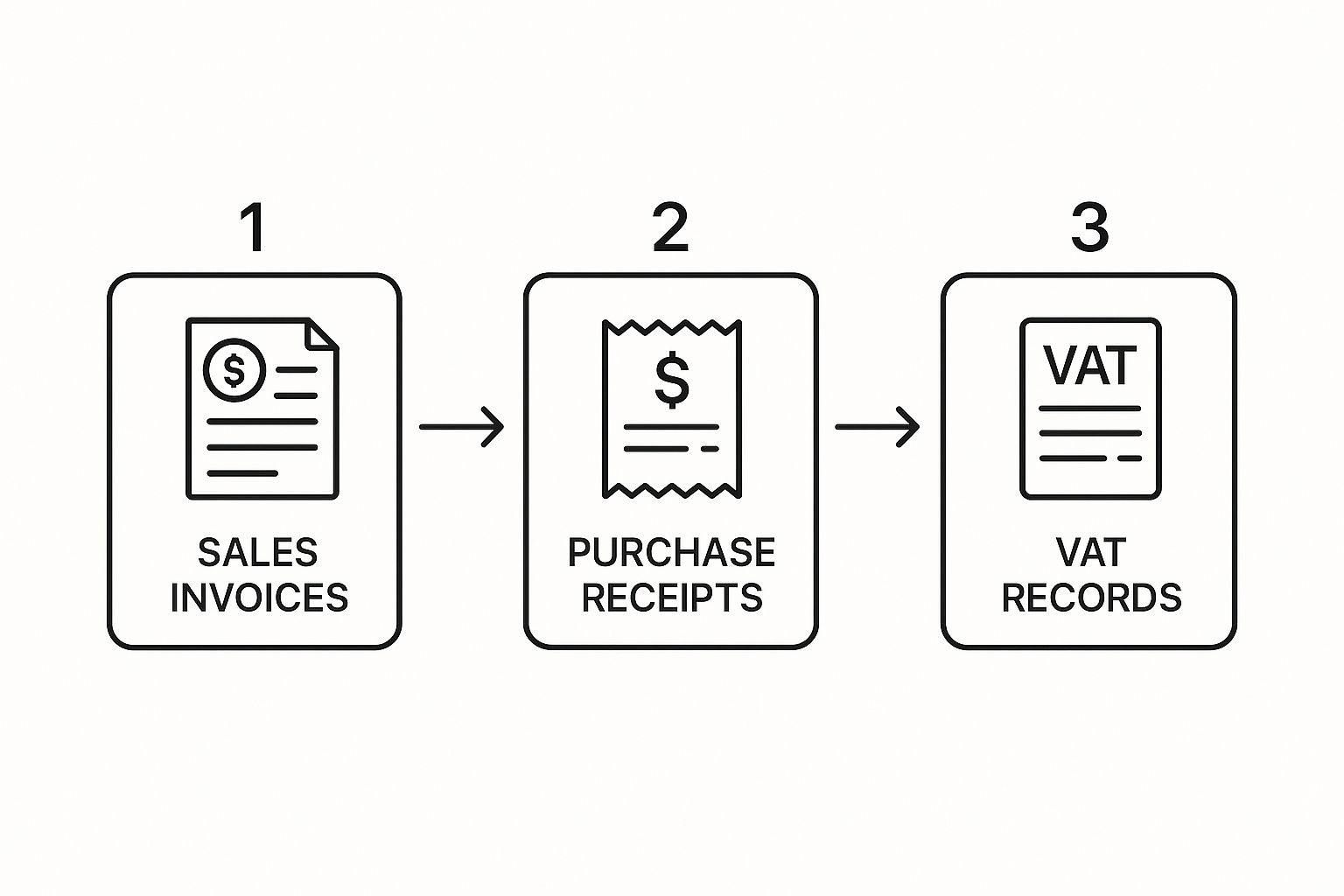
As you can see, accurate sales invoices, purchase receipts, and well-organised VAT records aren't just nice-to-haves; they're the essential foundation for getting your return right.
The ‘Money’ Boxes: 1 to 5
These first five boxes are the most critical. They directly calculate whether you owe HMRC money or if you’re due a refund. This is the heart of your VAT return.
To make this real, let’s use an example of a small creative agency filing its quarterly return.
-
Box 1 VAT Due on Sales: This is where you put the total VAT you’ve charged your customers. Our agency invoiced for £20,000 of standard-rated services, so they charged £4,000 in VAT (£20,000 x 20%). The figure for Box 1 is £4,000.
-
Box 2 VAT Due on Acquisitions from EU: Post-Brexit, this box is far less common for most UK businesses. It generally applies if you've bought goods from Northern Ireland from a VAT-registered supplier. Our agency hasn’t, so this is £0.
-
Box 3 Total VAT Due: Nice and simple—just add Box 1 and Box 2 together. For our agency, that’s a straightforward £4,000.
Now for the good part: what you can claim back.
- Box 4 VAT Reclaimed on Purchases: This is the total input VAT you've paid on legitimate business expenses. Our agency spent £5,000 on software and freelance help (all standard-rated), allowing them to reclaim £1,000 in VAT (£5,000 x 20%). The figure for Box 4 is £1,000.
This is where it all comes together. Box 5 is the final calculation—the difference between the VAT you owe and the VAT you can reclaim. It’s the bottom line of your return.
Finally, the moment of truth.
- Box 5 Net VAT to Pay or Reclaim: You get this figure by subtracting Box 4 from Box 3. In our scenario, it’s £4,000 – £1,000 = £3,000. Because the number is positive, this is what the agency must pay to HMRC. If it were a negative number, that would be the amount they'd get back as a refund.
The ‘Information’ Boxes: 6 to 9
The final four boxes don't actually change the amount you pay or reclaim. Instead, they provide HMRC with a broader picture of your total sales and purchases. Don't skip them—they are just as important for a correct submission.
-
Box 6 Total Value of Sales: Enter the total value of your sales, but excluding the VAT. Our agency had its £20,000 in UK sales and also did £5,000 worth of work for a client in the US (which is zero-rated for UK VAT). So, the total figure here is £25,000.
-
Box 7 Total Value of Purchases: This is the net value of all your business purchases, again, without the VAT. For our agency, this was £5,000.
-
Boxes 8 & 9 Total Value of Supplies/Acquisitions of Goods to/from EU: Much like Box 2, these are now mainly for businesses dealing with goods moving to or from Northern Ireland under specific post-Brexit rules. For most businesses, including our agency, these boxes will be £0.
By following this flow, you can turn what looks like a complicated tax form into a simple and manageable checklist.
Filing Your VAT Return with MTD Software
Gone are the days of filling out paper VAT returns and popping them in the post. Everything is now handled through Making Tax Digital (MTD), which means using HMRC-approved software isn't just a good idea—it's the law. But don't think of it as just another piece of red tape; it's genuinely a much better way of managing your VAT.
Modern cloud accounting platforms like Xero, QuickBooks, and FreeAgent are built for MTD. They link up directly with HMRC's system, turning what used to be a headache-inducing task into a straightforward, digital process. As long as your bookkeeping is current, the software really does most of the hard work for you.
Getting Connected and Generating the Return
First things first, you need to give your accounting software permission to talk to HMRC. This is a simple, one-time setup. Your software will send you over to the Government Gateway login page where you'll grant access. Once that's done, your software and HMRC are connected.
When it's time to file, you'll find an option within your accounting platform to generate your VAT return. The system will automatically pull together all the necessary data from the transactions you've recorded—your sales, purchases, and expenses—and fill in the nine boxes on the VAT form. This automation is a lifesaver, as it virtually eliminates the classic manual entry errors that used to trip so many people up.
Before you hit 'submit', you get a chance to look over everything. The software will show you a full breakdown, detailing exactly which transactions make up the figures in each of the nine boxes. This is your moment to be a detective. Check for any expenses that might have been put in the wrong category or any sales invoices that are missing.
Take a proper look at this review. Are there any unusually large transactions? Have they been handled correctly? It’s infinitely easier to fix a mistake now than it is to amend a return later. A ten-minute check at this stage can honestly save you hours of pain down the line.
Submitting and Getting Confirmation
Happy with the numbers? Great. Now you can authorise the submission right from your software. It’s usually just a couple of clicks to confirm you’re happy with the declaration and ready to send it off. The software then zaps your completed VAT return securely over to HMRC.
If you're looking for software, the GOV.UK website has a handy list of compatible options to get you started.
Using this official list ensures that whatever tool you pick is fully compliant and will work seamlessly with HMRC's MTD system.
Once filed, you should get an instant confirmation from HMRC right there in your software. This will usually include a submission receipt or a reference number. It is absolutely vital that you save this. Keep a copy of the confirmation and a PDF of the VAT return itself. These are your proof of filing and are crucial for your business records, creating a perfect digital trail that an auditor would love to see.
Managing Deadlines, Payments, and Refunds
You’ve hit submit on your VAT return, which is a great feeling. But you're not quite over the finish line yet. The final, and arguably most important, step is settling up with HMRC—either paying what you owe or getting back what you're due. Honestly, getting this part right is just as critical as the return itself, especially for keeping your business's cash flow in good shape.
The key date to remember is that the deadline for submitting your return and making the payment is exactly the same. You typically have one calendar month and seven days after the end of your VAT accounting period.
So, if your quarter wraps up on 31st March, you need to have everything submitted and paid by 7th May. Pop that date in your calendar right away, because missing it can lead to penalties.
Making Your VAT Payment to HMRC
When it comes to paying your VAT bill, HMRC gives you a few different ways to do it. It’s a good idea to pick the one that slots neatly into your existing business processes and guarantees the money arrives on time.
Here are the most common options I see clients use:
- Direct Debit: This is my personal favourite for a reason—it’s the ultimate ‘set it and forget it’ method. You authorise it once, and HMRC handles the rest, automatically taking the payment from your account. It's a lifesaver for avoiding accidental late payments.
- Bank Transfer: You can pay straight from your bank account via Faster Payments, CHAPS, or Bacs. If you go this route, double-check that you're using the correct 18-digit payment reference number. It’s crucial for making sure HMRC knows the payment came from you.
- Online Card Payment: Another straightforward option is to use a corporate credit or debit card through HMRC’s online service.
A quick tip from experience: payment methods have different processing times. A Faster Payment is usually instant, but a Bacs transfer can take three working days. Always aim to send your payment so it clears in HMRC's account by the deadline, not just leaves your account on that day.
What Happens When You're Due a Refund
Of course, sometimes the shoe is on the other foot. If the VAT you paid on your purchases (your input VAT) is more than the VAT you charged on your sales (your output VAT), HMRC owes you a refund. This happens quite often, especially if you've recently made a big investment in equipment or if most of your sales are zero-rated.
Once you’ve submitted a return showing a reclaim, HMRC gets to work. They generally aim to process repayments within 30 days, assuming they don’t have any questions about your figures. The money will be paid directly into the bank account you’ve registered with them.
Just a heads-up: if this is your first ever VAT refund or the amount is unusually large, don't be surprised if HMRC decides to run a few extra checks. It’s standard procedure, but it can sometimes slow things down a little.
It’s worth remembering why this process is so carefully managed. VAT is a massive source of income for the government. Receipts have ballooned from £72.9 billion in 2005-06 to an estimated £171.1 billion in 2024-25, which really shows how vital it is to the UK's finances.
For a deeper dive into general tax compliance, including other areas like filing tax returns and managing payments, there are plenty of excellent resources out there. Getting comfortable with these final steps is a core part of staying on top of your business finances.
Common VAT Return Pitfalls and How to Sidestep Them
Even the most organised business owner can trip up when it comes to VAT returns. Trust me, I've seen it all. But knowing where the common banana skins are is the best way to avoid them, saving yourself a world of pain and potential penalties from HMRC down the line.
We're not talking about obscure tax law here. These are the everyday errors that catch people out time and time again. A simple typo, like transposing two numbers or misplacing a decimal point, can completely skew your figures. It's so easy to do when you're rushing. Always give everything one last "does this look right?" glance before filing.
Claiming VAT on Things You Shouldn't
This is probably the number one mistake I see. It’s so easy to assume that if you bought something for the business, you can automatically reclaim the VAT. Unfortunately, it's not always that simple.
Here are a few classic examples of expenses where VAT reclamation is a no-go:
- Business Entertainment: Taking a client out for lunch is a perfectly valid business expense for your profit and loss account. But you generally cannot reclaim the VAT on that meal. This catches so many people out.
- Items with Personal Use: Bought a new laptop that you use for work and watching films in the evening? If it’s not used 100% for your business, you can only reclaim the business portion of the VAT.
- Purchases from Businesses Not Registered for VAT: You can only reclaim VAT that has actually been charged by a VAT-registered supplier. It sounds obvious, but always check your receipts and invoices for a proper VAT number before you make the claim.
The reverse charge mechanism, which often applies when you buy services from overseas, is another area ripe for confusion. Getting this wrong is a common reason for an incorrect VAT filing.
At the end of the day, you're the one responsible for your VAT return. Taking five extra minutes to double-check these common pitfalls before you hit 'submit' is the most valuable part of the entire process.
Realised You've Made a Mistake? Here's What to Do
Right, so you’ve spotted an error on a return you’ve already filed. First off, don't panic. It happens. HMRC has a straightforward process for putting it right.
If the net error (the difference between what you paid and what you should have paid) is under £10,000, you can usually just correct it on your next VAT return. Good accounting software, like Xero or QuickBooks, will have a function for making these kinds of adjustments.
For anything bigger, or if you'd just feel better telling HMRC straight away, you'll need to fill out a "Notification of errors in VAT returns" form. Being upfront and honest with HMRC is always the best approach. It shows you're on top of your affairs and can save you a lot of stress.
To help you catch these issues before you file, I've put together a quick checklist. Run through this table just before you finalise your return—it might just save you a headache.
Common VAT Pitfalls and Prevention Checklist
This simple checklist highlights the most frequent errors and gives you practical steps to avoid them, helping to ensure your submission is spot on.
| Common Mistake | How to Check and Prevent | Potential Consequence |
|---|---|---|
| Simple Calculation Errors | Don't just trust the software. Sense-check the auto-populated figures against your own records. A quick scan can catch obvious typos. | Paying the wrong amount; facing potential interest charges and penalties from HMRC. |
| Claiming on Blocked Items | Review your expense categories. Create a specific check to isolate and exclude VAT on things like client lunches or staff parties. | Having to repay wrongly claimed VAT, often with added interest and potential penalties. |
| Missing Invoices | Before you start, reconcile your purchase and sales ledgers with your bank statements for the entire VAT period. | Under-claiming the input VAT you're owed or, worse, under-reporting the output VAT you've charged. |
Treating this checklist as a final, non-negotiable step in your process can make a huge difference. It’s about building good habits that make every subsequent VAT return that little bit easier and a lot more accurate.
A Few Common Questions About VAT Returns
Even with the best guide in hand, VAT often throws up a few curveballs. It's completely normal to have questions. Here are some of the most common ones we hear from business owners, along with some straight-talking answers to clear things up.
"I Had No Sales This Quarter. Do I Still Need to File a Return?"
Yes, you absolutely do. This is a common trip-up. If your business had zero sales or purchases in a VAT period, you still have to submit what HMRC calls a 'nil' return.
Think of it as checking in. You're just logging into your MTD software and submitting the return with zeros in the boxes. HMRC treats a failure to file a nil return just like any other late submission, which means penalties could be heading your way. It’s a quick task that keeps you on the right side of the taxman.
"What if I Pay My VAT Bill a Few Days Late?"
Unfortunately, HMRC isn't very forgiving when it comes to late payments. Missing the deadline will trigger penalties and interest charges. While there’s a points-based system for late submissions, late payment penalties are different—they're calculated as a percentage of what you owe. The longer it takes you to pay, the more it will cost you.
Remember, submitting your return and paying your bill are two separate deadlines. You can file perfectly on time but still get penalised if the payment doesn't clear into HMRC's account by the due date. It’s a distinction that can catch people out.
"How Far Back Can I Claim VAT From Before I Registered?"
This is a great question, and the answer offers a nice little cash flow boost for newly registered businesses. You can indeed reclaim VAT on some past purchases, but there are strict time limits.
- Goods: You can go back up to four years to reclaim VAT on goods you bought before registering, as long as you still have them for your business to use.
- Services: The time frame for services is much tighter—just six months before your registration date.
Claiming this pre-registration VAT is a fantastic way to claw back some money, but it all hinges on having solid records. You must have valid VAT invoices for every single claim you make.
"Do I Really Need an Accountant for My VAT?"
Legally, no. You're not required to hire an accountant. Many small business owners handle their own VAT returns just fine using MTD-compliant software like Xero or QuickBooks and keeping their books in good order.
But should you? That's a different question. A good accountant does more than just file the return. They can spot opportunities to reclaim VAT you might have missed, navigate tricky areas like partial exemption, and simply offer the assurance that it's all been done correctly. Deciding to bring in a professional is often a savvy move, especially as your business gets more complex.
We know that managing VAT can feel like a full-time job in itself, pulling you away from what you do best. At Stewart Accounting Services, we take the entire process off your hands, from prep to submission. We make sure you’re always compliant and that you get back every penny you're owed. Let us give you your time back. Learn more about how we can help at https://stewartaccounting.co.uk.