

Imagine it’s the evening before your VAT return is due, but your Government Gateway ID has vanished and the HMRC helpline closed hours ago. It’s a stressful situation that many small business owners face when they realize they need urgent business tax account help to stay compliant. You aren’t alone in feeling overwhelmed by the HMRC “Digital First” shift or the complexity of managing Corporation Tax and PAYE through a single portal. We understand how frustrating it is to feel locked out of your own financial data or confused by the overlap between your personal and business tax profiles.
This guide provides a clear roadmap to navigating your HMRC Business Tax Account, solving common access issues, and understanding when to delegate management to a professional. We will walk you through recovering lost credentials, distinguishing between account types, and how partnering with a local expert can permanently remove the weight of tax administration from your shoulders. By the end, you’ll know exactly how to reclaim your time and mental well-being while ensuring your business remains in good standing with the Revenue.
Key Takeaways
- Clearly distinguish between Personal and Business tax accounts to avoid confusion and ensure you are managing the correct financial data.
- Navigate the recovery process for lost Government Gateway IDs and 2FA issues to secure the business tax account help required for meeting tight deadlines.
- Master the setup process by gathering essential details like your UTR and company registration info for a smooth, error-free registration.
- Use your account as a central hub to monitor VAT, PAYE, and Corporation Tax liabilities in real-time, preventing unexpected payment surprises.
- Understand how delegating account access to a trusted partner can restore your professional liberty and remove the burden of tax administration.
What is an HMRC Business Tax Account and why is it so confusing?
Have you ever logged into your HM Revenue and Customs (HMRC) portal only to find your VAT balance is missing? This is a frequent point of frustration for local business owners seeking business tax account help. The HMRC Business Tax Account is a secure online portal designed for businesses to view tax positions, file returns, and manage payments across multiple tax regimes. It acts as the central digital hub for managing business-related taxes like VAT, PAYE, and Corporation Tax. However, the system is notoriously complex, often leading to wasted hours and significant stress for entrepreneurs.
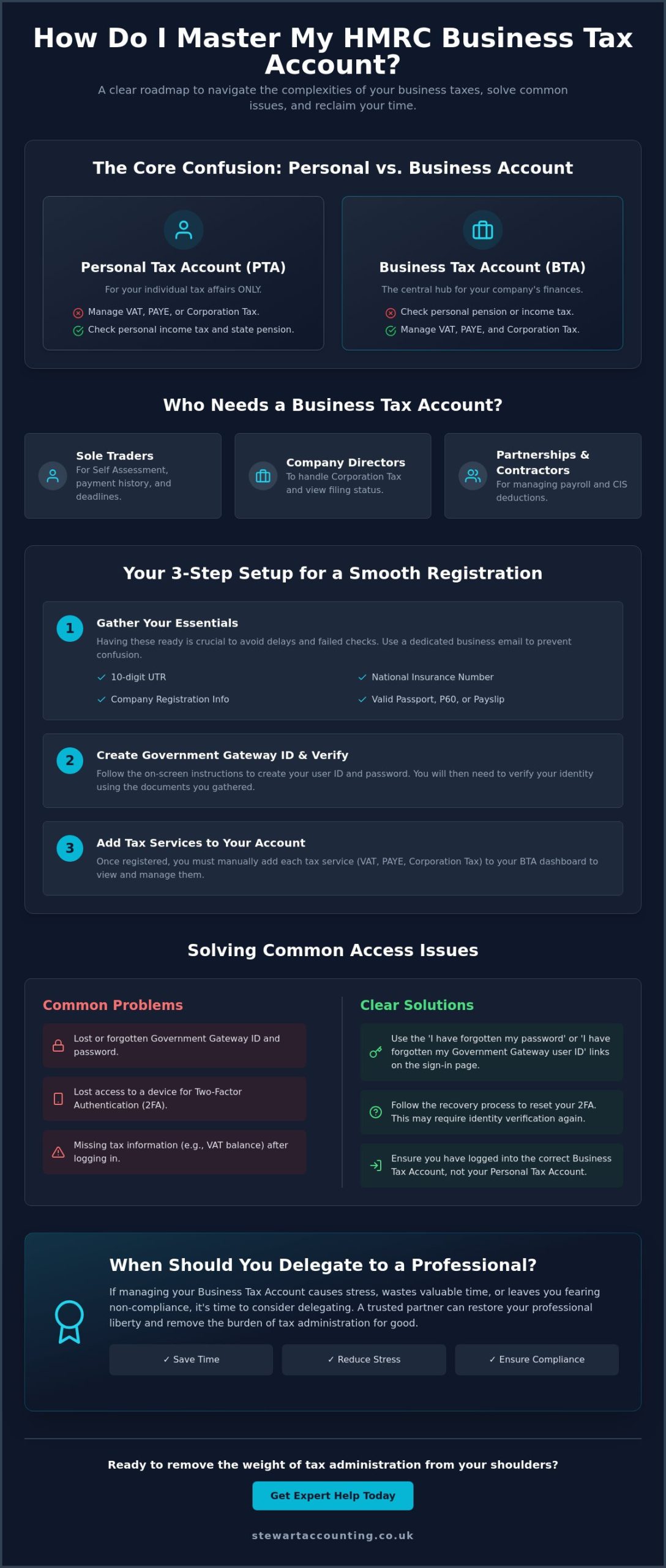
One of the most confusing aspects for business owners in Stirling and Alloa is the critical distinction between a Personal Tax Account (PTA) and a Business Tax Account (BTA). A PTA is strictly for your individual affairs, such as checking your state pension or managing personal income tax. In contrast, the BTA is where your company’s financial life lives. Many people mistakenly try to manage company affairs through their personal login, which leads to a total lack of visibility over business liabilities. While this separation is intended to protect your data, in practice, it creates a significant barrier to efficient management.
To better understand how this system works, watch this helpful video:
Who needs a Business Tax Account in 2026?
In the current 2026 tax landscape, the BTA is no longer optional for those who want to stay compliant and avoid automated penalties.
- Sole traders: If you are managing Self Assessment, you need this account to view your payment history and upcoming deadlines.
- Directors: Those running limited companies must use the BTA to handle Corporation Tax and view their filing status.
- Partnerships and Contractors: Whether you are running payroll or managing Construction Industry Scheme (CIS) deductions, the BTA is your command center for all business liabilities.
The ‘Maze’ effect: Why GOV.UK guidance feels insufficient
The official GOV.UK guidance often leaves busy SME owners feeling trapped in a “maze.” You might click a link for help, only to be redirected through three different pages that eventually lead back to the start. This circular logic, combined with dense technical jargon, makes the 2026 digital requirements feel like a hurdle rather than a tool. The shift toward Making Tax Digital (MTD) means that “Sign in” is now the most stressful part of the day for many. When the system fails to recognize your ID or your two-factor authentication device is out of reach, the fear of missing a deadline becomes very real. This complexity is exactly why many seek professional business tax account help to restore their mental well-being and professional liberty.
How do I set up and navigate my business tax account correctly?
Setting up your digital headquarters requires a methodical approach to avoid the common pitfalls that lead many owners to seek urgent business tax account help. Correctly configuring your portal is the first step toward total financial liberty. Before you even click the register button, gather your essentials: your 10-digit Unique Taxpayer Reference (UTR), National Insurance number, and company registration details. Using a dedicated business email address is vital; it prevents the common maze effect where personal and business data become tangled and difficult to manage.
The identity verification process in 2026 uses advanced security protocols to protect your sensitive data. You’ll likely need to provide details from a valid passport, a P60, or a recent payslip to prove your identity. If you fail these checks twice, HMRC may lock your ability to register online for 24 hours. This is why having your documents ready is crucial for obtaining the business tax account help you need without unnecessary delays. Follow these five steps for a clean setup: gather your data, create your ID, enable security, link your taxes, and verify with activation codes.
Registering for a Government Gateway ID
Step 1 involves visiting the official portal to access your business tax account and selecting the organisation account type. Step 2 requires creating a complex password and enabling multi-factor authentication (MFA) via a mobile app or SMS. This security layer is non-negotiable in the current digital landscape. Finally, Step 3 is the most critical: recording your 12-digit Government Gateway User ID. Many owners lose this ID within weeks; we recommend using a secure digital vault or a physical safe to store it, as recovering it can be a lengthy process.
Linking your specific tax services
Once you’ve successfully logged in, your dashboard will likely appear empty. You must manually ‘add a tax, duty or scheme’ for every regime your business operates, such as VAT or PAYE. Be prepared for a physical delay; HMRC often sends an activation code via the post, which can take up to ten working days to arrive at your registered office. If you encounter a ‘service already linked’ error, it usually indicates a forgotten duplicate account created in the past. If these technical hurdles are slowing your progress, speaking with an expert can help resolve these conflicts and ensure your account is fully operational.
Solving common HMRC login and access issues without the stress
Getting locked out of your digital tax portal can feel like a professional crisis, especially with a filing deadline looming. If you find yourself unable to log in, the first step is to stay calm and identify the specific barrier. In 2026, most login failures are triggered by incorrect Two-Factor Authentication (2FA) codes or expired passwords. If you’ve recently changed your mobile phone, your authentication app may no longer be synced. In these cases, you’ll need to use your “backup codes” if you saved them during setup, or go through the identity verification process again to reset your security preferences. This is a common area where business owners seek professional business tax account help to ensure they don’t trigger a permanent lock on their profile.
Another frequent headache involves your online accounting services. If your software stops pulling data from HMRC, it’s often because the “authorisation” token has expired. These tokens typically last for 18 months, after which you must log back into your BTA to re-confirm that your software has permission to access your data. If your account becomes locked due to too many failed attempts, the system usually imposes a mandatory 2-hour cooling-off period. Don’t keep trying during this window; it will only extend the lockout and increase your frustration.
Recovering lost credentials
The recovery workflow differs depending on whether you’ve lost your password or the 12-digit User ID itself. If you only need a password reset, the process is relatively swift via email verification. However, if you need to set up an HMRC online account recovery for a lost ID, the security checks are more rigorous. Recovering an HMRC ID typically requires your registered email address and a secondary form of identity verification, such as a passport or P60 details. For a faster resolution, try the HMRC Digital Assistant before attempting to phone, as it can often handle simple credential resets through an automated chat interface.
Dealing with HMRC helplines in Central Scotland
For business owners in Stirling, Alloa, and across Central Scotland, calling the helpline is often a last resort due to significant wait times. To avoid the standard 45-minute delays, we recommend calling at 8:00 AM precisely when the lines open. Ensure you have your UTR, business postcode, and National Insurance number ready before the adviser picks up to prevent being disconnected. If you don’t have time for a long wait, the HMRC App is a surprisingly efficient alternative for checking simple payment histories or tax codes without needing a full desktop login. Proactively seeking business tax account help early prevents the anxiety of last-minute technical glitches during peak filing seasons.
Managing multiple taxes: VAT, PAYE, and Corporation Tax in one place
Once you’ve navigated the initial setup, your BTA transforms from a source of confusion into a powerful digital command centre. It provides a single source of truth for all your business liabilities, showing you exactly what is owed across different tax regimes. This visibility is the most practical form of business tax account help, as it removes the guesswork from your cash flow planning. Instead of digging through paper notices or waiting for letters in the post, you can view your tax position in real-time. This ensures you never miss a payment deadline and helps you avoid the automated interest charges that HMRC now applies more aggressively.
Having all your obligations under one roof allows you to see the “big picture” of your business’s financial health. You can track how your payroll liabilities interact with your VAT cycles, providing a level of clarity that was previously difficult to achieve. It’s a tool designed to restore your professional liberty by putting you back in control of your data. When you can see every liability on a single screen, the anxiety of the unknown begins to fade, replaced by a pragmatic understanding of your upcoming requirements.
VAT and Making Tax Digital (MTD) integration
Managing your VAT returns is significantly easier when your BTA is correctly linked to your MTD-compliant software. You can check if a payment has been successfully processed or view your entire history of Value Added Tax payments with a few clicks. If you’re linking this service for the first time, remember that it often takes up to 72 hours for the data to populate after you enter your registration details. The portal also allows you to check your current VAT certificate and confirm your specific staggered filing dates, which is essential for staying compliant with the latest digital regulations.
Corporation Tax and Payroll management
For limited companies, the BTA is essential for tracking accounting periods and Corporation Tax deadlines. You can easily find your 10-digit Corporation Tax UTR within the portal, which is a detail frequently required for bank applications and funding requests. This real-time data is essential for accurate business tax account help, allowing you to make informed decisions about your company’s finances. The portal also acts as a secure inbox for PAYE messaging, where you can find coding notices for employees and check that your monthly payroll credits have been applied correctly to your account balance.
- Refund Tracking: Easily check for overpayments or pending tax refunds without calling a helpline.
- Payment History: View a detailed breakdown of every payment made toward Corporation Tax or PAYE over the last six years.
- Secure Messages: Access official HMRC notices that might otherwise get lost in the post or filtered into spam folders.
These systems interact most closely as you approach your Year End. Ensuring these accounts are reconciled and accurate throughout the year prevents a frantic rush when your final accounts are due. If you find the interplay between these different taxes overwhelming, requesting a professional review of your account can simplify the entire process and protect your business from unexpected liabilities.
When should you delegate your tax account management to a professional?
Are you spending more time wrestling with HMRC login screens than you are growing your business? While the digital portal is designed for accessibility, the reality for many SME owners is a cycle of technical frustration and compliance anxiety. There comes a point where seeking professional business tax account help is no longer just a convenience; it’s a strategic necessity. True professional liberty comes from knowing that your financial obligations are being managed by experts who understand the nuances of the 2026 tax landscape. This allows you to step away from the screen and return to the work that actually generates revenue for your company.
Our approach is built around a specific three-part promise: the liberation of your time, your finances, and your mental well-being. By delegating these tasks, you physically remove the burden of tax administration from your daily routine. We don’t just file your forms; we provide a complete transfer of responsibility. This means you no longer have to worry about missing a PAYE message or misunderstanding a Corporation Tax deadline. Instead, you gain a dependable partner who ensures every digital interaction with HMRC is handled with precision and care.
The benefits of appointing a Chartered Accountant
The difference between “doing it yourself” and strategic management is significant. While a BTA shows you what you owe, a Chartered Accountant helps you understand why and how to optimise that position. We ensure your tax returns are not only accurate but also fully optimised for all available reliefs and allowances. Beyond simple compliance, we provide professional representation. If HMRC ever opens an inquiry into your affairs, you won’t have to face it alone; we handle all correspondence and technical queries on your behalf, providing a vital shield for your business.
How to get started with Stewart Accounting Services
Transitioning to professional support is a straightforward process that requires no technical expertise on your part. We use a system called “Agent Authorisation” to gain the business tax account help permissions we need. Through your BTA, you can appoint us as your digital tax agent. This allows our team to access your tax data through our own professional portal, meaning we never need to ask for your personal Government Gateway ID or private passwords. It is a secure, transparent way to hand over the heavy lifting of tax management.
We are proud to serve as a supportive regional expert for businesses across Alloa, Stirling, and Falkirk. Our local presence means we understand the specific challenges facing enterprises in Central Scotland. Whether you are a sole trader or the director of a growing limited company, our goal is to reduce your anxiety through pragmatic, grounded support. You can contact our offices in Alloa, Stirling, or Falkirk to discuss how Stewart Accounting Services can streamline your tax affairs and restore your personal and professional liberty.
Take Control of Your Business Tax Future
Managing your digital tax affairs shouldn’t be a source of constant anxiety. You now have the roadmap to navigate your Government Gateway ID and correctly link your VAT or Corporation Tax services. This visibility is vital for your cash flow and long-term planning. However, the ultimate way to secure comprehensive business tax account help is to move beyond troubleshooting and into total delegation.
As Chartered Accountants with local offices in Alloa, Stirling, and Falkirk, we are experts in Year-End Accounts and MTD compliance. Our team is dedicated to liberating your time and mental well-being by removing the physical burden of tax administration. You deserve to focus on your professional goals while we handle the technical complexities of the BTA. Let us take the tax burden off your shoulders; contact Stewart Accounting today. We look forward to helping you achieve professional liberty and financial peace of mind.
Frequently Asked Questions
How do I find my HMRC Business Tax Account User ID?
You can find your User ID by searching your email inbox for your original confirmation from Government Gateway. If you can’t find that message, use the “forgotten User ID” link on the HMRC sign-in page. You’ll need to provide your registered email address and your password. HMRC will then send the 12-digit ID to you. It’s vital to store this safely once you’ve recovered it to avoid future delays.
Can I have two HMRC business tax accounts for different companies?
Yes, you should have a separate account for every distinct legal entity you manage. If you run two limited companies, each one requires its own unique Government Gateway ID and BTA profile. This structure ensures that Corporation Tax and VAT liabilities remain separate for your accounting records. Attempting to manage multiple companies under a single ID is usually not possible and often leads to significant reporting errors.
What is the difference between a Personal Tax Account and a Business Tax Account?
A Personal Tax Account is for your individual taxes, like State Pension and Income Tax, while a Business Tax Account handles company-level obligations. You use the BTA to manage VAT, Corporation Tax, and PAYE. Confusing these two portals is a common reason why many owners seek business tax account help. Keeping them distinct is essential for maintaining clear financial records and ensuring you’re viewing the correct liabilities.
How do I link VAT to my HMRC business tax account?
Log in to your BTA and select “add a tax, duty or scheme” from the main menu. Choose “Value Added Tax (VAT)” and enter your VAT registration number along with the date you registered. You’ll also need the postcode of your principal place of business. HMRC will often send an activation code by post to your registered office. You must enter this code within 30 days to complete the link.
Why is my HMRC business tax account not showing my Corporation Tax?
This usually occurs because the Corporation Tax service hasn’t been manually added to your specific dashboard yet. Even if your company is officially registered, you must “add a tax” using your 10-digit Corporation Tax UTR. If you’ve already done this, check that you aren’t logged into a different Government Gateway ID. Sometimes, a delay of up to 72 hours happens before data appears after the initial setup.
How do I give my accountant access to my business tax account?
You can authorize an agent by selecting “Manage account” and then “Add, view or change tax agents” within your BTA. You’ll need your accountant’s specific agent ID to complete this. Alternatively, your accountant can send an authorization request from their professional portal, which you then approve in your account. This is the safest way to get business tax account help without sharing your private login credentials.
What should I do if I am locked out of my HMRC account?
Wait for the cooling-off period to end if you’ve entered the wrong password too many times. This lockout usually lasts for 2 hours. If you’ve forgotten your details entirely, use the online recovery tools to reset your password or ID. If your 2FA device is lost, you’ll need to contact the HMRC online services helpdesk to have your security preferences reset. This process may require additional identity verification.
Can I manage PAYE and CIS through the same business tax account?
Yes, you can manage both PAYE and the Construction Industry Scheme (CIS) through a single Business Tax Account. Once you’ve added the “Employers’ liabilities” service, both sets of data will be visible on your main dashboard. This allows you to track monthly deductions and payments in one place. It’s a pragmatic way to simplify your payroll administration and ensure you’re meeting all your contractor and employer obligations.