

What if the only thing standing between you and total financial liberty was a single digital handshake? If you’ve ever logged into the Government Gateway and felt an immediate sense of dread, you’re certainly not alone. Many local business owners worry that one wrong click will lead to a penalty or a security risk. Learning how to authorise an accountant on HMRC is the essential final step in reclaiming your time, protecting your finances, and restoring your mental well-being.
We believe that managing your taxes shouldn’t feel like a burden that keeps you up at night. This guide provides a comprehensive, step-by-step walkthrough to ensure a smooth transition of your financial responsibilities. We’ll cover the latest 2026 protocols, including the 21-day digital link expiry and the 30-day postal code window, giving you a clear path to successful authorisation. By the end of this post, you’ll know exactly how to delegate these tasks so you can focus on your business with complete confidence.
Key Takeaways
- Understand how granting authorisation restores your personal and professional liberty by removing the administrative burden of tax compliance.
- Discover the two primary ways to connect with a professional, including the secure “digital handshake” and the traditional agent-led process.
- Learn exactly how to authorise an accountant on HMRC using your Government Gateway credentials and Unique Taxpayer Reference (UTR) for a seamless transition.
- Clarify what your accountant can and cannot see to ensure your sensitive banking data remains private while your tax affairs are fully managed.
- Find out how our team in Alloa, Stirling, and Falkirk provides hands-on support to handle the heavy lifting of HMRC registration on your behalf.
Why should you authorise an accountant on HMRC?
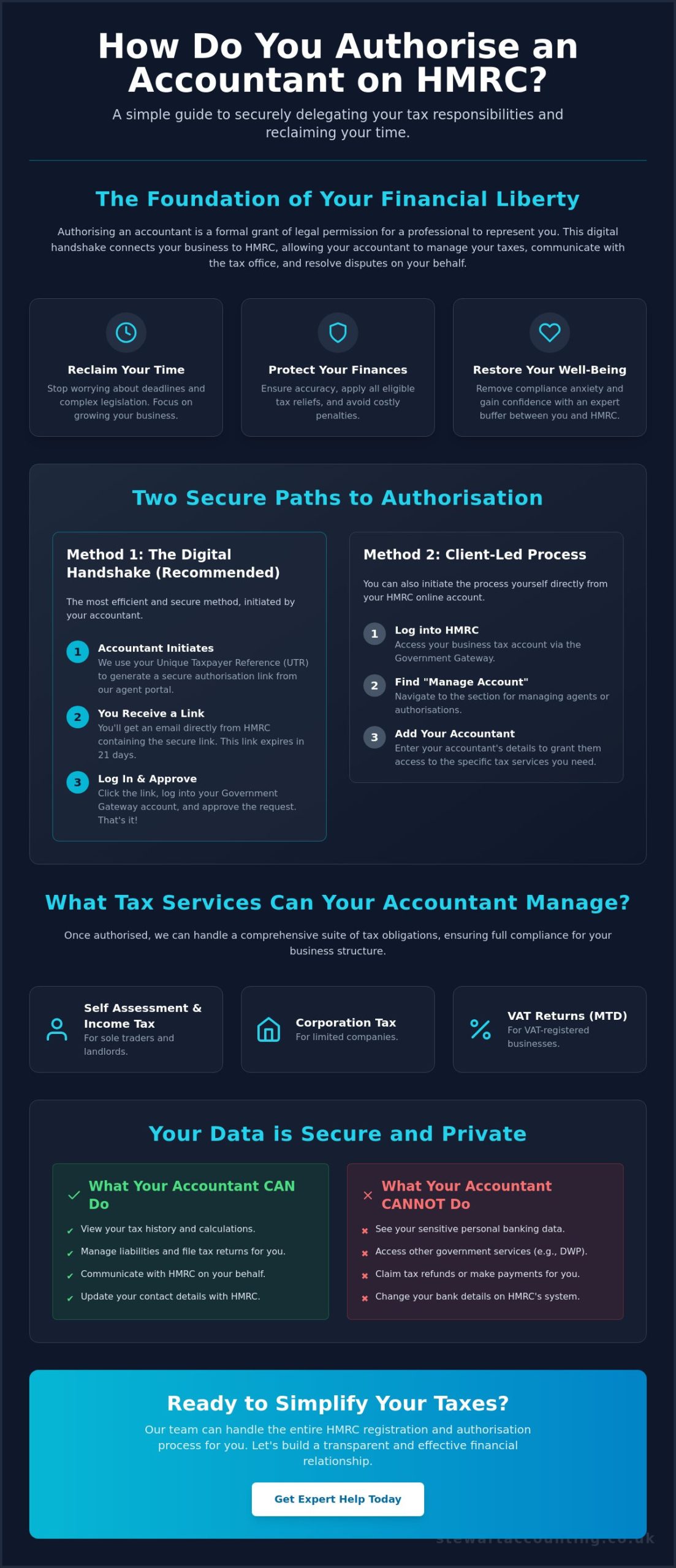
Authorising an accountant is more than a simple tick-box exercise; it’s a formal grant of legal permission for a professional to represent your interests. This link connects your business directly to HM Revenue and Customs (HMRC), allowing us to view your tax history and manage your liabilities. Without this authorisation, your accountant cannot communicate with the tax office on your behalf or help you resolve potential disputes. It’s the essential first step in building a transparent and effective relationship with your financial advisor.
At Stewart Accounting Services, we believe that this process is the foundation of your professional liberty. For our clients throughout Alloa, Stirling, and Falkirk, learning how to authorise an accountant on HMRC is the quickest way to remove compliance anxiety. We act as a dedicated buffer between your business and HMRC enquiries. This ensures that every piece of financial data is presented accurately and through an expert lens, protecting your reputation and your wallet from unnecessary scrutiny.
To better understand how this digital connection works for specific tax accounts, watch this helpful video:
The benefits of professional tax delegation
The burden of keeping up with ever-changing HMRC legislation can be overwhelming for any business owner. We take that responsibility off your shoulders entirely. Our team ensures that all available tax reliefs and allowances are correctly applied to your specific circumstances, which often results in significant tax savings. This professional oversight doesn’t just save money; it provides a clear and verifiable audit trail for your year end accounts. By delegating these tasks, you eliminate the fear of missing a deadline or miscalculating a payment, which restores your mental well-being and allows you to focus on growth.
Taxes your accountant can manage for you
Once the authorisation is active, we can manage a comprehensive suite of tax obligations tailored to your business structure. For sole traders and landlords, we handle the intricacies of Self Assessment and Income Tax. If you operate a limited company, we take charge of your Corporation Tax and statutory filings. We also ensure your VAT returns are submitted correctly under the Making Tax Digital (MTD) rules. We provide full support for HMRC Registration and Authorisation, ensuring that every tax regime your business is subject to is covered from day one. This total transfer of responsibility allows you to focus on your core business goals while we handle the technical complexities of tax law.
What are the different ways to authorise an accountant?
While the end goal is always the same, the method you choose depends on your current digital setup. HMRC has modernized these processes to make them more secure, though the variety of options can sometimes feel overwhelming. You can find the official HMRC guidance for authorising an accountant online, but we prefer to simplify the choice for our clients. Most businesses now use digital methods, but paper-based forms remain a vital fallback for specific situations.
If you’re researching how to authorise an accountant on HMRC, you’ll encounter two main digital paths. In an agent-led process, your accountant initiates the request through their professional account using your Unique Taxpayer Reference (UTR). In a client-led scenario, you log into your own portal to add the firm as an authorised representative. Both paths are designed to be secure, ensuring that only a verified professional can access your sensitive financial data. We often recommend the agent-led approach because it allows us to handle the initial setup on your behalf.
The Digital Authorisation Service (Standard)
The most efficient method is known as the digital handshake. Your accountant generates a secure link and sends it to you via email. You then log into your Government Gateway account to approve the request instantly. This method is the gold standard for online accounting services because it removes the need for physical paperwork and postal delays. It’s important to act quickly; these secure digital links expire after 21 days. If you miss this window, your accountant will need to initiate a new request, which can delay your filings.
Using Form 64-8: When is it necessary?
Despite the shift toward digital, the paper-based Form 64-8 is still used in 2026. This is often necessary if you don’t have a Government Gateway ID or if you’re dealing with older tax matters where digital access isn’t supported. You’ll need to sign a physical copy and post it to HMRC. This is a significantly slower route, often taking several weeks for the tax office to process the request. Even when using digital codes sent by post, you must provide the code to your accountant within 30 days before it expires. If you feel unsure about which method fits your current business needs, it might be helpful to speak with a member of our team for personalized guidance.
How do you authorise an accountant using your HMRC online account?
Ready to hand over the administrative heavy lifting? Before you begin, ensure you have your Government Gateway user ID and password to hand. You’ll also need your 10-digit Unique Taxpayer Reference (UTR). This number is essential for verifying your identity and linking your account to our professional services. Once you’re prepared, the process of how to authorise an accountant on HMRC becomes a logical series of clicks. It’s a structured path designed to protect your data while granting us the access we need to help your business thrive.
Follow these straightforward steps to complete the connection through your portal:
- Log into your personal or business tax account on the official HMRC portal.
- Navigate to the “Manage Account” or “Tax Agents” section, which is usually found on the main dashboard.
- Select the option to “Add an agent” or “Authorise an agent” for the specific tax type you need help with.
- Enter the specific Agent ID or details provided to you by our team at Stewart Accounting Services.
- Confirm exactly which tax regimes you want us to manage. You can choose specific areas like Corporation Tax, PAYE, or Self Assessment.
Authorising for Self Assessment and Income Tax
For those utilizing our sole trader accounting services, specific steps apply to Self Assessment. You’ll need to locate your 10-digit UTR on previous tax returns or HMRC correspondence to verify the connection. Security is a priority; you’ll likely encounter a 2-step verification process. This usually involves a code sent to your mobile phone or generated by an app. Completing this ensures that your sensitive income data remains secure during the transfer of responsibility. It’s a simple step that provides immense peace of mind.
Authorising for VAT and Making Tax Digital
Granting authority for VAT returns within the MTD framework is a key part of how to authorise an accountant on HMRC. Under current 2026 rules, the old Online Agent Authorisation (OAA) service is no longer used for VAT. Instead, we use the Agent Services Account (ASA) to initiate a “digital handshake.” You must verify that your business is correctly registered for VAT on the portal before approving our request. Once the digital link is active, we can manage your submissions directly through our software. This setup is crucial for maintaining compliance and avoiding the administrative burden of manual filings.
What happens after you authorise an accountant?
Once you have navigated the steps of how to authorise an accountant on HMRC, the dynamic of your relationship with the tax office shifts immediately. Your accountant gains visibility into your tax history, current liabilities, and previous payments. This allows them to spot discrepancies or potential savings that you might have missed. However, it’s vital to understand the limits of this access. Your accountant cannot see your personal banking details, private spending habits, or any data unrelated to the specific tax regimes you’ve authorised.
If you used the agent-led method, you’ll receive a physical letter from HMRC containing a unique authorisation code. This letter is sent to your registered home or business address. You must provide this code to your accountant within 30 days of the issue date. If you miss this deadline, the code expires, and the process must begin again. Once the code is entered, HMRC’s communication patterns change. Most formal letters regarding your tax affairs will be directed to your accountant first, acting as a filter to ensure you aren’t overwhelmed by technical jargon.
Security and Data Protection
HMRC employs high-level encryption to protect your data during and after the authorisation period. While we have access to your tax portal, this does not mean we have your login details. You should never share your personal Government Gateway password with anyone, including your accountant. A professional firm will always use their own Agent Services Account to connect with yours. Choosing a chartered accountant in Scotland ensures that your data is handled according to the highest professional and ethical security standards.
How to revoke or change your authorisation
Circumstances change, and you may eventually need to move to a different firm or bring your accounting in-house. Removing an accountant is a straightforward process within your HMRC portal. You simply navigate to the “Tax Agents” section and select the option to remove the current authorisation. When an authorisation is cancelled, the accountant’s access is revoked instantly. Your data remains with HMRC, but the professional link is severed. We always advocate for a smooth handover between professionals to ensure your compliance remains uninterrupted. If you’re ready to experience a more streamlined way of managing your taxes, get in touch with our team today to start your journey.
How Stewart Accounting Services simplifies the HMRC process for you
We understand that even with a clear guide, the prospect of managing government portals can feel like a distraction from your actual work. Stewart Accounting Services takes a proactive stance by managing the heavy lifting of your HMRC Registration and Authorisation. Instead of leaving you to struggle with the interface alone, we handle the technical setup. This commitment is central to our goal of restoring your personal and professional liberty. When you know how to authorise an accountant on HMRC through our supported process, the administrative burden physically shifts from your desk to ours.
Our support isn’t limited to a digital screen. We provide dedicated assistance across Alloa, Stirling, and Falkirk for business owners who prefer a more personal touch. If you hit a snag during the digital handshake or feel unsure about which tax regimes to select, our team is available for face-to-face guidance. We integrate your tax affairs with Xero and other cloud platforms to ensure your Making Tax Digital (MTD) compliance is automatic rather than a manual chore. This seamless integration means your financial data is always accurate, accessible, and ready for submission.
A local partner for Central Scotland businesses
Being based in Central Scotland gives us a unique perspective on the challenges you face. We aren’t just experts in general tax law; we understand the specific Scottish tax nuances that affect your take-home pay and business liabilities. Whether you’re a contractor in Stirling or a landlord in Falkirk, we ground our expert advice in the local context. This regional anchoring ensures that your tax planning is as relevant as it is robust. We know the local landscape, and we use that knowledge to protect your interests.
Ready to delegate your tax burdens?
Delegating your tax affairs is a straightforward process that begins the moment you reach out. Our onboarding is methodical, starting with a review of your current setup before moving into the authorisation phase. We provide clear, bite-sized instructions that remove the guesswork from the process. If you’re ready to stop worrying about HMRC deadlines and start focusing on your business growth, contact us for a free consultation today. Let us handle your HMRC authorisation while you focus on what you do best.
Reclaim your time and peace of mind today
Navigating the technical landscape of tax compliance doesn’t have to be a source of stress. By understanding the digital handshake and the importance of professional oversight, you’ve taken a significant step toward securing your business’s future. Knowing how to authorise an accountant on HMRC is about more than just granting access; it’s about delegating the administrative heavy lifting to experts who care about your success. This transition ensures that your data is handled securely while you focus on what you do best.
As Chartered Accountants with offices in Alloa, Stirling, and Falkirk, we specialize in helping SMEs manage tax and MTD compliance with ease. Our professional, reassuring approach is designed to remove the complexity from your finances. We’re ready to act as your buffer with the tax office, ensuring every filing is accurate and timely. Don’t let technical hurdles stand in the way of your professional liberty. Let us handle your HMRC authorisation; get in touch today to begin your journey toward a simpler, more supported financial life. We look forward to helping your business thrive.
Frequently Asked Questions
How long does it take for HMRC to process an accountant authorisation?
Digital handshake authorisations are processed instantly once you click the ‘approve’ button in your portal. If you’re using the agent-led method, it typically takes 7 to 10 working days for the physical authorisation code to arrive at your registered address by post. Once you provide that code to us, the link is activated immediately, allowing us to start managing your affairs without further delay.
Can I have more than one accountant authorised on my HMRC account?
You can have different agents for different tax services, but HMRC usually only allows one authorised agent per specific tax regime. For example, you might have one firm handle your payroll and another for your Year End Accounts. However, you cannot have two separate accountants both authorised for your Corporation Tax at the same time. This structure prevents conflicting submissions and keeps your records clear.
What is an HMRC authorisation code and where do I find it?
An HMRC authorisation code is a unique 6-digit security string sent by post to your home or business address. It’s generated when an accountant starts an agent-led request for your tax affairs. You won’t find this code online or in your email; you must wait for the physical letter. Once it arrives, you have 30 days to give it to your accountant before it expires.
Do I need a Government Gateway account to authorise an accountant?
You need a Government Gateway account for all modern digital authorisation methods. This account acts as your secure digital identity. While you can technically use a paper Form 64-8 without an online account, it’s a much slower and less efficient process. Most business owners find that setting up a Gateway ID is the best way to learn how to authorise an accountant on HMRC quickly.
Will I still get letters from HMRC if I have an accountant?
Yes, you will still receive certain types of correspondence directly from HMRC at your registered address. While we receive copies of most tax-related notices, HMRC sends statutory documents, such as tax return reminders or legal notices, to the business owner. It’s important to share any letters you receive with our team in Alloa or Stirling so we can verify the details and handle any responses.
Is it possible to authorise an accountant for only one specific tax, like VAT?
Authorisation is entirely service-specific, so you can choose exactly which taxes your accountant manages. You might only need professional help with VAT returns while choosing to handle other areas yourself. When you log in to approve the request, you’ll see a list of specific tax regimes. You simply select the ones you want to delegate to our team to ensure you stay in control.
What should I do if the authorisation code has expired?
If your code has expired, your accountant must initiate a new request from their side to generate a fresh one. Postal codes expire after 30 days, while secure digital handshake links are valid for only 21 days. There’s no way to reactivate an old code once it’s past the deadline. Acting quickly when you receive the notification is the best way to ensure your how to authorise an accountant on HMRC process stays on track.
Can an accountant see my personal bank account once authorised on HMRC?
No, an accountant cannot see your personal or business bank accounts through the HMRC portal. Their access is strictly limited to the tax data held by HMRC, such as your payment history, tax liabilities, and previous filings. Authorising a professional is a secure process that doesn’t involve sharing your private banking passwords or sensitive login credentials for any of your financial institutions.