

It's surprisingly easy to overpay tax, and many people do without even realising it. If you think you might be one of them, claiming a refund from HMRC is pretty straightforward. It usually starts with a specific event, like changing jobs or getting put on an emergency tax code. From there, you'll need to make a claim, which can be done online through your Government Gateway account or as part of your Self Assessment tax return.
Are You Owed a Tax Refund from HMRC?

Before you start digging out payslips and filling in forms, the first thing to do is figure out if you actually have a good reason to claim. Tax can be overpaid for all sorts of reasons, and knowing exactly why it happened in your case will make the whole process much smoother.
A change in your life is often the trigger. For those with more complicated earnings or investments, using tools like AI for financial analysis can sometimes help pinpoint discrepancies that might lead to a refund.
Most people find themselves in a few common situations that lead to an overpayment. Below is a quick rundown of the usual suspects.
Common Reasons You Might Be Due a Tax Refund
| Scenario | Why It Leads to a Refund | What You Need to Do |
|---|---|---|
| Emergency Tax Code | Your new employer used a temporary code (BR, 0T, W1/M1) that doesn't include your tax-free allowance, causing you to pay too much tax. | Check your payslips for these codes. HMRC usually corrects this automatically, but you can contact them to speed it up. |
| Changed Jobs | You had a gap between jobs or your new role pays differently, and your tax wasn't adjusted correctly for the full year. | Gather your P45 from your old job and your P60 from your new one to see the full picture. |
| Had Multiple Jobs | Juggling several PAYE jobs can confuse the system, sometimes leading to your tax-free allowance being incorrectly applied. | Review your P60s from all employers and check if your tax codes add up correctly. |
| Stopped Working | You retired or were made redundant part-way through the tax year, but your tax was calculated as if you'd work until 5 April. | You'll need to fill out a form P50 to claim your refund for the tax year you stopped working. |
| Work-Related Expenses | You paid for things like professional subscriptions, tools, or a uniform out of your own pocket and weren't reimbursed by your employer. | You can claim tax relief on these allowable expenses, either through your tax return or a form P87. |
These scenarios are more common than you'd think. Think about the sheer scale of it all – between April and July 2025 alone, the government collected around £160.6 billion in PAYE Income Tax and NICs. With that much money moving around, it’s inevitable that mistakes happen.
The most important thing is to never just assume HMRC has it right. Get into the habit of checking your payslips and your P60 at the end of every tax year. If you spot a weird-looking tax code or your earnings have been up and down, that's your cue to take a closer look.
Getting Your Documents in Order for a Smooth Claim
Before you even think about contacting HMRC, getting your paperwork sorted is the single best thing you can do. A little bit of organisation now saves a mountain of headaches later and can genuinely speed up your refund.
The two documents at the top of your list should be your P60 and P45. Your P60 is the summary you get from your employer after the tax year ends, showing your total pay and the tax you've paid. If you’ve changed jobs, your P45 from the old employer is just as crucial, as it details your earnings and tax paid up to the day you left. These are the bedrock of any tax refund claim.
Your Paperwork Checklist
Having these details ready will make filling out forms or talking to HMRC a breeze:
- National Insurance Number: This is your unique identifier for the entire UK tax and benefits system. It’s on your payslips, P60, and just about any official letter from HMRC.
- P60 and P45 Forms: These are your primary evidence. They show HMRC exactly what you earned and what tax was deducted.
- Proof of Work-Related Expenses: Claiming for tools, uniforms, or professional fees? You'll need the receipts or bank statements to back it up. HMRC will want to see proof you actually spent the money.
- Unique Taxpayer Reference (UTR): If you're in the Self Assessment system, your 10-digit UTR is essential. You'll need it for any communication about your tax returns.
It's also a good idea to check the tax code on your payslip or P60. The government's own site gives a good breakdown of what the common codes mean.

This matters because your tax code directly controls how much tax-free income you get. If you see an emergency code like 'W1' or 'M1' on your payslip, that's a massive red flag that you've likely been paying too much tax.
How to Submit Your HMRC Tax Refund Claim
Right, you’ve got all your documents in order, so now it’s time to actually submit your claim. How you do this really comes down to your employment status. Are you a PAYE employee, or do you file a Self Assessment tax return every year? The path you take depends entirely on that answer, and choosing the right one is the key to getting your money back without any fuss.
The PAYE Route: Claiming Online
For most people on a company payroll (PAYE), the easiest way to claim is through your HMRC online service account. This is where your Government Gateway user ID comes in handy. Once you're logged in, you can see a history of your income and the tax you've paid. If you notice something isn't right or you know you've overpaid, you can often make a claim directly through the portal. It’s far simpler than filling out old-school paper forms.
The online system is designed to walk you through it. This graphic gives you a good idea of what the process looks like from start to finish.
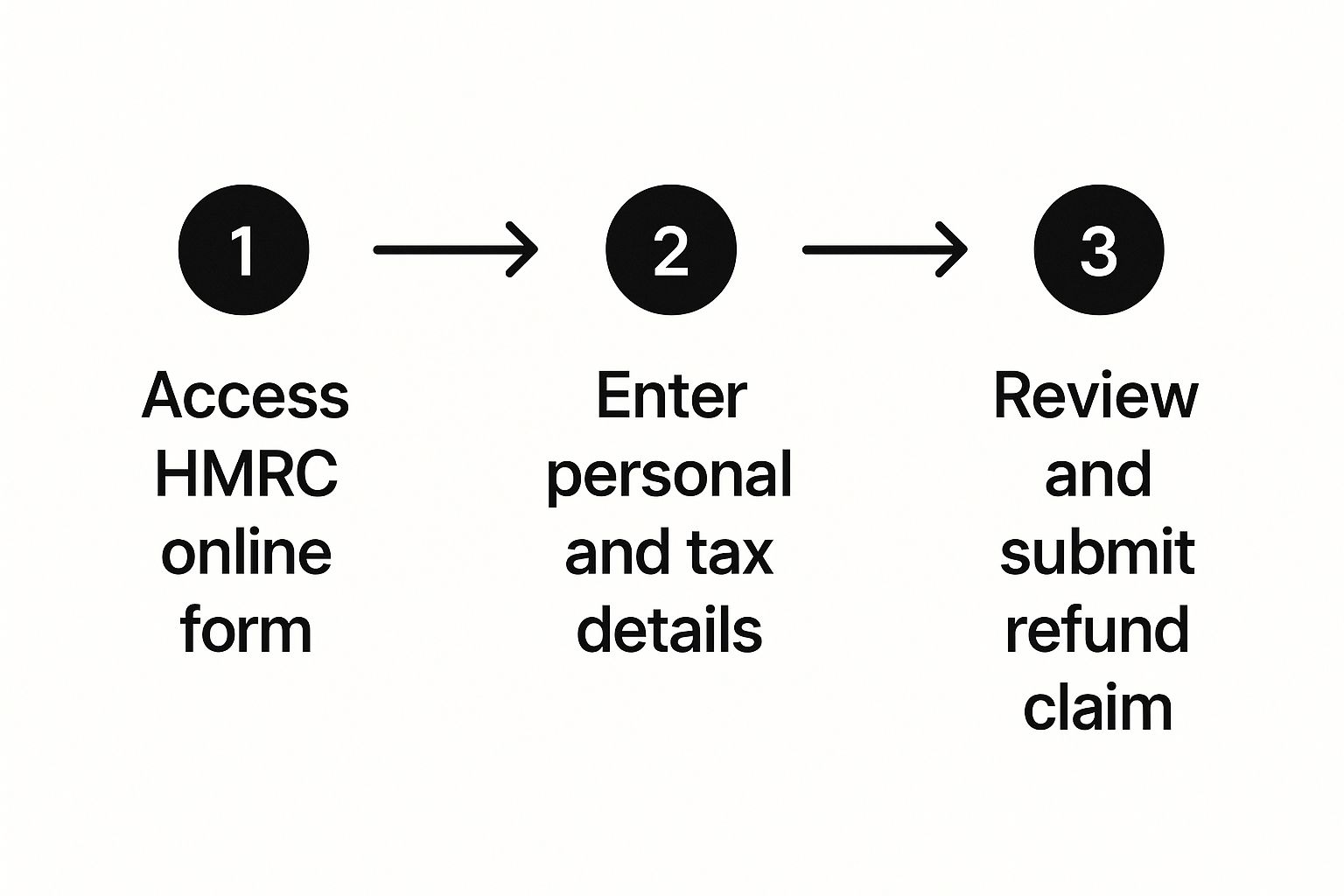
Everything is centralised in one place, which makes reviewing your details and lodging the claim with HMRC pretty straightforward.
The Self Assessment Route: Built-In Refunds
If you already file a Self Assessment tax return each year—perhaps because you're self-employed, a company director, or have rental income—then claiming a refund is just part of that process. As you complete your return, you’ll declare your income and deduct any allowable expenses. If the final calculation shows you’ve paid too much tax, HMRC will sort out the refund automatically once you file.
More and more people are getting ahead of the game by filing early. In the first week of the 2024-2025 tax year alone, a record 299,419 returns were filed, which is up by over 28,000 from 2020. Filing early doesn't mean you have to pay any tax owed any sooner, but it absolutely means HMRC can process any refund you're due much faster. You can read more about this trend in HMRC's official report on GOV.UK.
A Quick Word of Advice: Whichever method you use, please double-check your bank details. I can't tell you how many refund delays I've seen caused by a simple typo in an account number. Make sure the details you give HMRC are for an account in your own name to avoid any hold-ups.
So, You've Submitted Your Claim – What Now?
Right, you’ve done the hard part and sent your tax refund claim off to HMRC. Now comes the slightly nerve-wracking part: the wait. It's completely normal to be eager for an update, but knowing the typical timeline can help manage expectations. How long it takes really boils down to how you filed your claim.
If you submitted online, either through your Government Gateway for a PAYE refund or as part of your Self Assessment, you're on the fastest track. You can usually check the status of your claim in your online account within about 72 hours. Assuming there are no hitches, the money should land in your bank account via direct transfer in about two to three weeks.
Keeping Tabs on Your Refund
The best way to see what's happening is to log in to your HMRC online account. You'll be able to see the status change as your claim progresses through their system, which gives you a decent idea of where things are at. Don't worry if there's no immediate update, particularly during busy periods like the Self Assessment deadline in January.
Once your refund gets the green light, HMRC will send the money straight to the bank account you listed on your claim. It’s quick, secure, and by far the most common method.
A quick word of advice from experience: always, always double-check your bank details before you hit submit. A simple typo in your account number is one of the most frequent slip-ups we see. It’s a small mistake that can cause a big delay, as HMRC will have to cancel the transfer and post you a cheque instead, adding weeks to the process.
It's also worth getting familiar with the different HMRC Payment Methods available. While a bank transfer is the go-to, knowing the alternatives can be handy if something goes wrong. If the money hasn't arrived when you expect it and your online account isn't showing any problems, that’s your cue to give HMRC a call to find out what's going on.

Troubleshooting Common Tax Refund Issues
It’s a frustrating moment: you’ve gone through the whole process, only to find your tax refund claim has hit a wall. Maybe HMRC has rejected it, or the amount that’s landed in your account is far less than you were expecting. Before you panic, take a breath. There are usually clear, practical steps you can take to sort things out.
The first thing you need to do is become a bit of a detective. Carefully read through any letter or notification from HMRC. They won't just say 'no'; they'll typically give a reason for their decision. It could be a simple miscalculation, or perhaps they’re missing a key piece of information. Get your own P60s and payslips out and compare them line by line with HMRC's figures to see where the numbers diverge.
Dealing With a Rejected Claim
An outright rejection often boils down to a mismatch between your records and theirs. A classic example is when HMRC’s system shows you’ve already been given your full tax-free allowance for the year, even if you know that’s not the case.
When this happens, here’s what to do next:
- Get on the phone with HMRC. A quick call can often clear up simple misunderstandings right away. Just make sure you have your National Insurance number and the claim details handy before you dial.
- Arm yourself with more evidence. If the problem is a bit more tangled, you'll need to back up your claim. This means sending copies of your P60, P45, or any relevant receipts for expenses you’re claiming.
It's easy to feel defeated if your claim is rejected, but persistence really does pay off. Many initial decisions are overturned once the taxpayer provides the correct supporting documents.
If you’ve provided everything and still fundamentally disagree with HMRC's final decision, don't give up. You have the right to request a formal review. This kicks your case up the ladder to a different officer at HMRC who will take a fresh look at all the evidence.
This is more common than you might think. Between July and September 2024, taxpayers who challenged HMRC's initial decisions were successful around 26% of the time. That resulted in thousands of correct refunds being paid out or tax bills being reduced. You can dig into the numbers yourself by looking at the official performance data on GOV.UK.
By being methodical, checking the details, and communicating clearly, you give yourself the best possible chance of sorting out any issues and getting the refund you’re genuinely owed.
Your Top HMRC Tax Refund Questions Answered
When you're trying to figure out how to get your money back from HMRC, a few questions always seem to pop up. Let's tackle some of the most common ones to give you a bit more clarity.
How Far Back Can I Claim a Tax Refund?
The rule of thumb is that you can go back four tax years from the current one. The UK tax year is a bit unusual, running from 6 April to 5 April the following year.
You have to get your claim in within that four-year window. If you miss the deadline for a particular year, you've unfortunately lost your chance to claim that money back. It's a firm cut-off, so it really does pay to keep on top of things.
Will HMRC Automatically Refund Overpaid Tax?
Sometimes, but I wouldn't count on it. If you're employed and pay tax through PAYE, HMRC's system can sometimes spot an overpayment and send you a P800 tax calculation. This often happens if you've switched jobs. However, the system isn't foolproof, and things can easily be missed.
If you’re self-employed, a refund will only ever be calculated after you've filed your Self Assessment tax return.
The best approach is always to check your own tax position rather than waiting for HMRC to notice something. Taking the initiative is the only sure-fire way to know you're not leaving money on the table.
How Long Does an HMRC Tax Refund Take?
The wait time really depends on how you file. Submitting your claim online is almost always the quickest way to get your money. If you do it through your Government Gateway account or file a Self Assessment return online, you could see the refund in your bank account within two to three weeks.
Claims sent by post, on the other hand, take significantly longer. It’s also worth remembering that things grind to a halt during HMRC’s peak times, like just after the 5 April year-end. My advice? Get your claim in as early as you can to beat the rush and get paid faster.
Navigating tax claims can feel like a maze, but you don't have to tackle it by yourself. The team at Stewart Accounting Services can manage your self-assessment and make sure you claim exactly what you're owed, saving you time and stress. Find out how we can help at https://stewartaccounting.co.uk.