

How to Prepare VAT Returns A Simple UK Guide
Preparing your VAT return isn't just a box-ticking exercise. It boils down to a clear, methodical process: gathering your financial records, running the numbers on what you owe and what you can claim back, filling out the nine-box return (using MTD-compatible software, of course), and getting it filed on time.
Once you get the hang of it, what seems like a daunting task becomes a smooth quarterly routine. Let's break down each part of the puzzle, turning a pile of receipts into a confidently submitted return.
Getting Started with Your VAT Return
Putting together a VAT return can feel like a high-stakes puzzle, but it doesn't have to be. Really, it's just about telling HMRC a clear story of your business's financial activity over the last quarter. You’re officially declaring the VAT you’ve collected from customers versus the VAT you’ve paid to suppliers.
The whole system hangs on two key terms: output tax and input tax.
- Output Tax: This is the VAT you add to your sales of goods and services. Think of yourself as a temporary collector for the taxman.
- Input Tax: This is the VAT you pay on your business purchases—from stock and materials to software subscriptions. In most cases, you can claim this back from HMRC.
The final figure you either pay to HMRC or get back as a refund is simply the difference between the two. If you collected more than you paid out, you send the balance to HMRC. If you paid out more in VAT than you collected, they’ll send you a refund. That fundamental calculation is the engine driving your entire return.
Why Accuracy Is Non-Negotiable
Getting your returns right and filed on time is a core responsibility for any VAT-registered business in the UK. This isn’t just red tape; it’s a process that directly funds public services. To give you a sense of the scale, total VAT receipts for the 2023-24 financial year hit a massive £169.25 billion. It’s a clear indicator of how vital these submissions are to the national economy. You can explore more about these figures and their impact on the UK's finances.
A well-prepared VAT return is more than just a compliance task; it's a financial health check for your business. It provides a clear snapshot of your sales, costs, and cash flow every quarter, offering valuable insights that go far beyond the tax form itself.
Consider this guide your roadmap. We’ll walk through exactly what HMRC needs from you and show you why organised records are your best friend when it comes to avoiding costly errors and penalties. Getting a solid grasp of these principles first is the key to a stress-free process every time.
Building Your VAT Record-Keeping System
A perfect VAT return doesn't just happen when you sit down to file it. The real work starts long before you even think about logging into HMRC's portal. It’s all built on a foundation of solid, well-organised records. Let’s move beyond just a list of what you need to keep and focus on how to organise it all for maximum efficiency and minimum stress.
Think of your record-keeping as the engine of your whole VAT process. A well-oiled machine makes the journey smooth. A neglected one? That’s when you get breakdowns—usually at the worst possible time, like the night before your deadline.
The Core Components of Your VAT Records
At a bare minimum, your system needs to track and store a few key documents. These are the absolute non-negotiables, the evidence that backs up every single figure on your return.
- Sales Invoices: Every invoice you've sent to a customer, making sure the VAT amount is clearly shown.
- Purchase Invoices and Receipts: All the bills and receipts for things you’ve bought for the business. Critically, make sure they are proper VAT invoices that show the supplier's VAT number. A simple card receipt often won't cut it.
- Bank and Credit Card Statements: These give you the full picture of money coming in and going out, helping you reconcile every single transaction.
- Proof of Exports or EU Dispatches: Selling goods outside the UK? You'll need evidence like shipping documents to prove they left the country. This is vital for justifying why you've zero-rated the sale.
These records aren’t just for your own benefit; they form your audit trail. If HMRC ever decides to take a closer look at one of your returns, this documentation is your first and most important line of defence.
Organising Records for MTD Compliance
With Making Tax Digital (MTD) now the law of the land, the days of the shoebox full of crumpled receipts are well and truly over. HMRC requires you to keep your records digitally and use MTD-compatible software to file your returns. But don't see this as just another rule to follow—it's a massive opportunity to build a smarter, more efficient system.
For example, using cloud accounting software like Xero or QuickBooks lets you create a robust digital filing cabinet. Instead of physical folders gathering dust on a shelf, you can attach a digital copy of a purchase receipt directly to the transaction it relates to in your software.
It's a simple but powerful habit. Imagine you buy a new laptop for the business. You get an email receipt, save it as a PDF, and immediately upload it to the corresponding £1,200 expense entry in Xero. Six months later, if your accountant (or HMRC) asks for proof, it’s just one click away, not buried in a random filing cabinet.
This approach doesn't just tick the MTD box; it saves you countless hours when it’s time to prepare the return because everything is already categorised and linked. To dig deeper into the specific requirements, check out our detailed guide on VAT digital record keeping which really gets into the nitty-gritty of creating a compliant system.
Tagging Transactions The Smart Way
The real magic of a digital system comes from how you categorise your transactions from day one. This is where you can genuinely eliminate the vast majority of the manual work. Instead of spending hours each quarter sorting sales and purchases into different VAT piles, you set up rules that let your software do the heavy lifting for you.
Here’s a practical way to think about it:
- Standard-Rated Supplies (20%): Most of what you buy and sell will fall here. In your software, you’ll tag these transactions with the "20% VAT" code.
- Zero-Rated Supplies (0%): This applies to certain goods like most food, children's clothing, and books. Even though no VAT is charged to the customer, you must still record and report the sale. Tag these as "Zero-Rated". Crucially, this allows you to still reclaim the input VAT on the costs you incurred to make those sales.
- Exempt Supplies: This is for things like insurance, finance, or postage services. Tag them as "Exempt". Unlike zero-rated items, you generally cannot reclaim VAT on costs related to making exempt supplies, which makes this distinction absolutely vital for getting your final VAT bill right.
- Outside the Scope: Some money movements, like your own capital injection into the business or a bank loan, aren't part of the VAT system at all. Tagging them as "No VAT" or "Outside Scope" ensures they are completely excluded from your return calculations.
By getting into the habit of tagging every transaction correctly as it happens, you're not just doing bookkeeping—you're preparing your VAT return in real-time, piece by piece. When the quarter ends, your software can generate a near-perfect draft return in minutes. All you have to do is review it. This systematic approach transforms VAT prep from a frantic quarterly scramble into a calm, routine check.
Nailing Your VAT Calculations Every Time
With your records neatly organised, it’s time to get down to the numbers. This is where your careful record-keeping pays off, transforming all those invoices and receipts into the final figures you’ll submit to HMRC. It’s simply a case of working out what VAT you owe, what you can reclaim, and what the final balance is.
The whole calculation boils down to two key figures. First, you need to add up all the output tax – that’s the VAT you’ve charged on your sales during the VAT period. Then, you’ll do the same for your input tax, which is the VAT you’ve paid on legitimate business purchases. Getting these two numbers right is the bedrock of an accurate return.
Calculating Your Output and Input VAT
Let's begin with your output tax. Simply go through your sales records for the quarter and add up the VAT from every single taxable sale you made. If you're using accounting software, this is usually as easy as running a report. For example, if you invoiced for £30,000 worth of standard-rated services, your output VAT for the period is £6,000.
Next up is your input tax. Comb through your purchase invoices and receipts and tally up the VAT from every valid business expense. The key here is "valid"—you can only reclaim VAT on costs that are genuinely for business purposes. So, if you spent £10,000 on VAT-able goods and services for your company, you can reclaim £2,000 in input tax. For a deeper dive into this, check out our guide on output and input VAT.
The different VAT rates in the UK are often what make these calculations feel tricky. It’s not just about the standard 20% rate. You also have to contend with the 5% reduced rate for things like domestic fuel and the 0% rate for essentials like most food and children's clothes. HMRC’s own data for 2023-24 shows that around 70% of all VAT collected came from standard-rated sales, but that other 30% is where mistakes can happen.
Take a look at this quick breakdown.
Understanding UK VAT Rates
This table gives a practical look at the different VAT rates, what they typically apply to, and how they affect what you charge and reclaim.
| VAT Rate | Percentage | Common Examples | Impact on Calculation |
|---|---|---|---|
| Standard Rate | 20% | Most goods & services (e.g., consultancy, electronics, adult clothing) | You charge 20% on sales and can reclaim 20% on related purchases. |
| Reduced Rate | 5% | Home energy, children's car seats, some mobility aids | You charge 5% on sales and reclaim input VAT as normal. |
| Zero Rate | 0% | Most food, books, newspapers, children's clothing | You charge 0% VAT but can still reclaim all input VAT on related costs. |
| Exempt | N/A | Insurance, postage stamps, some financial services, some property letting | You charge no VAT and cannot reclaim input VAT on related costs. |
Getting to grips with which rate applies to your sales and purchases is fundamental. A shop selling both standard-rated stationery and zero-rated books has to get the distinction right on every transaction.
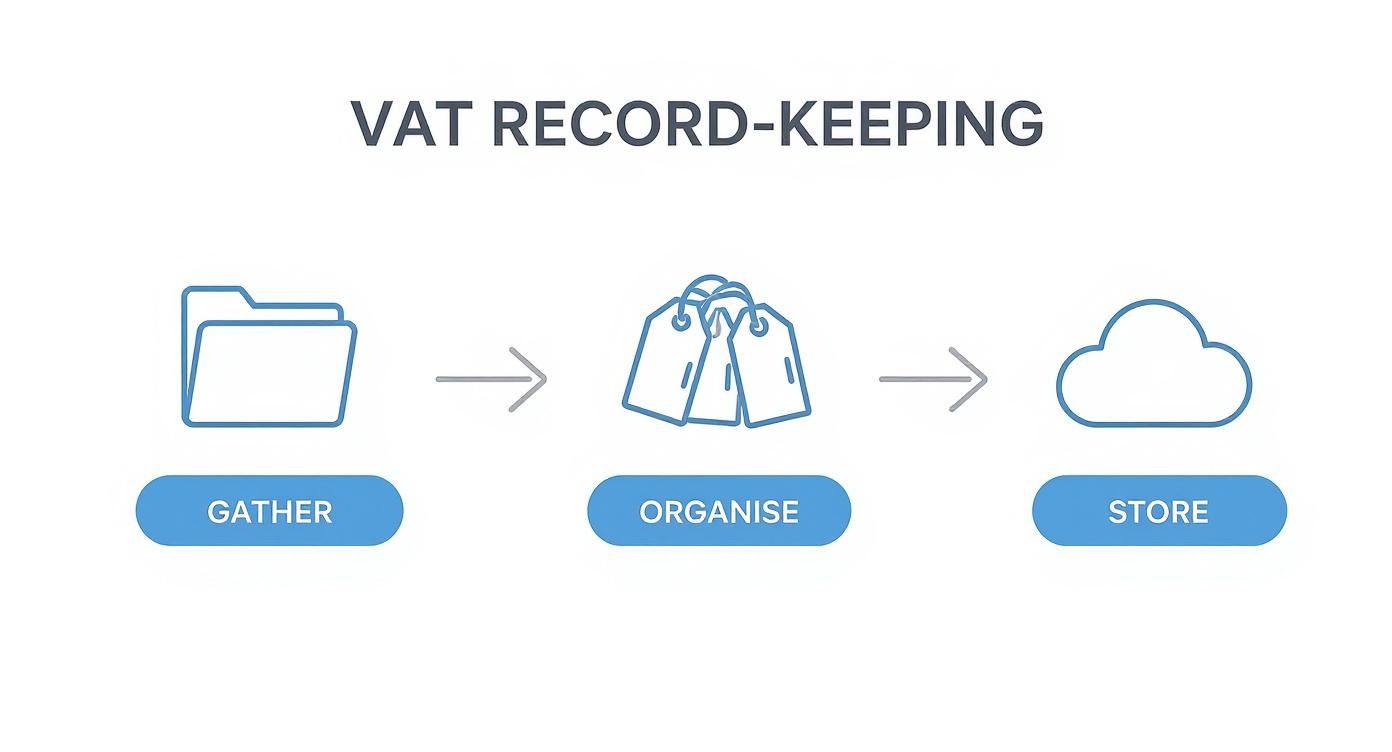
Keeping this simple workflow in mind—gather, organise, and store—makes sure that when it's time to do the sums, everything you need is right where it should be.
Dealing With Partial Exemption
Now, things can get a bit more complex if your business makes both taxable sales (anything with a 20%, 5%, or 0% VAT rate) and exempt sales. This is a common situation for businesses like a financial advisor who offers taxable consultancy alongside exempt insurance products.
If this sounds like you, then you’re in the territory of partial exemption. The rules are fairly logical: you can reclaim all the input tax on costs that are directly linked to your taxable sales. But, and it's a big but, you generally can’t reclaim any input VAT on costs that relate only to your exempt sales.
So, what about overheads that cover everything, like your accountant's bill or the office electricity? For these, you’ll need to do a specific calculation to work out how much of this 'residual' input tax you're allowed to claim.
Worked Example: A Partially Exempt Business
Let's say a design agency made £50,000 from standard-rated branding services and £10,000 from exempt financial training in a quarter. Their input tax on shared overheads (like software and rent) comes to £1,500.
To figure out the reclaimable portion, they use the standard method:
(Value of Taxable Sales / Total Sales) x Residual Input Tax
(£50,000 / £60,000) x £1,500 = £1,250
So, they can reclaim £1,250 of the overhead VAT. The other £250 is lost.
This isn't a step you want to skim over. Get it wrong, and you could be over-claiming VAT (hello, penalties) or under-claiming and leaving cash on the table.
Understanding the Reverse Charge
Another specific rule you might come across is the domestic reverse charge, which is a big one for anyone working in the construction industry. It was brought in to tackle VAT fraud in the sector.
Here’s how it works. Normally, a subcontractor charges VAT to the main contractor. With the reverse charge, they don't. The subcontractor issues an invoice stating the reverse charge applies, but doesn't actually add the VAT amount.
It's the main contractor who has to do the legwork on their VAT return:
- They account for the VAT amount as output tax (as if they were their own supplier).
- At the same time, they reclaim the very same amount as their input tax.
While the net effect on the VAT bill is usually zero, it's a non-negotiable reporting step. Forgetting to apply the reverse charge is a surefire way to attract unwanted attention from HMRC.
Finding Your Final VAT Figure
Once you’ve got your total output tax and your total reclaimable input tax (after factoring in any partial exemption or reverse charge tweaks), the last bit is straightforward.
Total Output Tax – Total Reclaimable Input Tax = VAT Payable or Refundable
This is the number that goes into Box 5 of your VAT return. If it’s a positive figure, that’s what you owe HMRC. If it’s a negative number, then a refund is heading your way. By working through these calculations methodically, you can get to that final figure with confidence, quarter after quarter.
Submitting Your Return with MTD Software
The days of filling out paper VAT returns and popping them in the post are long gone. The UK's tax system has moved on, and if you’re still thinking in terms of manual forms, you’re missing a fundamental piece of the puzzle.
This shift is all thanks to Making Tax Digital (MTD), HMRC's initiative to bring UK tax into the 21st century. For VAT-registered businesses, this means you can no longer just log into the HMRC website and type in your figures. Instead, the law requires you to keep digital records and use MTD-compatible software that talks directly to the taxman.
Since April 2019, any business with a turnover above the £85,000 threshold has had to comply. The impact has been pretty dramatic, cutting down on the simple human errors that used to be commonplace. By 2023, over 90% of VAT returns were filed digitally—a massive leap from just 60% in 2018. In fact, official UK government statistics on VAT show that in the first full year of MTD, late submissions fell by 15% and errors dropped by 10%.
How Software Turns Your Records into a Return
Modern accounting software is so much more than a digital filing cabinet. Platforms like Xero, QuickBooks, and FreeAgent are designed to connect directly with HMRC, turning what used to be a headache-inducing task into just a few clicks.
Let's take Xero as an example. All quarter, you've been diligently tagging your sales invoices and purchase receipts with the correct VAT rates. The software has been quietly logging all this in the background. When your VAT period ends, you just need to navigate to the VAT return section.
At this point, the software does the heavy lifting. It automatically pulls every relevant transaction from your digital records and populates all nine boxes of the VAT return for you. It calculates your total output tax (Box 1), your reclaimable input tax (Box 4), and the final figure that's either due to or from HMRC (Box 5).
Here’s what the VAT return dashboard in Xero typically looks like.
This screen gives you a clear, bird's-eye view of your return before you send it off. You can see the totals for each box and, crucially, you can click into them to see a detailed list of every single transaction that makes up that total.
This is the real game-changer. It replaces manual spreadsheets and calculators with a dynamic, auditable report that's generated in seconds. The software effectively builds a bridge between your day-to-day bookkeeping and your legal filing obligation. There are plenty of options out there, including some of the best free bookkeeping software for UK businesses, so you can find one that fits.
Your Final Pre-Submission Checklist
Even with the smartest software, hitting "submit" without a final check is a rookie mistake. Think of this as your pre-flight check before your return goes to HMRC. Spending ten minutes on this now can genuinely save you hours of stress later.
Before you file, ask yourself one simple question: "Does this look right?" A quick sense-check of the summary against what you were expecting from previous quarters is one of the most powerful error-detection tools you have.
Here are a few critical points to run through:
- Check the Reporting Period: Is the software pulling data for the correct dates? A simple slip-up here can throw the whole thing off. Make sure it’s for 1st July – 30th September and hasn't accidentally pulled in a late-paid invoice from June.
- Scan for Uncategorized Transactions: Most software has a section for bank transactions that haven't been explained or assigned an account code. An uncategorized payment to a supplier means you've missed out on reclaiming legitimate input VAT.
- Review Large or Unusual Items: Does anything jump out at you? Maybe a large one-off asset purchase has pushed your input tax claim way higher than usual. It’s probably correct, but it’s always worth a second look to confirm it’s been categorised properly.
- Confirm Bank Feeds are Current: Make sure your bank feeds are up-to-date and all transactions from the period have been reconciled. A missing week of sales data because the feed dropped could lead to a significant under-declaration of VAT.
Once you’ve ticked off these checks and you feel confident in the numbers, you can authorise the software to submit the return directly to HMRC. The system will give you an official submission receipt for your records. The very last step is to make a note of the deadline and schedule the payment to HMRC (or sit back and wait for your refund).
Avoiding the Common Pitfalls of VAT Returns

It’s surprisingly easy to make a mistake on a VAT return, but the good news is that most errors are entirely preventable with a few solid checks in place. We're not just talking about simple typos; the most expensive blunders I see come from a misunderstanding of the rules – what you can claim, what you can't, and how to treat different kinds of sales.
Getting this right isn't just about good bookkeeping. An error can trigger penalties, interest charges, and the headache of an HMRC enquiry. Let's look at the most common tripwires and, more importantly, how you can build simple checks into your routine to sidestep them.
Misinterpreting VAT Rates and Rules
One of the most frequent mistakes is simply applying the wrong VAT rate. This is particularly common for businesses with a mix of sales, like a health food shop that sells standard-rated vitamin supplements alongside zero-rated food. It’s an easy slip-up to make in the day-to-day running of a business.
Another classic is trying to reclaim VAT on something HMRC has specifically blocked. No matter how much you talked business over lunch, you absolutely cannot reclaim input VAT on client entertainment costs. This is a non-negotiable rule that catches out so many businesses.
Here are the top offenders I regularly see:
- Incorrectly Zero-Rating Sales: Since Brexit, if you're shipping goods to an EU customer, you need to hold specific proof of export. If you don't have it, HMRC can argue that the sale should have been standard-rated all along.
- Reclaiming VAT on Blocked Items: Client entertainment is the big one, but this also includes the purchase of most company cars. There are exceptions for some commercial vehicles, but you need to be sure.
- Confusing Zero-Rated and Exempt: This is a crucial distinction. You can reclaim input tax on costs related to your zero-rated sales, but you can't for exempt sales. Mixing them up leads to a direct overclaim of VAT.
The best way to combat these errors is with consistency. I always recommend creating a simple "VAT cheat sheet" for your business. List your common sales and purchases and their correct VAT treatment. It removes the guesswork for you and your team.
Errors in More Complex VAT Areas
Once your business ventures beyond straightforward UK sales and purchases, the risk of getting things wrong climbs. Areas like the domestic reverse charge and partial exemption are notorious for tripping people up, and a mistake here can have a serious impact on your figures.
For example, a construction subcontractor who incorrectly charges VAT to the main contractor when the reverse charge applies is creating a messy problem for both businesses. Likewise, a partially exempt business that reclaims all its overhead VAT without doing the proper calculation is making a direct error that HMRC will spot.
It's vital to know if these complex rules apply to you. If you're in the construction industry or your business makes any exempt sales, you need to get your head around the specific obligations before you even think about your calculations.
Understanding HMRC’s Penalty System
Not so long ago, a late VAT return might have earned you a gentle reminder. Those days are gone. HMRC now uses a points-based penalty system for late submissions and payments, making consistent, on-time filing more critical than ever.
Here’s a quick rundown of how it works:
- You get one penalty point for every VAT return submitted late.
- Once you hit your points threshold (which is four points for quarterly returns), you receive a £200 penalty.
- You'll get hit with another £200 penalty for every subsequent late submission while you’re at the threshold.
This system is designed to penalise persistent offenders rather than someone who makes a one-off slip. But be aware, there are also separate penalties for paying your VAT bill late, and those start ticking up from day one. Knowing what's at stake is a pretty good motivator for getting things right and filed on time.
How to Correct an Error on a Past Return
That sinking feeling when you spot a mistake on a return you’ve already filed is horrible, but there’s a clear process for fixing it. The method depends on the size of the error.
For net errors under £10,000 (or up to £50,000 in some cases), you can usually just correct it on your next VAT return. You simply add the output tax you missed or subtract the input tax you overclaimed from your current figures. Just make sure you keep a clear note in your records explaining what the error was and how you’ve adjusted for it.
If the error is bigger than these limits, you have to formally disclose it to HMRC. This means filling out Form VAT652. Don't wait for them to find it. A prompt and voluntary disclosure is always viewed more favourably and can help reduce potential penalties. When you find a mistake, acting quickly and transparently is always the best approach.
Common VAT Return Questions Answered
Even with the most organised system, there are always a few tricky questions that pop up when you're finalising a VAT return. Let's tackle some of the most common queries I hear from business owners and landlords, so you can handle these situations with confidence.
What Happens If I Miss the VAT Return Deadline?
First off, don't panic, but do act quickly. Missing a deadline puts you into HMRC's penalty points system. You get one penalty point for every late submission.
Once you hit your points threshold (which is usually four points if you file quarterly), you’ll get hit with a £200 penalty. From that point on, every subsequent late filing will cost you another £200.
Keep in mind, there are separate penalties for paying your VAT bill late. Those start racking up from the very first day your payment is overdue. The best advice is simple: submit and pay on time. If you know you're going to have trouble, give HMRC a call as soon as you can to explain your situation.
Can I Reclaim VAT on Purchases from Before I Registered?
Absolutely, and this is a great way to get a welcome cash boost when you first register. HMRC lets you look back and reclaim VAT on certain costs, but the rules are very specific.
- For Goods: You can go back up to four years before you registered. The key condition is that you still own and use those goods in your business. Think about that office furniture or the van you bought two years ago – if it's still in use, you can likely claim the VAT back.
- For Services: The window here is much shorter, just six months before your registration date. This could cover things like accountancy fees, web hosting, or other professional services you paid for while setting up.
You’ll need valid VAT receipts for everything, and the purchases must be for your current business. You then include these claims on your very first VAT return.
It's well worth spending an afternoon digging out those old invoices. For a new business, this one-off exercise can result in a significant refund on your first return, which is a fantastic boost to cash flow right when you need it most.
How Do I Handle VAT on Services from Outside the UK?
When you buy services from a supplier based overseas—say, a software subscription from the US—you'll almost certainly need to use the reverse charge mechanism. It sounds complicated, but it's really just an accounting adjustment.
What it means is that you, the buyer, become responsible for accounting for the VAT, not the seller.
On your VAT return, you essentially play both sides. You record the VAT as output tax in Box 1, and then you claim that exact same amount back as input tax in Box 4 (assuming the service is for your business).
For most businesses, the two entries cancel each other out, so the net effect on your VAT bill is zero. It’s a crucial compliance step, though, and HMRC expects to see it reported correctly.
What Is the Difference Between Zero-Rated and Exempt Items?
This is a classic point of confusion. In both cases, you don't charge VAT to your customer, but how they’re treated on your return is completely different—and getting it wrong can cost you.
Zero-rated items are still technically taxable, just at a rate of 0%. Think of things like most food, books, and children's clothing. You must include the value of these sales in Box 6 of your return. Crucially, because they are taxable, you can reclaim all the VAT on the costs you incurred to produce them.
Exempt items, however, are completely outside the scope of VAT. This includes services like insurance, postage stamps, and most financial services. You don't include the value of these sales in your taxable turnover, and this is the important bit: you generally cannot reclaim the VAT on any costs directly related to them.
While this guide covers UK VAT, it’s interesting to see how other countries handle things. For example, Canada has its own version, and you can read a guide to filing GST/HST tax returns in Canada to see the similarities and differences.
Recent Posts
17 Oct, 2026
17 Oct, 2026
16 Oct, 2026
15 Oct, 2026