

7 Essential Invoice Examples for Contractors in 2025
Getting paid on time and without hassle is crucial for any contractor, and the invoice you send is the final, critical step in that process. A clear, professional, and well-structured invoice doesn't just ask for money; it builds trust, minimises payment delays, and simplifies your bookkeeping. For limited company directors, sole traders, and property landlords alike, using the right template ensures you capture all necessary details for compliance, whether for HMRC, Companies House, or your own KPI tracking.
This article breaks down seven excellent invoice examples for contractors, sourced from leading UK platforms like Xero, FreeAgent, and Sage. We'll analyse the specific fields, formatting, and customisation options each provides, complete with screenshots and direct links to help you choose the best fit for your business. We'll explore how to present itemised services, CIS deductions, and VAT calculations clearly. To further ensure clarity and prompt payment, considering specific scenarios like when you need information on the best practices for invoicing for hours worked can make a significant difference.
Our goal is straightforward: to equip you with actionable insights so you can create invoices that not only look professional but actively improve your cash flow and reduce administrative burdens.
1. Xero UK
For UK-based contractors, Xero UK offers a highly practical and localised starting point for creating professional invoices. The platform provides a suite of free, downloadable templates specifically designed for the British market, including dedicated versions for general contractors and those in the construction industry. This regional focus is a key differentiator, ensuring all examples include the correct fields and terminology.
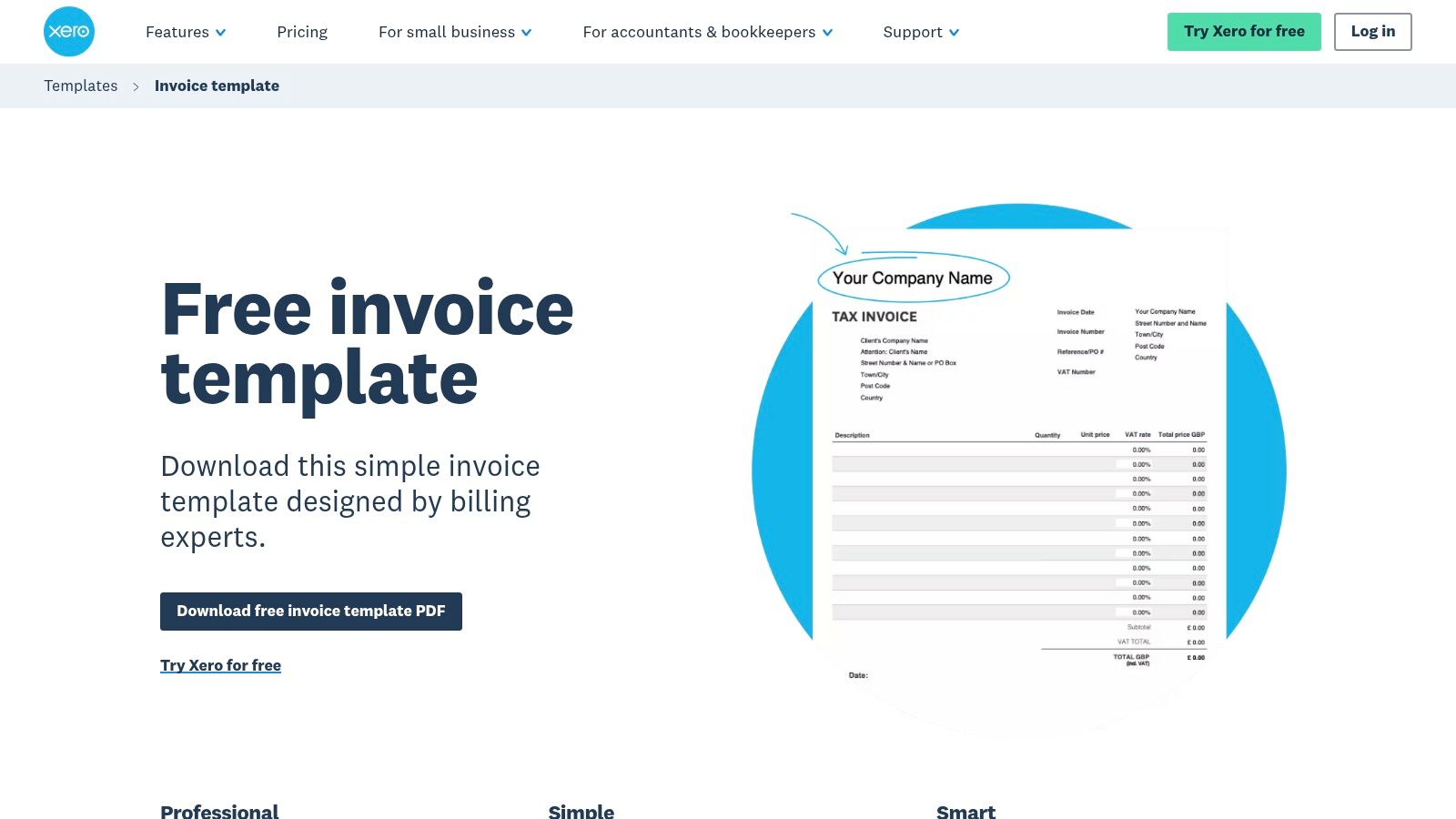
Xero’s templates, available in Word, Excel, and PDF formats, come in two crucial variations: one for VAT-registered businesses and another for non-VAT businesses. This simple separation saves contractors significant time and reduces the risk of compliance errors. Each template is clearly laid out, providing a solid foundation for your own branding and project details.
Strategic Breakdown & Key Features
Xero's primary strategy is to provide a valuable free resource that serves as a seamless on-ramp to its paid accounting software. The free templates are fully functional but are designed to highlight the benefits of automation, which is only available through a Xero subscription.
- UK-Specific Design: The templates are pre-formatted with UK conventions, including date formats and specific fields for Company Number and VAT Registration Number. This is a major advantage over generic international templates.
- Free Invoice Generator: For quick, one-off invoices without downloading a template, Xero offers a browser-based generator. You can fill in the details online and download a professional PDF instantly.
- Path to Automation: While the templates are manual, they introduce users to the Xero ecosystem. Upgrading to a paid plan unlocks powerful features like recurring invoices, automated payment reminders, and direct "Pay Now" links for online payments, which are crucial for developing smarter invoicing habits that improve cash flow.
Actionable Takeaways
To make the most of Xero’s resources, start by downloading the contractor-specific template that matches your VAT status. Customise it with your logo and brand colours to maintain a professional image. Use the free invoice generator for urgent or one-off jobs when you are away from your main computer. If you find yourself manually chasing payments or sending the same invoice each month, consider it a clear signal that it's time to evaluate their paid automation features.
| Feature | Availability | Best For |
|---|---|---|
| Downloadable Templates | Free | Establishing a consistent, branded invoice format. |
| Online Invoice Generator | Free | Creating quick, one-off invoices without software. |
| Automated Invoicing | Paid Subscription | Contractors needing to save time with recurring invoices, payment reminders, and online payment processing. |
Website: https://www.xero.com/uk/templates/invoice-template/
2. FreeAgent
Built from the ground up for UK freelancers and contractors, FreeAgent is more than just an invoicing tool; it's a comprehensive accounting platform. It provides MTD-compliant invoice layouts designed to meet the specific needs of sole traders and limited companies. This focus on the UK contractor market ensures that every invoice generated is professional, compliant, and ready for tax purposes.
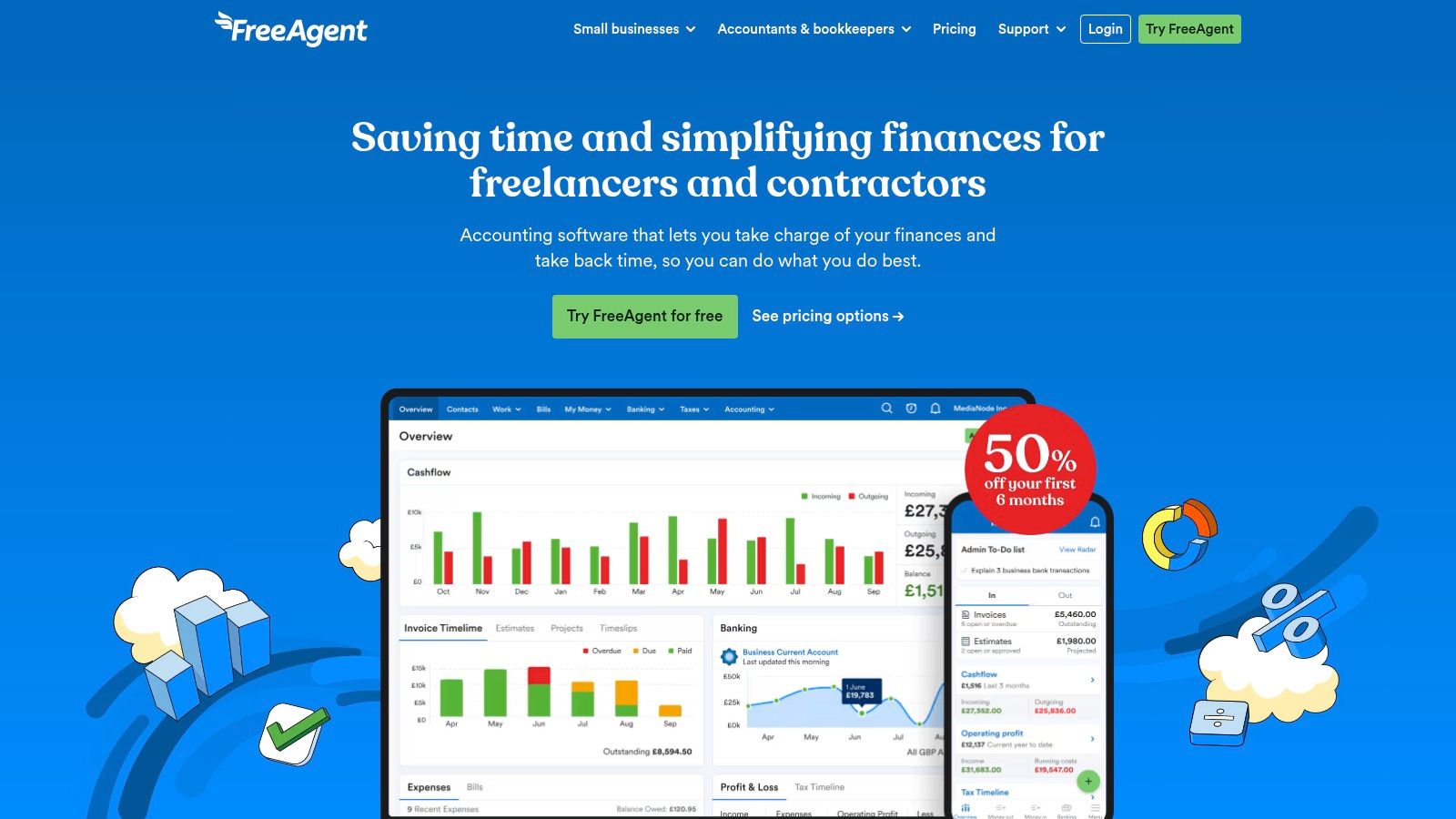
Unlike platforms offering simple downloadable files, FreeAgent’s approach is entirely software-based. After a 30-day free trial, access requires a subscription. This model is ideal for contractors who are ready to move beyond manual templates and embrace a more integrated system for managing their finances, from invoicing and expense tracking to VAT returns.
Strategic Breakdown & Key Features
FreeAgent's core strategy is to provide a complete, all-in-one financial management solution specifically for the UK's self-employed workforce. The platform uses invoicing as a central hub, connecting it directly to expense tracking, bank feeds, and tax estimations. This seamless integration is its primary value proposition, aiming to simplify the entire business admin process.
- Contractor-Centric Design: The invoicing system is designed with contractor workflows in mind, allowing for easy creation of estimates that can be converted into invoices with one click.
- Automated Recurring Billing: A key feature for contractors on retainers or long-term projects is the ability to set up recurring invoices. The system automatically generates and sends them on a schedule, saving significant administrative time.
- Direct MTD Compliance: As an HMRC-recognised software, invoices created in FreeAgent are directly linked to its Making Tax Digital (MTD) for VAT functionality, simplifying compliance for VAT-registered contractors.
Actionable Takeaways
Use the 30-day free trial to fully explore the platform's automation capabilities. Set up a test client and project to create an estimate, convert it to an invoice, and schedule a recurring bill. Connect your business bank account to see how the system automatically explains invoice payments, giving you a real-time view of your cash flow. If you find the integration of invoicing, expense tracking, and tax forecasting saves you significant time during the trial, the subscription is likely a worthwhile investment for your business.
| Feature | Availability | Best For |
|---|---|---|
| Professional Invoice Creation | Subscription (after 30-day trial) | Contractors wanting an all-in-one, compliant system. |
| Automated Recurring Invoices | Subscription (after 30-day trial) | Saving time on retainer-based or repeat project billing. |
| Integrated Expense Tracking | Subscription (after 30-day trial) | Linking project costs directly to invoices and accounts. |
Website: https://www.freeagent.com/freelancers-and-contractors/
3. Sage Accounting
Sage Accounting is a well-established name in UK business finance, offering a comprehensive suite of tools where invoicing is a core component. Rather than providing standalone templates, Sage integrates invoicing directly into its accounting platform, making it an excellent choice for contractors looking for an all-in-one solution. This approach is ideal for those who want to manage their finances, from quotes to final payments, within a single, compliant ecosystem.
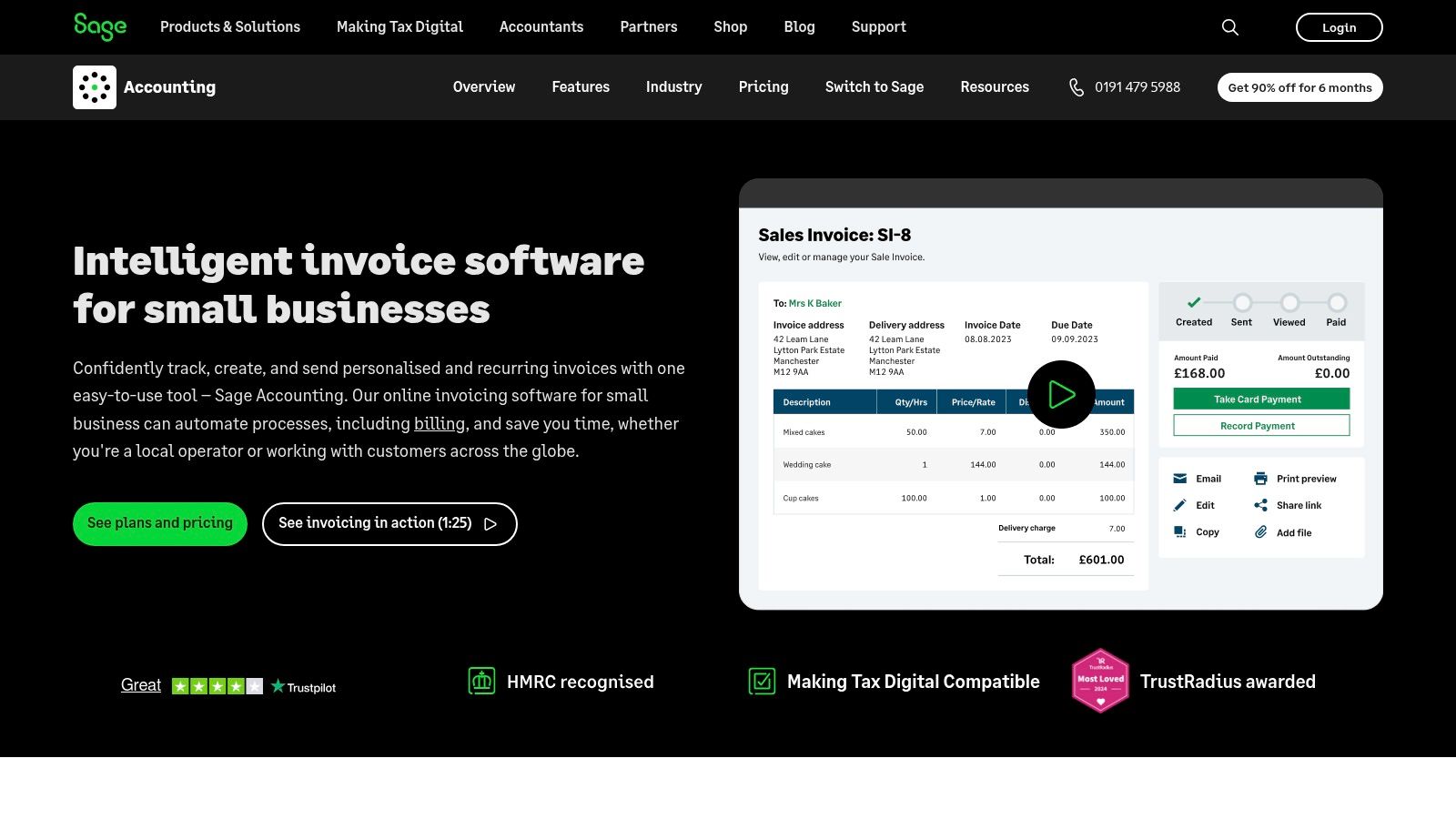
The platform enables contractors to create and send professional, customised invoices directly from their web browser or mobile app. Its strong UK focus ensures all necessary fields for compliance, such as VAT details, are correctly handled. The tiered pricing model allows contractors to start with basic invoicing and scale up to more advanced features as their business grows.
Strategic Breakdown & Key Features
Sage's strategy is to embed invoicing within a complete accounting solution, encouraging users to manage their entire financial workflow on the platform. By connecting quotes, invoices, and payment tracking, it positions itself as the central hub for a contractor's business operations. The tiered plans are designed to accommodate growth, from sole traders to expanding limited companies.
- Quote-to-Invoice Conversion: A key time-saving feature is the ability to convert an accepted quote or estimate into an invoice with a single click. This reduces manual data entry and minimises the risk of errors.
- VAT Support & Personalisation: Sage provides robust support for VAT, automatically calculating the correct amounts and ensuring invoices are HMRC-compliant. Users can also personalise their invoices with a logo and brand colours.
- Scalable Automation: Higher-tier plans unlock powerful automation tools, including the ability to set up automatic invoice chasing. This feature sends payment reminders on your behalf, improving cash flow without manual intervention.
Actionable Takeaways
Start by evaluating which Sage Accounting tier aligns with your current needs. If you frequently send quotes, the seamless conversion feature will immediately boost your efficiency. Customise your invoice design from the outset to ensure brand consistency across all client communications. As your business scales, monitor how much time you spend chasing late payments; this is the key indicator that it’s time to upgrade to a plan with automated reminders to reclaim your time.
| Feature | Availability | Best For |
|---|---|---|
| Integrated Invoicing | Paid Subscription | Contractors who want a single platform for accounting, quotes, and invoicing. |
| Quote Conversion | Paid Subscription | Businesses that want to streamline the process from estimate to payment. |
| Automatic Invoice Chasing | Higher-Tier Subscription | Growing contractors who need to automate payment reminders and improve cash flow. |
Website: https://www.sage.com/en-gb/sage-business-cloud/sage-accounting/features/invoicing/
4. Zoho Invoice (UK)
For contractors seeking a comprehensive yet entirely free solution, Zoho Invoice (UK) presents a compelling option. The platform provides a dedicated contractor invoice template that can be downloaded in PDF or Excel formats, or used directly within its powerful online invoicing system. This flexibility caters to both contractors who prefer manual spreadsheet management and those ready to embrace a more integrated digital workflow.
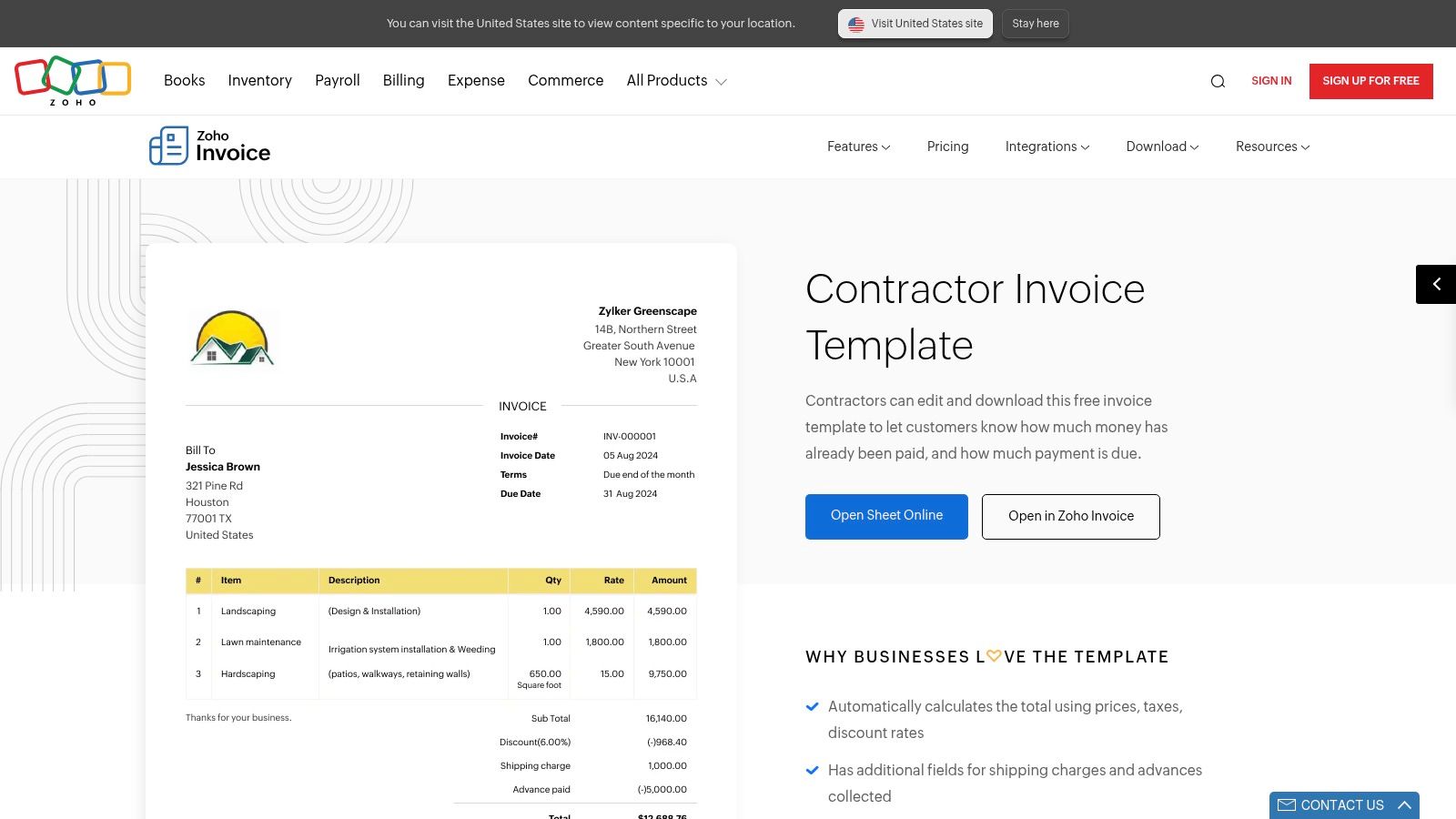
Zoho’s key differentiator is that its powerful invoicing software is genuinely free, a rare offering in the market. The templates are clean, professional, and easily customisable with your company branding. The online version includes built-in calculations for totals, taxes, and discounts, significantly reducing the chance of manual errors and streamlining the entire invoicing process from creation to payment.
Strategic Breakdown & Key Features
Zoho's strategy is to offer a best-in-class free invoicing tool to attract small businesses and contractors into its wider ecosystem of business applications. By providing a robust, full-featured invoicing platform at no cost, it builds brand loyalty and creates a natural pathway for users to explore its other paid products (like CRM or accounting software) as their business needs grow.
- Truly Free Invoicing Suite: Unlike competitors that offer free templates as a gateway to paid software, Zoho’s entire invoicing platform is free. This includes features often behind a paywall, such as estimates, recurring invoices, and timesheets.
- Built-in Customisation and Calculations: The online tool allows for effortless branding and automatically handles calculations. This feature is particularly useful for contractors who bill hourly or need to apply specific taxes or discounts, ensuring accuracy on every invoice.
- Multiple Formats: The choice between a downloadable template (PDF/Excel) and a full online platform gives contractors the freedom to choose the workflow that best suits their current business operations.
Actionable Takeaways
Start by using the online version of Zoho Invoice to create and send your next invoice. Customise the template with your logo and payment details to establish a professional standard from the outset. Explore the integrated timesheet feature to track billable hours accurately for specific projects, which can then be converted into an invoice with a single click. As your client base grows, leverage the recurring invoice feature for retainer clients to automate your monthly billing and improve cash flow consistency.
| Feature | Availability | Best For |
|---|---|---|
| Downloadable Templates | Free | Contractors who prefer to manage their invoicing manually using Excel or PDF. |
| Online Invoicing Platform | Free | Creating, customising, and sending professional invoices directly from a web browser. |
| Invoicing Suite Features | Free | Contractors needing to manage estimates, track time, and set up recurring invoices without a subscription. |
Website: https://www.zoho.com/uk/invoice/templates/contractor-invoice-template/
5. Square Invoices (UK)
For contractors who prioritise simple, pay-as-you-go payment processing over complex accounting software, Square Invoices presents a compelling option. The platform offers free, customisable UK invoice templates that integrate directly into its powerful payment ecosystem. This focus on seamless transactions makes it an excellent choice for businesses that need to accept card and digital wallet payments without committing to a monthly subscription.
Square's key advantage is its accessibility; contractors can send professional invoices via email or text and immediately give clients the option to pay by card, Apple Pay, Google Pay, or a BACS transfer. The platform is free to use, with revenue generated from a transparent, per-transaction processing fee. This model is ideal for contractors with fluctuating income or those just starting out.
Strategic Breakdown & Key Features
Square's strategy revolves around removing friction from the payment process. By bundling free invoicing tools with its core payment processing service, it creates an all-in-one solution for getting paid quickly. The platform is designed for action, encouraging immediate payment upon receipt of the invoice.
- Integrated Payment Processing: Unlike traditional templates, Square invoices have payment functionality built-in. This direct integration significantly speeds up payment times by offering clients convenient, modern payment methods.
- No Monthly Fees: The pay-as-you-go model is a major draw. Contractors avoid fixed overheads, only paying a small percentage when they successfully receive a payment, making it a low-risk solution for managing finances.
- Multi-Channel Delivery: The ability to send invoices via email or a direct text message link caters to different client preferences and increases the likelihood of the invoice being seen and actioned promptly. This is a core part of effective invoicing management for a small business.
Actionable Takeaways
Start by customising a Square invoice template with your logo and business details. For maximum impact, enable all available payment options (card, digital wallets, BACS) to provide clients with ultimate flexibility. Use the text message delivery option for smaller, time-sensitive jobs where a quick turnaround is expected. Regularly review your transaction fee costs; as your business grows, you may find that a fixed-fee subscription model from another provider becomes more cost-effective.
| Feature | Availability | Best For |
|---|---|---|
| Customisable Templates | Free | Contractors wanting an all-in-one invoicing and payment solution. |
| Integrated Payments | Pay-as-you-go Fee | Speeding up cash flow by accepting instant card and digital payments. |
| Email & Text Invoicing | Free | Reaching clients quickly and conveniently on their preferred platform. |
Website: https://squareup.com/gb/en/invoices/invoice-templates
6. Zervant
Zervant provides a strong middle-ground for contractors who want more than a basic template but aren't ready to commit to a full accounting suite. The platform offers a well-organised gallery of UK-formatted invoice templates in Word and Excel, covering both VAT and non-VAT scenarios. This makes it an excellent resource for sourcing compliant and professional-looking invoice examples.
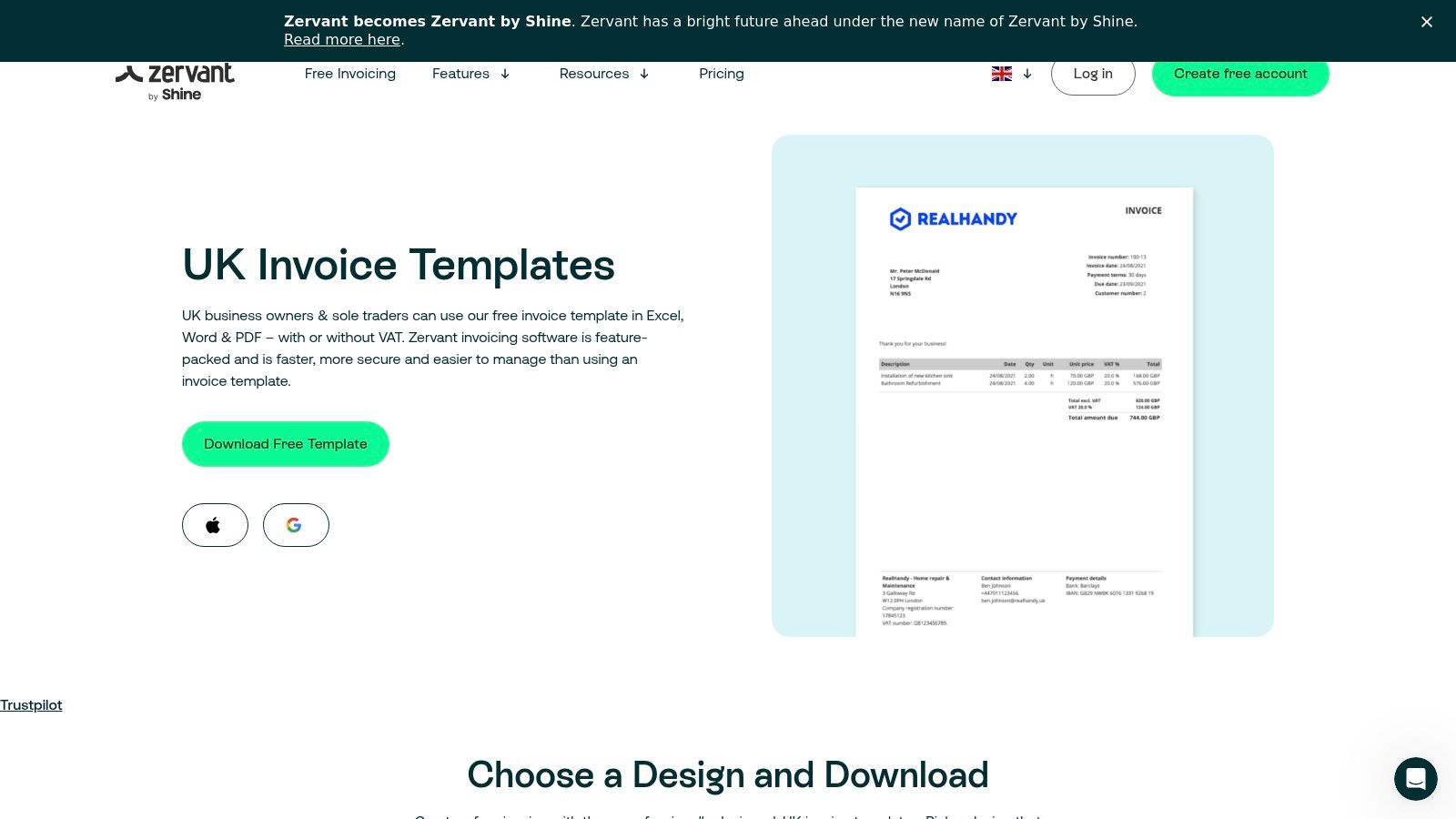
The key distinction for Zervant's templates lies in their Excel versions, which come with pre-built formulas. These automatically calculate subtotals, VAT, and final totals, reducing the potential for manual calculation errors. This small touch of automation adds significant value for contractors who prefer managing their finances in a spreadsheet environment.
Strategic Breakdown & Key Features
Zervant’s strategy is to offer functional, free tools as a clear pathway to its freemium invoicing software. The templates and generator solve an immediate need, while the optional free account introduces users to the benefits of a centralised system for storing client and item details, paving the way for an upgrade to their paid plans.
- Excel Templates with Formulas: Unlike a static Word or PDF document, Zervant’s Excel invoice examples include formulas to handle calculations. This is a major efficiency gain for contractors creating detailed invoices with multiple line items or complex VAT.
- Freemium Software Bridge: Contractors can use the templates without signing up, or they can create a free Zervant account. This account allows them to save customer and product information, making future invoice creation much faster and more organised.
- Mobile App Accessibility: For contractors who are frequently on-site, Zervant offers a mobile app. This allows for invoicing on the go, a feature not available with simple downloadable files, bridging the gap between static templates and cloud-based software.
Actionable Takeaways
Start by downloading one of the Excel templates to see if the built-in formulas suit your workflow. This is particularly useful if you regularly bill for multiple services or materials on a single invoice. If you find yourself repeatedly entering the same client or service details, create a free Zervant account to store this information. This will streamline your process without any initial cost. Consider the free account a trial run for how a more integrated invoicing system could save you administrative time.
| Feature | Availability | Best For |
|---|---|---|
| Downloadable Templates | Free | Contractors who prefer managing invoices in Word or Excel and want automated calculations. |
| Online Invoice Generator | Free | Creating a fast, professional PDF invoice without any downloads or sign-ups. |
| Freemium Invoicing Software | Free Account | Storing client and product details to speed up the creation of recurring or similar invoices. |
Website: https://www.zervant.com/en/invoice-templates/
7. GOV.UK
While not a template provider, GOV.UK is the definitive authority on what information a UK invoice must legally contain. It serves as an essential compliance checklist for every contractor, offering official guidance on the mandatory elements required for invoices, whether you are a sole trader or a limited company. This makes it a crucial resource to consult before adopting any template or invoicing software.
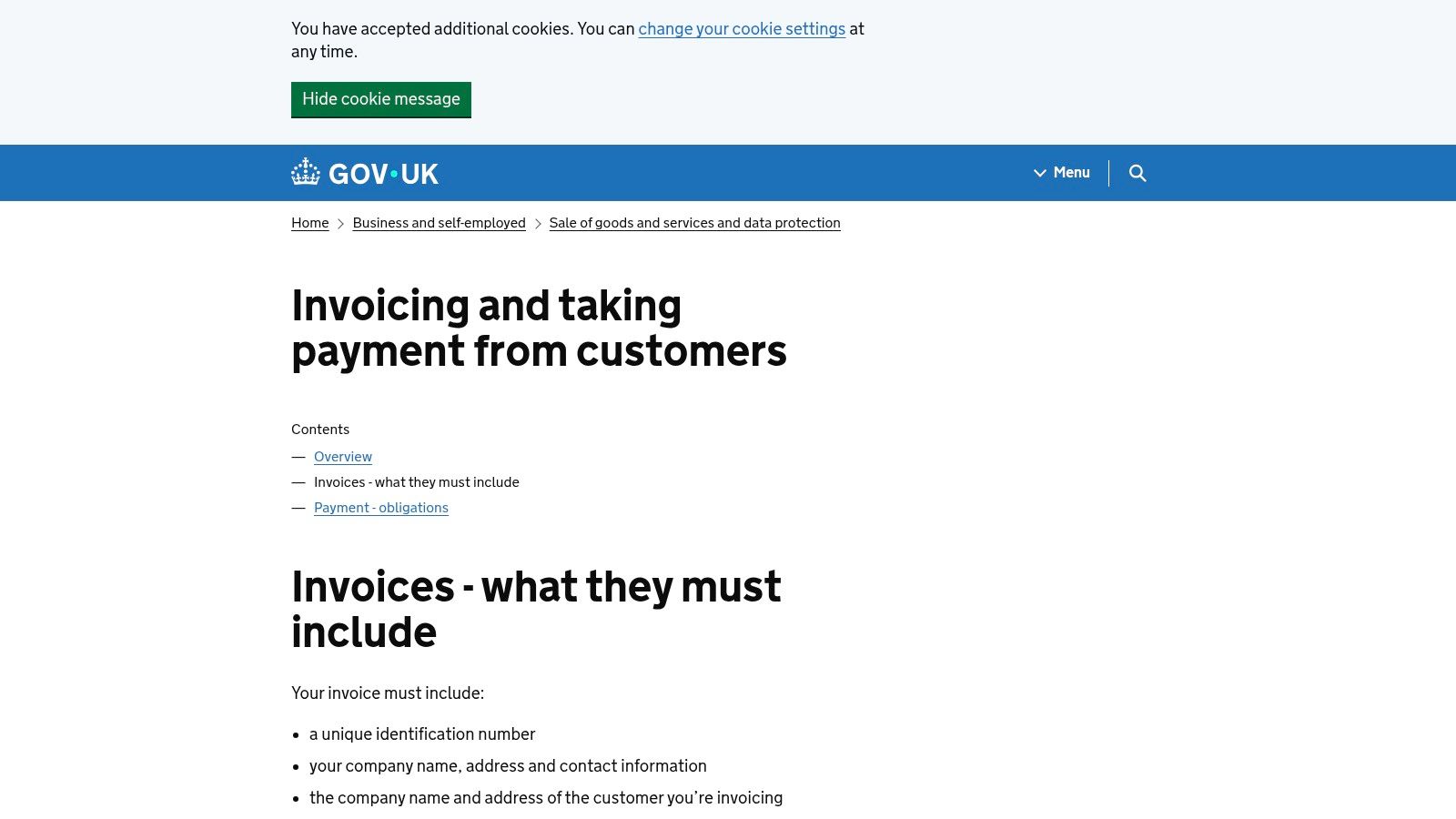
The platform clearly lists all required details, such as a unique identification number, company details, clear descriptions of services, and relevant dates. It also provides specific guidance for VAT-registered businesses, linking to further resources on VAT rules, self-billing arrangements, and correct record-keeping practices. This guidance ensures your invoices are not just professional, but fully compliant with HMRC regulations.
Strategic Breakdown & Key Features
GOV.UK’s strategy is not to provide a tool, but to be the single source of truth for legal and financial compliance in the UK. By offering clear, unambiguous guidance, it empowers contractors to create legally sound documents, regardless of the software or template they use. It acts as the foundation upon which all other invoice examples for contractors should be built.
- Authoritative Compliance Checklist: The site provides a non-negotiable list of what must be on an invoice. This includes details for sole traders (your name and any business name being used) and limited companies (the full registered company name).
- VAT-Specific Guidance: It offers direct links and clear instructions on what constitutes a valid VAT invoice, a critical area where mistakes can be costly. This helps contractors understand exactly what should be on a VAT invoice.
- Foundation for Any Template: This guidance should be used to audit any template you download or any invoice generated by software. It ensures the tool you've chosen is fit for the UK market and protects you from compliance issues.
Actionable Takeaways
Before settling on an invoice template from any source, cross-reference its fields against the list on the GOV.UK website. Bookmark the page as your go-to compliance checker. If you are VAT registered, pay special attention to the VAT-specific requirements to ensure every invoice you send is valid for tax purposes. Use this official resource to build confidence that your payment processes are legally robust.
| Feature | Availability | Best For |
|---|---|---|
| Mandatory Invoice Elements | Free | Auditing any invoice template for UK compliance. |
| VAT Invoicing Rules | Free | VAT-registered contractors needing to ensure their invoices are valid for HMRC. |
| Record-Keeping Guidance | Free | Understanding your legal obligations for storing financial documents. |
Website: https://www.gov.uk/invoicing-and-taking-payment-from-customers/invoices-what-they-must-include
Top 7 Contractor Invoice Solutions Comparison
| Service | 🔄 Implementation complexity | ⚡ Resource requirements | 📊 Expected outcomes | 💡 Ideal use cases | ⭐ Key advantages |
|---|---|---|---|---|---|
| Xero UK | Low for templates; Medium if enabling automation (paid) | Minimal for free templates; subscription for recurring/reminders | UK‑compliant invoices; upgrade path to automated billing | Contractors wanting UK templates + easy move to full accounting | UK‑tailored examples; smooth on‑ramp to automated invoicing ⭐⭐ |
| FreeAgent | Medium — subscription setup and onboarding | Subscription after 30‑day trial | MTD‑compatible invoicing, recurring billing, expense capture | Freelancers/contractors needing built‑for‑UK accounting | Contractor‑focused features and simple onboarding ⭐⭐ |
| Sage Accounting | Medium–High — choose tier for features and automation | Paid tiers; add‑ons for advanced automation | Scalable invoicing, VAT support, automatic chasing on higher tiers | Small businesses needing scalable, compliant accounting | Strong UK compliance and clear tiering ⭐⭐ |
| Zoho Invoice (UK) | Low — free templates and quick setup; suite optional | Free templates/tools; some advanced features may require account/region | Branded PDFs/Excel with built‑in calculations; basic automation | Contractors wanting free, customizable templates and exports | Truly free templates, multiple export formats ⭐⭐ |
| Square Invoices (UK) | Low — simple setup and send workflow | No subscription; pay‑as‑you‑go processing fees per payment | Fast invoice delivery and card/Apple/Google Pay acceptance | Ad‑hoc contractor billing needing online card payments | No monthly fee; wide payment method support ⭐⭐ |
| Zervant | Low — download Word/Excel or use online generator | Free templates; optional freemium account for storage/automation | Compliant‑looking invoices; Excel formulas for totals | Contractors who prefer offline Word/Excel templates | Free templates with Excel calculations; quick generator ⭐ |
| GOV.UK | Low effort (guidance only) | Free — no tools or software required | Definitive list of mandatory invoice elements for UK compliance | Anyone needing authoritative compliance requirements | Official, authoritative compliance guidance ⭐⭐⭐ |
Next Steps to Optimise Your Contractor Invoicing
As you have explored seven top invoicing examples for contractors, it is time to turn insights into action. This section distils the most critical strategies and provides a clear roadmap to refine your billing process, ensure compliance and boost cashflow.
Recap of Invoice Examples Insights
- Xero UK: Advanced custom fields and automated reminders to reduce late payments.
- FreeAgent: Project tagging and time-entry integration for precise billing.
- Sage Accounting: Multi-currency support and HMRC-ready submissions.
- Zoho Invoice (UK): Template flexibility and built-in payment links.
- Square Invoices (UK): Fast issuance and on-the-go mobile invoicing.
- Zervant: Simplified design and multi-lingual support for international clients.
- GOV.UK: Official template for sole traders, ensuring regulatory compliance.
“Customising each invoice template to reflect project specifics and payment terms cuts down queries and speeds up approvals by up to 30 per cent.”
Actionable Takeaways
- Standardise core fields such as invoice number, due date and VAT breakdown.
- Use automation-driven reminders in Xero or FreeAgent to chase unpaid bills.
- Leverage payment links from Zoho or Square to simplify client payments.
- Apply GOV.UK’s checklist to confirm all legal requirements are satisfied.
- Colour-code or tag invoices by project to track profitability at a glance.
Selecting the Right Invoicing Tool
Review your business priorities and transaction volume before choosing:
- For high-volume billing: Xero UK or Sage Accounting offer robust scalability.
- For freelancers and micro-firms: Zervant or FreeAgent deliver simplicity with essential features.
- For mobile teams: Square Invoices (UK) ensures you can send and manage invoices from anywhere.
If you’re already using multiple platforms, exploring how Quickbooks can streamline small business finances will show you how to integrate accounting data seamlessly with Airtable for unified reporting.
Implementation Considerations
- Integration: Verify API or CSV import options to sync with your bookkeeping system.
- Compliance: Check VAT rates and HMRC-approved formats before rollout.
- Training: Provide concise guides or short workshops for your team to adopt new templates.
- Security: Ensure your invoicing software offers encrypted data storage and two-factor authentication.
- Costs: Compare subscription tiers and transaction fees to find the best value.
With these steps, your invoicing will become more accurate, professional and efficient. By combining strategic template customisation with the right tool, you lay the groundwork for healthier cashflow and stronger client relationships.
Ready to take full control of your billing and bookkeeping? Partner with Stewart Accounting Services for expert guidance on VAT rules, cashflow optimisation and seamless invoice management. Visit Stewart Accounting Services to get started today.