

What Is PAYE for Employers? A Simple UK Payroll Guide

At its heart, Pay As You Earn (PAYE) is simply HMRC's way of collecting Income Tax and National Insurance directly from an employee's wages. The easiest way to think about it is that your business acts as a collection point for the tax man.
Instead of your staff being hit with a massive tax bill once a year, you deduct the tax and National Insurance they owe each time you pay them. It’s a system designed to make sure tax is paid right when the money is earned, which is far more manageable for everyone involved.
Understanding the PAYE System for UK Employers

As soon as you hire your first employee, running a PAYE scheme becomes a non-negotiable legal duty. Your job is to calculate the correct deductions from each person’s gross pay before they receive their take-home pay (or net salary). These calculations aren't guesswork; they're based on specific codes and rules provided by HMRC.
This system has been a bedrock of UK taxation for a long time, first introduced way back on 6 April 1944. Before then, people paid their tax in one lump sum annually. The shift to PAYE was made to improve the efficiency of tax collection during a time of major workforce growth, requiring employers to handle deductions weekly or monthly. If you're interested, you can explore the history of this system to see just how much it has evolved.
Your Core Role in the System
Your main responsibilities within the PAYE framework really boil down to a handful of key tasks. Getting these right is crucial for staying on HMRC's good side and avoiding any nasty penalties down the line.
Let's quickly break down the main elements an employer has to manage.
| Core Components of the PAYE System |
|---|
| Component |
| Tax Code Application |
| National Insurance Contributions (NICs) |
| Reporting and Payments |
Getting these pieces right ensures you're fully compliant with your duties.
A helpful way to view PAYE is to see your business as a crucial link between your employees and HMRC. Your diligence in calculating, deducting, and reporting ensures the entire tax system functions smoothly, preventing financial surprises for both your team and the tax authority.
Your Key Responsibilities Under PAYE
Once you get your head around the fact that PAYE basically turns you into a tax collection agent for HMRC, the next logical step is to understand exactly what you need to do. These duties aren't just suggestions—they are the legal cornerstone of being a compliant UK employer and the nuts and bolts of your entire payroll process.
Your role goes far beyond just transferring money to your staff at the end of the month. You're legally on the hook for managing several crucial tasks with precision and timeliness, making sure the right tax and National Insurance gets to HMRC for every single person, every single payday.
Core Employer Obligations
The list of duties might seem a bit daunting at first, but it’s really just a series of manageable steps. Every single employer running a PAYE scheme has to get these basics right.
- Get Registered with HMRC: Before you even think about paying your first employee, you have to register as an employer. HMRC will then send you the vital reference numbers you'll need to file your reports and make payments.
- Calculate the Deductions: This is the core of payroll. For each employee, you'll work out the exact amount of Income Tax and National Insurance Contributions (NICs) to deduct, all based on their specific tax code and how much they’ve earned.
- Issue Payslips: You are legally required to give every employee a payslip, either on or before their payday. This isn't just a slip of paper; it's a detailed breakdown showing their gross pay, every single deduction, and the final net pay hitting their bank account.
- Report to HMRC: With every pay run, you must send payroll data to HMRC using a Full Payment Submission (FPS). This has to be done on or before payday and is all handled through software that's compatible with Real Time Information (RTI).
PAYE compliance is more than just a financial chore; it's a legal requirement. Think of each responsibility, from issuing a payslip to paying HMRC, as a fundamental building block for a lawful and trustworthy business. Cutting corners on any of them can lead to some serious headaches down the line.
Financial and Statutory Duties
Beyond the rhythm of your regular payroll run, you have a few other significant financial responsibilities. These involve payments you make for your employees and, just as importantly, contributions you make as a business.
One of the biggest is Employer's National Insurance Contributions. This is a crucial one to understand: it’s a separate payment you, the employer, make on top of an employee's salary. It is never deducted from their pay. The amount is calculated based on their earnings and is a direct cost to your business.
You’re also in charge of managing:
- Statutory Payments: If an employee is eligible for Statutory Sick Pay (SSP), Statutory Maternity Pay (SMP), or other types of parental leave pay, it's your job to process these correctly through your payroll. The good news is you can often reclaim some, or even all, of this money from HMRC.
- Student Loan Deductions: When HMRC sends you a notice, you must start taking student loan repayments directly out of an employee's pay.
To get a complete picture of your legal and financial duties, it’s always a good idea to refer to a comprehensive company compliance checklist to make sure nothing slips through the cracks. Getting a firm grip on these elements is vital, and taking a look at some established payroll best practices can give you a solid roadmap to follow.
How to Set Up PAYE for Your Business
Getting your business registered for PAYE is one of those first big steps into becoming an employer. It can feel a bit daunting, but it’s really just a logical process to get you on HMRC’s radar so you can handle tax and National Insurance correctly from your very first payday.
The trigger point is straightforward: you have to register before you pay your new employee. This rule kicks in as soon as you hire someone who earns £123 or more a week, gets expenses or benefits, has another job, or is receiving a pension. This whole journey, of course, starts with bringing that first person on board. For a really helpful overview of that initial stage, check out this ultimate guide to hiring your first employee.
Navigating the HMRC Registration Process
You’ll do the entire registration online through the GOV.UK website. Be warned: it can take up to 15 working days for HMRC to process everything, so don't leave it until the day before payday! To make it a smooth process, it's a good idea to gather all the necessary information before you start.
Here’s a quick checklist of what you'll usually need:
- Company Details: Your official company name, registered address, and your Unique Taxpayer Reference (UTR).
- Contact Information: Your name, a contact number, and your own National Insurance number.
- Employee Information: Key details about your first employee, like when they’ll start and what you'll be paying them.
Once HMRC has processed your application, they'll send you an Accounts Office reference number and a PAYE reference number. These are absolutely vital. For a more detailed walkthrough of this whole setup, our guide on https://stewartaccounting.co.uk/setting-up-a-payroll-scheme/ breaks it down even further.
Think of these reference numbers as your business's payroll passport. You will need them to file reports, make payments, and communicate with HMRC about anything related to your staff's pay. Keep them safe and accessible.
Choosing Your Payroll Software
With your registration sorted, the next big task is picking the right tool for the job. You're legally required to report all your payroll information to HMRC online, and you must use recognised software to do it. This software becomes the engine of your payroll system, doing the heavy lifting of complex calculations and making sure your submissions are fully compliant.
The right software takes care of the core tasks: working out the correct tax and National Insurance contributions, reporting everything to HMRC under Real Time Information (RTI), and generating payslips for your team.
Essentially, your ongoing PAYE duties boil down to a simple, repeating cycle.
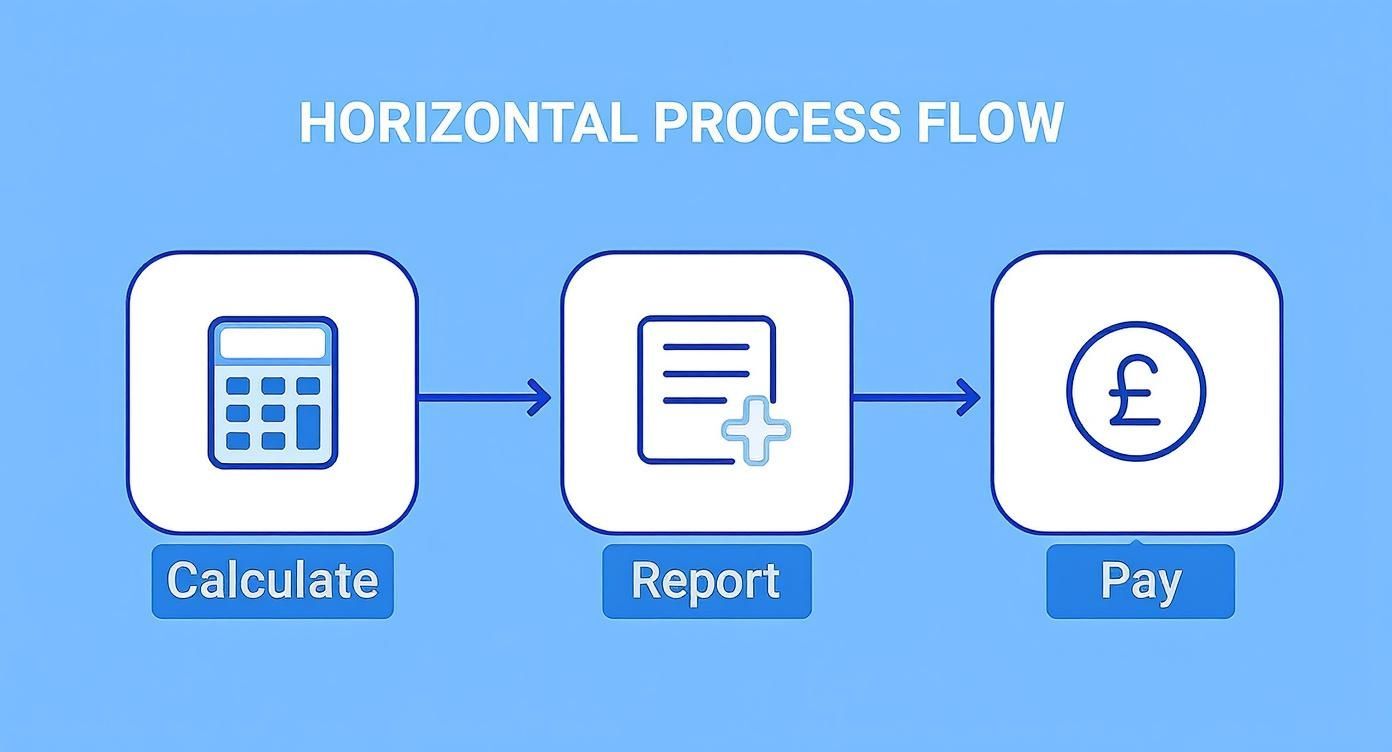
This process shows the continuous loop of calculating deductions, reporting them to HMRC, and paying what's due. Good payroll software makes managing this monthly cycle a whole lot easier.
How Real Time Information Reporting Works

At the heart of the modern PAYE system lies Real Time Information, or RTI. Don't worry, it isn't a separate tax you need to get your head around. It’s simply the mandatory way you report your payroll information to HMRC.
Think of it like a live, constantly updated digital ledger that your business shares with the tax office. Every single time you pay your employees, you’re required to update this ledger instantly. This direct line of communication keeps HMRC’s records perfectly current, which in turn improves accuracy across the board and helps ensure employees get the correct tax credits or benefits they're entitled to.
The PAYE system has come a long way. After National Insurance was merged into the system back in 1975, the introduction of RTI in April 2013 was the next great leap forward. It moved everything online, requiring employers to file payroll data electronically every single payday. This was a game-changer for data accuracy and paved the way for other major government schemes like Universal Credit. If you're interested in the details, you can learn more about the PAYE system's history and how it became the real-time process we have today.
Your Key Report: The Full Payment Submission (FPS)
Your main tool for RTI reporting is the Full Payment Submission (FPS). This is the digital report you send to HMRC that breaks down your employees' pay and every deduction you've made. It’s the absolute cornerstone of the RTI system.
Here's the critical bit: you must send an FPS on or before each payday. That deadline is non-negotiable. If your team is paid weekly, you send a weekly FPS. If they're paid monthly, you send a monthly FPS. Simple as that.
This report tells HMRC everything it needs to know for that specific pay period, including:
- Each employee's gross pay
- Deductions for Income Tax and National Insurance
- Details of new starters or employees who have left
- Any student loan repayments
Your payroll software will handle the heavy lifting of creating and sending the FPS. But remember, the ultimate responsibility for making sure it's on time and accurate is yours.
Think of sending your FPS like paying a credit card bill before the due date. It keeps your account with HMRC clean and prevents your business from being flagged for late filing penalties. It is the single most important routine task in your payroll cycle.
When Do You Need an Employer Payment Summary (EPS)?
While the FPS is all about what you're paying your employees, the Employer Payment Summary (EPS) is used for making adjustments. You send an EPS to HMRC to claim back money you're owed or to tell them when no employees were paid in a tax month.
You’ll need to submit an EPS if you need to:
- Reclaim statutory payments (like maternity, paternity, or sick pay).
- Claim the Employment Allowance, if your business is eligible.
- Report any Construction Industry Scheme (CIS) deductions you've suffered.
- Notify HMRC that you haven’t paid any staff and, therefore, won’t be sending an FPS for that tax month.
Unlike the FPS, you only send an EPS when you have something specific to claim or report. Getting these RTI submissions right isn't just good practice—it's essential for staying compliant.
Common PAYE Mistakes and How to Avoid Penalties
Let's be honest, getting PAYE right is a big responsibility. While the system is logical, even a small slip-up can lead to a penalty notice from HMRC – something no business owner wants to see. For anyone new to being an employer, there's always a bit of a learning curve. The good news is that most mistakes are entirely avoidable.
Knowing where others often trip up is the best way to build a solid payroll process from day one. Let's walk through the most common errors I see and, more importantly, how you can sidestep them completely.
Missing Critical Deadlines
This is, by far, the most frequent pitfall. HMRC's deadlines are non-negotiable, and their systems are automated to spot lateness instantly. Consistently missing them is a surefire way to rack up penalties.
- Late RTI Submissions: Your Full Payment Submission (FPS) isn't a summary you send at the end of the month. It must be sent to HMRC on or before the day you actually pay your employees. Missing this can trigger penalties that increase depending on how many people you employ.
- Late Payments to HMRC: The tax and National Insurance you've deducted needs to be in HMRC's bank account by the 22nd of the following tax month (or the 19th if you’re old school and pay by post). If you're late, interest starts clocking up immediately, and penalties will follow if it becomes a habit.
The solution here is simple: get organised. Set up calendar alerts in your payroll software and create a fixed internal schedule. Always aim to run your payroll a few days before the actual payday to give yourself a buffer.
"A common misconception I hear from new business owners is that there's a bit of wiggle room with deadlines. There isn't. The RTI system is automated, so a late submission is flagged the moment it happens. Your best defence is a disciplined payroll calendar."
Inaccurate Calculations and Data
Rubbish in, rubbish out. If the data you put into your payroll system is wrong, the calculations will be wrong, creating headaches for you and your staff down the line. These mistakes almost always come down to a few key details.
The most common data errors include:
- Using the Wrong Tax Code: Applying an outdated or incorrect tax code means you’re taking too much or too little tax from an employee's pay. Always use the most recent code issued by HMRC. For new starters without a P45, make sure you follow the starter checklist process properly to get them on the right footing.
- Miscalculating National Insurance: NI can be tricky, with different category letters and earnings thresholds to consider. This is one area where you absolutely should not be using a spreadsheet. Relying on HMRC-recognised payroll software is the only sensible way to guarantee these complex calculations are right every time.
- Incorrect Employee Details: A simple typo in a name, a wrong date of birth, or an incorrect National Insurance number will cause your submissions to be rejected. This creates a data mismatch on HMRC's end that can be a real pain to fix later.
To prevent these issues, make double-checking new employee information a non-negotiable part of your onboarding process. Your payroll software should be your single source of truth, so make sure it's always up to date with the latest official rates.
By being meticulous with the small details and religious about your deadlines, you'll find managing PAYE far less stressful and keep your business safely out of HMRC's penalty zone.
Choosing Your Payroll Management Approach
When it comes to managing PAYE, you're at a fork in the road. Do you keep it in-house and use specialist software, or do you hand the whole thing over to a team of experts? There's no single right answer.
The best path for you really depends on your business's size, how complex your payroll is, and, frankly, where you want to focus your time and energy.
Option 1: In-House Payroll with Software
Deciding to handle payroll yourself puts you firmly in control. This doesn't mean you're stuck with spreadsheets and a calculator, though. Modern, HMRC-recognised payroll software is designed to do the heavy lifting for you, automating most of the complex calculations and RTI submissions.
For smaller businesses with a straightforward payroll, this can be a great, cost-effective choice.
Good software will typically handle a few key things for you:
- Automatic Calculations: It crunches the numbers for Income Tax and National Insurance contributions for every employee, every time.
- Direct RTI Submissions: The software creates your Full Payment Submission (FPS) and sends it directly to HMRC, hitting your deadlines.
- Payslip Generation: It creates professional, compliant payslips that you can easily send out to your team.
This approach is ideal if you have the time to manage the process and feel confident you can get the data entry right each month.
Option 2: Outsourcing to a Professional
The other path is to pass the responsibility to a payroll specialist or an accountancy firm like ours. This is about more than just clawing back some time; it's about gaining peace of mind.
An expert service ensures you’re always compliant with the latest rules, handles all the HMRC submissions, and deals with any tricky questions that might come up.
By outsourcing, you're not just delegating a task; you're investing in expertise. This allows you to focus entirely on growing your business, secure in the knowledge that your legal payroll obligations are being met flawlessly.
For many growing businesses, this is the smart move. You can read more about the benefits of outsourcing your payroll and see how it frees up your resources and shields your business from expensive mistakes.
PAYE Questions Answered
Even when you've got a good handle on PAYE, a few specific questions always seem to pop up. Here are some quick answers to the queries we hear most often from business owners.
Does My Limited Company Really Need to Register for PAYE?
Almost certainly, yes. If you're a director and you're paying yourself a salary that goes over the National Insurance Lower Earnings Limit (which is £123 a week at the moment), your limited company has to register as an employer. You're legally required to run PAYE, even if you're the only person on the payroll.
What Tax Code Do I Use for a New Starter?
Think of a tax code as a simple instruction from HMRC telling you how much of an employee's pay is tax-free. When you take on a new team member, the first thing you should ask for is their P45 from their previous job. This document has the tax code you need.
If they can't provide a P45, don't worry. You'll need to get them to fill out HMRC's ‘starter checklist’ form. This process helps you work out a temporary tax code to use until HMRC sends you an official one.
What If I've Missed the RTI Deadline?
First off, don't panic. You still need to send your Full Payment Submission (FPS) as soon as your employee has been paid. When you do this, your payroll software will prompt you to select a ‘late reporting reason’ to let HMRC know why the submission wasn't on time.
Getting your reports in on time is crucial. Filing late over and over again without a good reason can lead to automatic penalties from HMRC. Sticking to a strict payroll schedule isn't just good practice—it's essential for staying on the right side of the taxman.
Wrestling with PAYE can eat up a huge amount of your time and energy. At Stewart Accounting Services, we can take care of all your payroll, CIS, and auto-enrolment duties. We make sure you’re always compliant, leaving you free to get on with what you do best: running your business. Find out how we can help at https://stewartaccounting.co.uk.