
When you're weighing up Xero vs QuickBooks UK, the "right" choice often comes down to one simple question: what kind of business do you run?
If your world revolves around stock levels, cost of goods sold, and detailed inventory, QuickBooks tends to be the stronger contender. On the other hand, if you're a service-based business, an agency, or a startup that prizes a clean user experience and team collaboration, Xero usually gets the nod.
Choosing Your UK Accounting Software
Picking between these two heavyweights is a big decision for any UK small or medium-sized business. Both are fantastic platforms packed with features to make your financial admin easier, but they come at it from slightly different angles. The software you choose will shape everything from how you handle daily bookkeeping to staying compliant with HMRC's Making Tax Digital (MTD) rules.
Xero vs QuickBooks UK At a Glance
To cut to the chase, here’s a quick rundown of how they stack up.
| Feature | Xero | QuickBooks |
|---|---|---|
| Ideal User | Service-based businesses, agencies, tech startups | Product-based businesses, retailers, construction |
| User Access | Unlimited users on all plans | Tiered users (1-25 depending on plan) |
| Inventory Management | Basic tracking on all plans | Advanced features on higher-tier plans |
| Reporting | Strong, visually appealing dashboards | More customisable, in-depth reports |
| User Interface | Modern, clean, and minimalist | More traditional, feature-dense layout |
This table highlights the core philosophical differences. Xero prioritises accessibility and a clean look, while QuickBooks focuses on deep functionality and customisation.
While both are brilliant cloud platforms, it helps to understand their history. QuickBooks has been around for donkey's years, and its Desktop version still holds a massive 62.23% market share in the UK. Xero is the newer, cloud-native challenger, but it's quickly gained ground with 8.90% of the market. This long history is why many traditional accountants are die-hard QuickBooks fans.
The QuickBooks UK dashboard, for instance, is built to give you a complete financial picture right from the login screen.
This kind of "everything at your fingertips" layout is perfect for users who want to dive straight into a wide range of reports and tools from one central hub.
Ultimately, the best software is the one that makes your life easier, whether you handle the books yourself or get a bit of help. Many businesses find that pairing the right software with outsourced accounting services is the most effective way to stay on top of their finances. For more tips on getting started, have a read of our guide to https://stewartaccounting.co.uk/simple-bookkeeping-for-small-business/.
Comparing Core Accounting and MTD Features
When you're trying to decide between Xero vs QuickBooks UK, it's the day-to-day accounting features that really set them apart. Both platforms nail the essentials—invoicing, tracking expenses, and reconciling the bank—but they go about it in very different ways. This isn't just a trivial difference; it shapes how you manage your finances every single day.
It's not enough to just look at a feature checklist. The real test is how usable and deep these tools are. And for any business in the UK, a major part of that test is how well they handle Making Tax Digital (MTD). While both are fully recognised by HMRC, the experience of preparing and submitting your VAT returns can feel worlds apart.
Bank Reconciliation and Automation
Bank reconciliation is the cornerstone of good bookkeeping. It’s a chore that can quickly become a headache, but both Xero and QuickBooks have built some brilliant tools to make it less painful.
Xero is famous for its intuitive bank reconciliation screen. It’s wonderfully simple. Transactions from your bank feed appear on the left, and Xero suggests matching invoices or bills on the right. It honestly feels more like a matching game than a complex accounting task, which is a massive win for business owners who aren't accountants.
QuickBooks, on the other hand, flexes its muscles with a more powerful, rule-based automation system. You can set up very specific rules to automatically categorise transactions as they come in. If you're running a business with a high volume of transactions, like an e-commerce shop, this can save you an incredible amount of time once you've got it dialled in.
The Bottom Line: Xero is all about ease of use for manual reconciliation, making it fast for anyone to learn. QuickBooks leans into deeper automation, which takes more setup but is far more efficient for handling a high volume of complex transactions.
Invoicing and Getting Paid
How you bill your clients and chase payments has a direct line to your cash flow. Both platforms give you solid invoicing tools, but their subtle differences cater to different types of businesses.
Xero’s invoicing is clean, professional, and dead easy to use. You get basic customisation options and it plays nicely with payment gateways like Stripe and GoCardless. The real standout feature, though, is the unlimited user access on all its plans. This means your whole team can jump in to create and manage invoices without you having to pay for extra seats.
QuickBooks gives you much more control over the look and feel of your invoices. You can design your own templates from scratch, which is perfect for businesses that want to keep their branding tight and consistent. It also has more advanced features like progress invoicing and the ability to turn estimates into invoices, a must-have for project-based businesses like builders or consultants.
Let’s look at how that plays out in the real world:
- Xero for Teamwork: Imagine a small design agency where multiple project managers need to bill their clients. With Xero, they can all have access to raise invoices without any extra cost, keeping the billing process moving smoothly.
- QuickBooks for Precision: A construction firm can use QuickBooks to create detailed, multi-stage invoices tied to project milestones. They can convert the initial quote into an invoice with just a few clicks, ensuring everything looks professional and consistent from start to finish.
Expense Tracking and Receipt Capture
Keeping on top of expenses when you're out and about is vital. Both Xero and QuickBooks have mobile apps with receipt capture, but their core expense tools are packaged differently.
The QuickBooks mobile app is fantastic for this. You just snap a photo of a receipt, and its tech automatically pulls out the key details—vendor, date, amount. That information flows straight into your accounts, ready to be categorised.
Xero has a similar tool called Xero Expenses, but you often need to be on a higher-priced plan to get it. While it works well, this can make it a pricey extra for smaller businesses. Xero’s ace in the hole, however, is its massive app marketplace, where you’ll find plenty of brilliant third-party expense tools that plug right in.
Making Tax Digital VAT Submissions
For any UK business, MTD compliance is simply not optional. The good news is that both platforms are fully set up to handle VAT returns and file them directly with HMRC.
- Xero's Approach: The VAT return process in Xero is incredibly straightforward. It's visually guided, pulls in all the numbers it needs, and gives you a clear summary to check before you hit submit. Its simplicity is its biggest plus, making it easy for anyone to file their VAT with confidence.
- QuickBooks' Approach: QuickBooks offers more detailed VAT reports and error-checking features. It gives you the flexibility to make more complex adjustments and provides a deeper look at the figures making up your return. This can be a lifesaver for businesses on non-standard VAT schemes or for those who just want more granular control.
Getting to grips with the deadlines and rules is vital, and you can get a clear overview by checking these Making Tax Digital important deadline dates. When it comes to MTD, the choice between Xero and QuickBooks really boils down to whether you prefer simplicity or detailed control.
Analysing Pricing Plans and the Real Cost
When you’re weighing up Xero vs QuickBooks, looking at the monthly price tag is only the first step. The real cost of any accounting software is a bit more complicated, hiding in the details of feature limits, user caps, and essential extras like payroll or project management. Both platforms use tiered pricing, but they’re built for different types of business growth, so a straightforward comparison can be misleading.
QuickBooks often looks like the cheaper option to get started, especially for sole traders. Its ‘Simple Start’ plan is priced aggressively and, crucially, includes VAT submission right out of the box. That’s a massive plus if you’re VAT-registered from day one. The catch? The user limits can quickly become a bottleneck as your team grows, forcing you into a more expensive plan sooner than you’d like.
Xero takes a different approach. Its entry-level plan is quite restrictive, capping the number of invoices and bills you can process each month, which makes it a non-starter for many active businesses. But its big selling point is unlimited users on every single plan. This offers fantastic value and scalability for growing teams, meaning you’ll never have to upgrade just to give your accountant or a new team member access.
A Closer Look at the UK Pricing Tiers
Let's get down to what you actually get for your money. Both platforms price their plans in Pounds Sterling (£) for the UK market, and as you pay more, you unlock more powerful features.
Here’s a simple way to think about their plan structure:
- Entry-Level (For Sole Traders & Micro-Businesses): This is for basic bookkeeping. QuickBooks usually wins here for VAT-registered businesses because it doesn't restrict transaction volumes like Xero's starter plan.
- Mid-Tier (For Growing SMEs): This is where things get interesting. Both platforms start adding in must-haves like bill management, multi-currency support, and CIS submissions. For most established small businesses, this is the sweet spot.
- Top-Tier (For Established Companies): At the top end, you get the advanced stuff. Xero bundles in project profitability and detailed expense claims, while QuickBooks focuses more on deep inventory management and more sophisticated reporting.
The real challenge isn't the monthly fee; it's predicting when your business will outgrow your current plan's limitations. A platform that seems cheaper initially can become more expensive if you're forced to upgrade just to add a single user or handle more invoices.
Calculating the Total Cost of Ownership
To figure out which platform is genuinely more cost-effective, you have to think about the "total cost of ownership." That means adding up the cost of any extras your business can't do without.
Payroll: This is almost always the biggest extra cost. Both Xero and QuickBooks have excellent, HMRC-compliant payroll add-ons, but you’ll pay for them on a per-employee, per-month basis. That cost adds up fast. For a small team of five, you could easily be looking at an extra £25-£30 or more on your monthly bill.
Project Management: If you run a service-based business, knowing which projects are making you money is vital.
- Xero includes its project tracking tools in the top-tier ‘Ultimate’ plan.
- QuickBooks offers its project features from the ‘Plus’ plan onwards, making it accessible at a much lower price point.
Advanced Inventory: For retailers or anyone selling physical products, proper stock control is critical. QuickBooks has historically had the upper hand here, with stronger inventory features built into its core plans. Xero’s built-in inventory is more basic, and if you need anything more sophisticated, you’ll be looking at a third-party app integration—and another monthly subscription.
Let’s put this into a real-world context. Imagine a small UK construction firm with three employees. They need CIS submissions, project tracking, and payroll.
- With QuickBooks, they could probably get by with the ‘Plus’ plan and add payroll on top.
- With Xero, they'd have to jump to the ‘Ultimate’ plan to get projects, and then add payroll.
In that scenario, QuickBooks would almost certainly work out cheaper. But what about a digital agency with ten staff who all just need to raise invoices? For them, Xero's unlimited user policy would be a game-changer, making it far more cost-effective, even on a higher-tier plan. It all comes down to what your business actually does day-to-day.
Evaluating User Experience and Team Adoption
Beyond the feature lists and pricing tiers, what truly matters in the Xero vs QuickBooks UK debate is how the software feels to use day in, day out. If a platform is clunky or has a steep learning curve, your team simply won't use it. That leads to errors and frustration, completely defeating the point of investing in it in the first place.
This is where the two platforms show their true colours. Xero is often praised for its clean, modern, almost minimalist design. It was born in the cloud, and you can feel it. The experience is guided and intuitive, making it a fantastic starting point for business owners who aren't accountants by trade.
QuickBooks, on the other hand, comes from a longer legacy. Its dashboard is more traditional and absolutely packed with features. For users who want every possible tool at their fingertips from the get-go, this feels powerful. For newcomers, however, it can be a bit overwhelming.
The Interface and Learning Curve
Your first impression of any software is its dashboard. Xero’s philosophy is to give you a clean, visually appealing summary of where your business stands—bank balances, outstanding invoices, and upcoming bills. It’s designed to be approachable, not to drown you in data.
QuickBooks takes a more data-rich approach right from the start. Its dashboard is a hub of graphs, shortcuts, and financial summaries. This is brilliant for seasoned users who know exactly what they’re looking for, but it often means team members without a finance background need a bit more hand-holding to get started.
Here’s a glimpse of Xero's clean dashboard, which puts key financial snapshots front and centre.

This less-is-more design makes it much easier for non-accountants to find their way around without feeling intimidated by too many options.
Key Takeaway: Xero generally wins on immediate usability, especially for staff who aren't finance-savvy. QuickBooks offers more depth from its main dashboard but might require more upfront training to get the whole team comfortable.
Mobile App Functionality
Business doesn't stop just because you've stepped away from your desk. A solid mobile app for invoicing, checking cash flow, and snapping receipts on the move is non-negotiable.
Both platforms offer robust mobile apps, but they shine in slightly different areas:
- QuickBooks App: Its receipt capture is a real standout. The app uses impressive tech to automatically scan and pull data from receipts, making expense claims significantly faster. It provides a truly comprehensive overview of your business in your pocket.
- Xero App: The Xero app excels at on-the-go invoicing and bank reconciliation. You can create and fire off an invoice from a client's office or approve bank reconciliation matches while waiting for a coffee. It's perfect for keeping the books tidy every single day.
The better choice really depends on what you do most when you're out and about. If your team is constantly submitting expenses, QuickBooks probably has the edge. If you need to manage invoices and banking from anywhere, Xero's app is incredibly slick.
Support and Community Resources
When you get stuck, the quality of support becomes paramount. Both Xero and QuickBooks have invested heavily in UK-based help and resources, but they go about it differently.
QuickBooks offers more direct lines of communication, including phone support on its higher-tier plans. That can be a lifesaver when you need an answer right now. They also have a massive library of tutorials and a very active community forum where you can find answers from other users.
Xero, in contrast, funnels its support primarily through an online ticketing system. While their response times are generally quick, the lack of a direct phone line can be a source of frustration for some. That said, Xero has built an enormous and loyal following in the UK. A 2024 survey found that UK businesses using the platform reported saving an average of 20% of their time on accounting tasks—a huge testament to its smooth workflows. You can read more about these accounting software insights. This is backed by a vast ecosystem of Xero-certified accountants and bookkeepers, so expert help is never far away.
Assessing UK App Integrations and Ecosystems
Let's be honest, your accounting software is only as good as the company it keeps. In a modern business, it can’t be a lonely island of data. Its real power is unlocked when it talks fluently with the other tools you rely on every day, whether that’s your e-commerce store, your payment processor, or your job management app. This is where we need to look closely at the app ecosystems in the Xero vs QuickBooks UK debate.
Both platforms will tell you they have impressive marketplaces, and it's true—they both connect to hundreds of third-party tools. But the real difference is in the quality, depth, and UK-specific focus of these connections. A solid app ecosystem isn't just a perk; it’s the engine that drives your efficiency, saving you from soul-destroying manual data entry and cutting down the risk of human error.
Comparing E-commerce and Payment Gateway Integrations
If you’re selling online or taking digital payments, the link between your sales platform and your accounts is absolutely critical. Get it wrong, and you're in for a world of pain with VAT reporting and trying to figure out your true cash flow.
- Xero’s Ecosystem: With over 1,000 integrations, Xero has really carved out a niche for its deep, seamless connections with modern cloud tools. Its links with platforms like Shopify, Stripe, and GoCardless are especially slick. A UK-based Shopify owner, for example, can have their daily sales, platform fees, and VAT data automatically pulled into Xero. It creates a perfect, clean record ready for your MTD submissions.
- QuickBooks’ Ecosystem: QuickBooks also connects with all the big names. However, because they have their own suite of tools (like QuickBooks Commerce), some of their tightest integrations are kept in-house. The Shopify connection is decent, but some business owners find that linking up with newer or more niche UK payment gateways can feel a bit clunkier than it does with Xero.
Scenario in Action: Picture a UK subscription box company using GoCardless for its recurring payments. With Xero's direct integration, every successful payment can trigger an invoice in Xero and instantly mark it as paid. To get that same smooth workflow in QuickBooks, you might need to bring in a middle-man app like Zapier, which adds another layer of complexity and a potential point of failure.
Integrations for Trades and Service-Based Businesses
For trades and service businesses, the right integrations can completely change the game by connecting job management directly to your financial tracking.
This is where the decision gets a bit more nuanced. QuickBooks often shines with strong, direct integrations into some of the more established, industry-specific software used in construction and the trades. This can give you really deep functionality for job costing and project management without ever leaving the QuickBooks environment.
Xero’s approach is different. It relies on its vast marketplace of best-in-class specialist apps like Tradify or ServiceM8. These apps are brilliant, but it does mean your complete system is built from two or more separate subscriptions. It really underscores the importance of thinking through effective SaaS integration strategies to make sure all your chosen tools play nicely together.
The Verdict on App Ecosystems
At the end of the day, the 'best' ecosystem is the one that works for your business. It’s not about the total number of apps; it’s about the quality of the specific connections you actually need.
| Integration Type | Xero Advantage | QuickBooks Advantage |
|---|---|---|
| Modern SaaS & Startups | Often has deeper, more native connections to newer cloud tools like Stripe. | Strong connections, but sometimes relies on its own ecosystem. |
| E-commerce | Excellent, seamless sync with platforms like Shopify for automated VAT. | Good integration but may require more setup for full automation. |
| Industry-Specific | Huge variety of third-party apps for almost any niche. | Often has stronger direct links to established, traditional industry software. |
The smartest move is to list out your non-negotiable software first—your CRM, your e-commerce platform, your job management tool. Then, you can properly investigate how well Xero and QuickBooks integrate with them. If you’re looking to push this even further, our guide on accounting process automation offers some practical next steps. Choosing the platform with the most seamless connections for your specific tech stack will pay you back tenfold in time saved and accuracy gained.
Making the Final Decision for Your Business
Deciding between Xero and QuickBooks isn't about crowning a single winner. It’s about figuring out which platform’s personality clicks with your business. The right software should feel like a natural extension of your workflow, not another complicated tool you have to wrestle with.
We've covered a lot of ground on features, pricing, and usability. Now it's time to connect the dots. This is where you match your day-to-day operations—how you bill clients, who needs access, and your growth plans—to the right accounting toolkit.
When Xero Is the Clear Choice
Xero really shines in businesses where teamwork and a slick, modern interface are top priorities. It was designed from the ground up to be simple and accessible, making it a great fit for service-based companies that don’t want to get lost in accounting jargon.
You'll probably find Xero is the better bet if your business looks like this:
- Creative Agencies and Consultants: If your days are filled with client projects and various team members need to log time or send out invoices, Xero's unlimited users on every single plan is a game-changer. It’s a huge cost saver right from the start.
- Tech Startups and Digital Businesses: For companies born in the cloud, it just makes sense to use accounting software that lives there too. Xero’s flexible API and seamless connections with tools like Stripe and Shopify make it feel right at home.
- Businesses That Need Simplicity: Let's be honest, not everyone is an accountant. If the person managing the books isn't a numbers whiz, Xero’s clean layout and helpful guides make for a much smoother ride.
When QuickBooks Is the Superior Option
QuickBooks has been around the block, and it shows in the sheer depth of its features. It’s the powerhouse choice for businesses that need granular control, especially those dealing with physical products or intricate projects.
QuickBooks will likely be your go-to if you're running:
- A Retail or E-commerce Business: If you hold stock, this is a big one. QuickBooks’ inventory management is far more robust than what Xero offers, even on its mid-range plans. It gives you proper control over your products.
- A Construction or Trades Business: Specialised features like detailed job costing, progress invoicing, and a solid CIS module make QuickBooks feel purpose-built for the trades. It’s all about tracking project profitability down to the last penny.
- An Established Business Needing Deep Reporting: If you need to slice and dice your financial data with highly customised reports, QuickBooks has the edge. Its reporting tools offer a level of detail and flexibility that’s hard to beat.
Your business model is the single most important factor in the Xero vs QuickBooks UK debate. A service business will value Xero's collaborative tools, while a product business will lean on QuickBooks' inventory control.
This simple decision tree can help you picture which path makes the most sense.
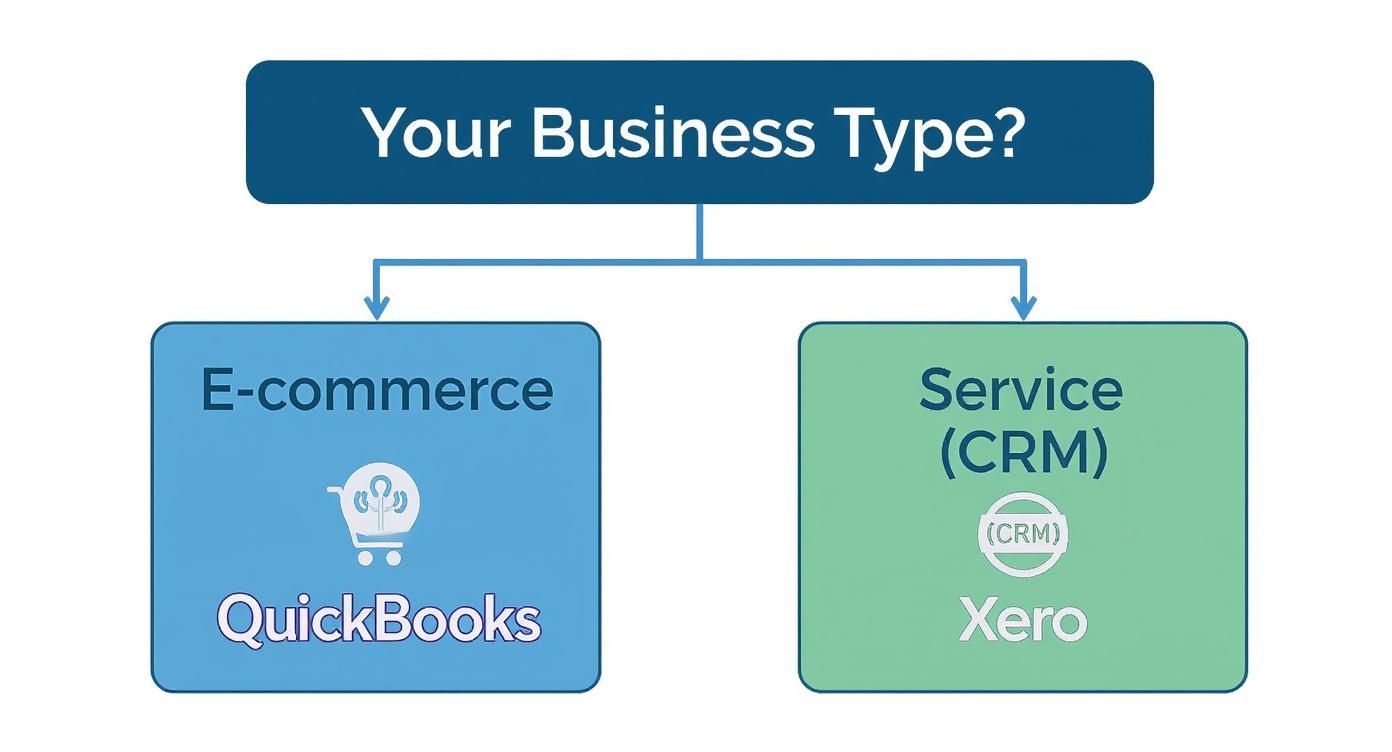
As the visual shows, it often comes down to this: product-focused businesses tend to fit naturally with QuickBooks, whereas service-based companies are often better served by Xero. Understanding this fundamental difference will help you make a choice that supports your business for years to come.
Frequently Asked Questions
Even after a detailed comparison, the decision between Xero and QuickBooks often boils down to a few practical questions. Let's tackle some of the most common ones we hear from UK business owners.
Which is Better for UK VAT and MTD?
Making Tax Digital (MTD) is non-negotiable for UK businesses, so this is a crucial question. The good news is that both platforms are fully HMRC-recognised and handle MTD for VAT submissions without a hitch. The real difference is in the user experience.
Xero has built a reputation on simplicity. Its VAT return process is very visual and guided, designed to give non-accountants the confidence to file correctly. It’s all about making the process as smooth and straightforward as possible.
QuickBooks, on the other hand, gives you a bit more under the bonnet. It provides more detailed error-checking and deeper control over adjustments. This is a real advantage for businesses with more complicated VAT needs, like those using non-standard schemes or needing to make frequent tweaks.
So, which is better? It comes down to what you value most. If you want a quick, guided process that just works, Xero is fantastic. If you need more granular control and detailed reporting before you hit 'submit', QuickBooks has the edge.
Can I Switch Between Xero and QuickBooks Later On?
Technically, yes, you can migrate your financial data from one to the other. There are specialist third-party services that can move your transaction history, contacts, and chart of accounts between the platforms.
But it’s far from a simple copy-and-paste job. A full migration is a project in itself, demanding careful planning, data clean-up, and thorough checks to make sure everything has moved over accurately. It can be expensive, time-consuming, and carries the risk of data errors or downtime. That’s why we always recommend putting in the effort now to choose the right software from the start—it will save you a major headache down the road.
Do UK Accountants Have a Preference?
You'll find fans of both in the accounting world, and the preference often comes down to the firm's own history and the type of clients they serve. Many accountants who've been in the game for a while cut their teeth on Sage or QuickBooks Desktop, so they have a deep-seated familiarity with the QuickBooks ecosystem. Its powerful, in-depth reporting tools are a big draw for finance professionals.
At the same time, Xero has made huge waves and is now incredibly popular, particularly with modern, cloud-first accounting practices. Accountants love its clean collaboration features and the sheer breadth of its app marketplace. The best advice is always to talk to your own accountant before you commit. They’ll tell you which platform fits best with their workflow and, most importantly, your specific business.
Getting your head around Xero, QuickBooks, and MTD can feel overwhelming. At Stewart Accounting Services, we specialise in helping UK businesses set up the right cloud accounting software to save time, boost profit, and reduce stress. Get in touch with our team of Chartered Accountants today to see how we can help.