

It all starts with figuring out if you've actually paid too much tax. More often than not, this isn't due to some huge blunder but rather small things that add up. Maybe you switched jobs, were put on the wrong tax code for a while, or simply forgot to claim for your work-related expenses.
If you’re employed and pay tax through PAYE, HMRC might give you a heads-up by sending a P800 tax calculation in the post. This letter is their way of saying, "It looks like you've overpaid, and here's why." But you can't always rely on them to spot it.
Are You Owed a Tax Refund?
Before you start digging through paperwork, it’s worth understanding why you might be due some money back. Overpaying tax is surprisingly common, and it’s usually because the tax system can't quite keep up with the changes in our lives.
The Pay As You Earn (PAYE) system is clever, but it's not foolproof. It’s designed to collect the right amount of tax smoothly over the year, but real life is rarely that neat. A new job, a period of unemployment, or a change in your personal situation can easily throw the calculations out of whack.
Common Reasons You Might Be Owed a Refund
Most tax overpayments happen for a handful of common reasons. For example, if you started a new job halfway through the tax year, your new boss might have put you on an emergency tax code. This is a temporary measure that often means you pay too much tax until HMRC gets your details sorted.
Having more than one job or receiving a pension while still working can also muddy the waters, making it more likely that you'll overpay.
Another big one is failing to claim all the tax reliefs you're entitled to. People often miss out on money they're owed for things like:
- Washing, repairing, or replacing a required work uniform or specialised clothing.
- Paying for membership to a professional organisation or union that's necessary for your job.
- Allowances for the extra household costs if you regularly work from home.
If there's one thing to remember, it's this: the responsibility is on you to tell HMRC about these expenses. They won't automatically know you bought new tools or paid a subscription unless you make a claim.
So, how often does this happen? Let's look at some of the most frequent scenarios that lead to a tax refund.
Common Reasons You Might Be Owed a Refund
| Scenario | Why It Causes Overpayment | What to Look For |
|---|---|---|
| Started a new job | Your new employer used a temporary emergency tax code (like 1257L W1/M1), which doesn't account for tax you've already paid that year. | Check your payslips for a tax code with "W1," "M1," or "X" at the end. |
| Had multiple jobs | Each employer might have given you the full tax-free personal allowance, leading to you underpaying initially and then being over-taxed to correct it. | Review your P60s from each employer at the year's end to see the total tax paid. |
| Were unemployed for part of the year | Your tax-free allowance is spread over 12 months. If you only worked for part of the year, you may not have used your full allowance. | Look at your P45 from your previous job. It shows your earnings and tax paid up to your leaving date. |
| Work-related expenses | You paid for essential items for your job out of your own pocket and didn't claim tax relief. | Think about uniforms, tools, professional fees, or mileage (if you use your own vehicle for work). |
| Flexible or "drawdown" pension | When you first take a flexible lump sum from your pension, it's often taxed at a higher emergency rate. | You’ll need to fill out a specific form (P55, P50Z, or P53Z) to claim this back quickly. |
Ultimately, income tax is the UK government's biggest earner, and with policies like the long-term freeze on the personal allowance, more people are being pulled into paying more tax. This means there's an even greater chance of overpayments when your circumstances shift.
If you want to get into the nitty-gritty of government tax forecasts, the reports from the Office for Budget Responsibility offer some deep insights. But for now, just knowing what triggers a potential refund is the perfect place to start.
How to Check Your Tax Status with HMRC

Before diving into a claim, the first thing you need to do is confirm you've actually overpaid. A hunch isn't enough, but thankfully, you don't need to spend ages on hold with HMRC to find out.
The quickest and most accurate way to get the facts is by using HMRC's own online services. This is where you'll find the concrete proof you need to kickstart the refund process and get your money back in your pocket.
Your Personal Tax Account: The Digital Gateway
The best place to start is your personal tax account on the GOV.UK website. I always think of it as my personal financial dashboard for anything HMRC-related. You’ll need your Government Gateway user ID and password to log in.
Don't have an account yet? Setting one up is pretty simple, though you'll need a few bits of information handy to prove who you are:
- Your National Insurance number
- A recent payslip or your P60
- A valid UK passport or driving licence
Once you're in, you'll see a clear summary of your tax, National Insurance contributions, and employment history for past years. It's the fastest way to spot if something doesn't look quite right.
Understanding the P800 Tax Calculation
If HMRC’s systems flag that you’ve paid the wrong amount of tax, they will send you a P800 tax calculation. This is an official breakdown of your income and the tax you've paid. Most importantly, it will clearly state one of three things: you’ve paid the right amount, you owe more tax, or you’re due a refund.
You might get a P800 in the post anytime between June and November, but I’ve found you can often see it much earlier by logging into your personal tax account and looking under the "Pay As You Earn (PAYE)" section.
The P800 is your golden ticket when it comes to how to claim tax refunds. If it shows you've overpaid, HMRC has already done the hard work for you. All you need to do is follow the instructions to claim it.
This whole process is surprisingly efficient. HMRC automatically reconciles everyone's Income Tax between June and November. For anyone not on Self Assessment, this is the main way to claim back any overpaid tax. But don't hang about—remember the four-year deadline. For example, any claim for the 2024-2025 tax year must be made by 5 April 2029.
You can dig into the specifics of these timelines and find more detailed guidance on the official government website.
Choosing the Right Way to Claim Your Refund
So, you’ve discovered you're owed a tax refund. Fantastic news! The next logical question is, how do you actually get that money back from HMRC? The good news is that claiming your tax refund isn't as daunting as it might sound. HMRC has a few different routes you can take, and the best one for you really boils down to your personal situation.
For most people on a standard PAYE salary, the process is pretty straightforward. If a P800 tax calculation has landed on your doormat (or in your inbox) showing you’ve overpaid, claiming online is almost always the quickest and easiest option. It’s designed to be simple.
Things are a bit different if you're self-employed or have more complicated finances that mean you fill out a Self Assessment tax return each year. In that case, your tax return is your tool for getting the refund. And for those who prefer not to handle things online, there’s always the traditional paper-and-post method.
The Online Claim Through Your P800
Receiving a P800 from HMRC confirming you’re due a refund is a great feeling. The letter itself will usually prompt you to claim it online through your personal tax account, and I'd strongly recommend this route if you can. It is, by far, the most efficient way to go.
You’ll just need to log in to your Government Gateway account, confirm your identity, and pop in your UK bank account details. The system is secure, and once you hit submit, things move surprisingly fast. In many cases, you could see the money land in your account in as little as five working days.
Honestly, this is the way HMRC wants you to do it. It minimises paperwork and potential postal delays, making it a smoother experience for everyone involved.
Filing a Self Assessment Tax Return
If you're already one of the millions who complete a Self Assessment tax return, the refund process is neatly integrated into your annual filing. You won't need to wait for a P800 or take any extra steps.
As you work through your return, the final calculation will tell you if you've overpaid tax for the year. If a refund is due, you simply enter your bank details directly on the form before submitting it. Here's a pro tip: don't wait until the January deadline. If you file your return as soon as the tax year ends in April, you could get that refund back in your pocket within weeks.
Claiming Your Refund by Post
What if you can't get online, or you simply don't file a Self Assessment? No problem. You can still claim your refund by post. If you have a P800, it will explain how to do this. Just be prepared for a bit of a wait.
Postal claims have to be manually processed, so they are naturally slower. It can take up to six weeks for HMRC to handle everything and get a cheque in the post to you. It's a reliable method, but it’s definitely not your fastest option.
This image gives a great overview of the prep work needed for any claim.
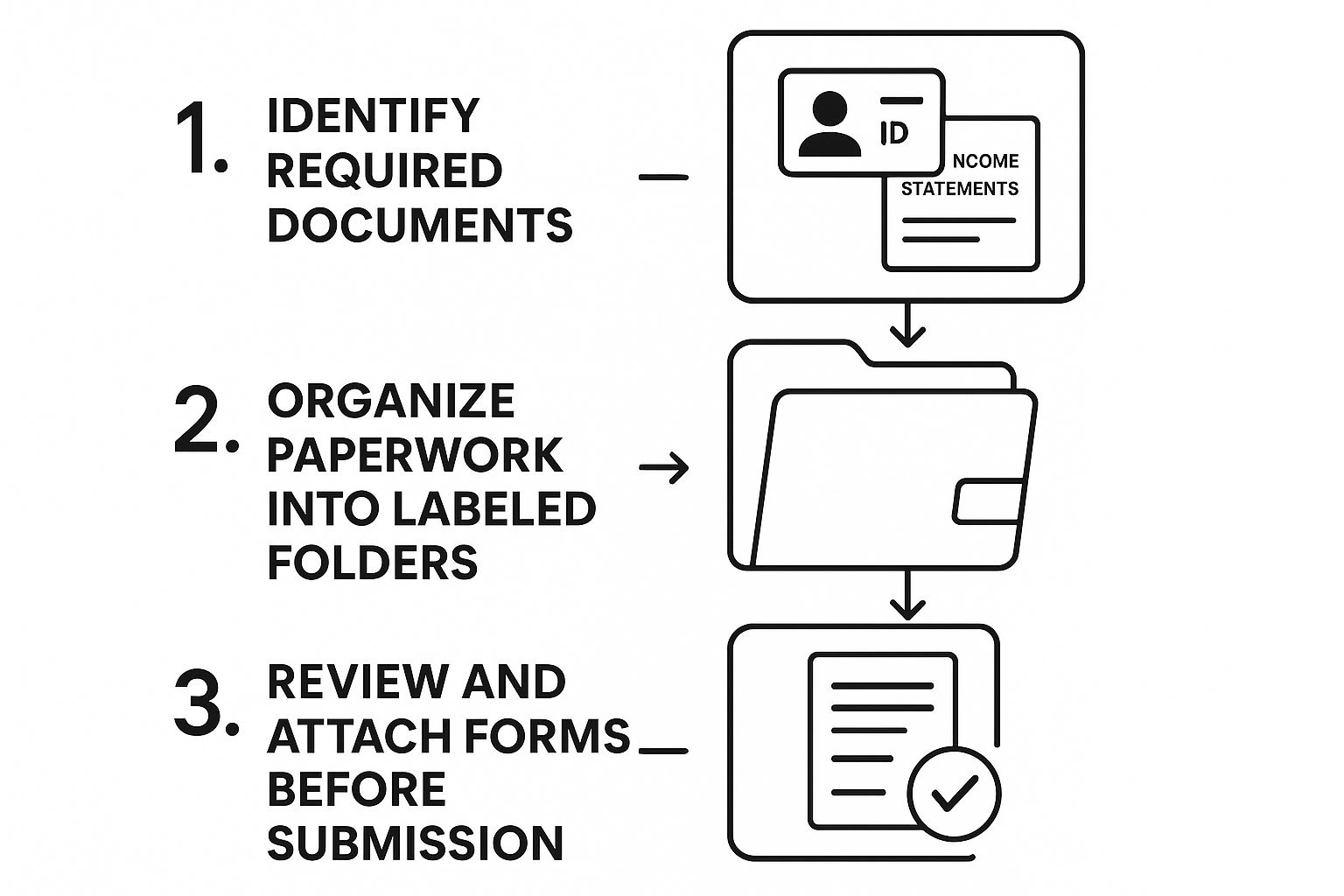
As you can see, getting your ducks in a row—gathering the right documents, getting them organised, and double-checking everything—is the foundation for a hassle-free claim, no matter which path you take.
Comparing Your Tax Refund Claim Options
To help you decide, let's break down the main ways to claim. This table gives a quick look at who each method is best for and what to expect.
| Method | Who It's For | Typical Processing Time | Key Action Required |
|---|---|---|---|
| Online via P800 | PAYE employees who receive a P800 tax calculation. | Around 5 working days | Log in to your Government Gateway account and enter your bank details. |
| Self Assessment | Self-employed individuals or anyone required to file a tax return. | 2-3 weeks (if filed online) | Complete your tax return and provide bank details for the refund. |
| Claiming by Post | Anyone with a P800 who can't or prefers not to use the online service. | Up to 6 weeks | Wait for a cheque to arrive in the post after HMRC processes your P800. |
Ultimately, the best choice depends on speed and convenience. If you have a P800, the online route is a clear winner. For Self Assessment filers, it's just part of the process. And for everyone else, the postal option is a solid, albeit slower, fallback.
Using Your Self Assessment to Get a Refund

If you're self-employed, a company director, or just have slightly more complicated financial affairs, your Self Assessment tax return is your main tool for communicating with HMRC. But it’s not just about settling up what you owe – it’s also the most effective way to claim back any tax you’ve overpaid during the year.
Unlike PAYE employees who often have to wait for a P800 tax calculation to land on their doormat, your Self Assessment return itself is what determines your final tax position. If you’ve paid too much, perhaps because your payments on account were based on a better year, your return is the official mechanism for getting that money back.
The Advantage of Filing Early
The final deadline for getting your online Self Assessment filed is 31 January, but there’s a massive, often-overlooked advantage to getting it done much sooner. Filing your return shortly after the tax year ends on 5 April means HMRC can process it faster, and you'll get any refund you're due that much quicker.
It’s an approach that’s catching on. In the first week of the 2024 to 2025 tax year alone, an incredible 299,419 taxpayers got their returns in early, which is a big jump from previous years. The benefits are clear: faster refunds, a better view of your finances for the year ahead, and zero last-minute stress.
Don’t forget, submitting your Self Assessment early doesn't mean you have to pay any tax you owe any sooner. The payment deadline is still 31 January. It simply means your refund arrives months earlier.
How to Tell HMRC Where to Send Your Refund
When you fill out your Self Assessment online, the system does the heavy lifting for you. Once you’ve entered all your income and claimed all your allowable expenses, it will run the final calculation.
This summary will clearly state whether you've paid the right amount, owe more tax, or are due a refund. If it's a refund, you'll be asked to provide your bank details so HMRC can pay you directly. It's so important to get these details spot on to avoid any delays.
You'll need to provide:
- Bank Name
- Account Holder's Name (exactly as it appears on your statements)
- Sort Code
- Account Number
Plugging in your bank details ensures the money goes straight into your account via BACS transfer. This is much quicker and far more secure than waiting around for a cheque to arrive in the post. Getting your Self Assessment right is key, and if you need a hand, our in-depth https://stewartaccounting.co.uk/self-assessment-tax-return-help/ can guide you through the process.
Understanding Key Timelines and Deadlines
When it comes to claiming back tax from HMRC, timing is everything. Get it wrong, and you could miss out on money you're owed. The single most important rule to burn into your memory is the four-year time limit.
Put simply, you can only go back four years from the end of the tax year in which you overpaid. The tax year, of course, runs from 6 April to 5 April.
The Four-Year Window Explained
Let's break that down with a practical example. Say you overpaid tax during the 2023-2024 tax year (which finished on 5 April 2024). You've got until 5 April 2028 to get your claim in. If you leave it a day later, that money is gone for good.
This is exactly why I always advise clients to check their tax position annually. It’s so easy to let things slide, but those forgotten work-from-home expenses or unclaimed mileage from a few years ago can really add up.
Here’s a quick reference for the upcoming deadlines:
- For the 2024-2025 tax year, your claim deadline is 5 April 2029.
- For the 2023-2024 tax year, your claim deadline is 5 April 2028.
- For the 2022-2023 tax year, your claim deadline is 5 April 2027.
This rule is fairly consistent across the board, covering everything from claiming on work expenses to fixing an incorrect tax code. For a deeper dive into important dates, our guide to the HMRC tax return deadline is a great resource.
How Long Does a Tax Refund Take?
You've filed your claim – now for the big question: when will you actually get your money? Honestly, it all comes down to how you sent your information to HMRC.
Setting realistic expectations is key. While some methods are incredibly quick, others require a bit more patience. Planning your finances around these timelines can save you a lot of stress.
The fastest way by far is claiming online after you get a P800 tax calculation from HMRC. In these cases, the money can be in your bank account within just five working days. It’s incredibly efficient.
If you’re claiming through your Self Assessment tax return, the timeline stretches a bit. Once you've filed online, you’re usually looking at a wait of two to three weeks.
The slowest route, without a doubt, is paper. If you file a paper tax return or respond to a P800 by post, settle in for a longer wait. It can easily take up to six weeks for HMRC to process the paperwork and send out a cheque.
Common Mistakes to Avoid When Claiming
When it comes to getting your money back from HMRC, a few simple slip-ups can cause real headaches. I've seen it time and again: avoidable errors leading to long delays or, even worse, a claim being rejected outright. Let’s walk through the most common pitfalls so you can steer clear of them.
It sounds almost too simple, but you'd be surprised how often incorrect bank details throw a spanner in the works. Just one wrong digit in your account number or sort code is all it takes for the payment to bounce. It’s worth taking an extra 30 seconds to double-check every number before hitting ‘submit’.
Another classic mistake is letting your personal information go stale. If you've moved house and haven't told HMRC, any P800 calculation or refund cheque they post will end up at your old address. A quick log-in to your personal tax account to make sure your details are current can save you a world of trouble down the line.
Deadlines and Dodgy "Refund" Companies
The biggest mistake? Missing the deadline. HMRC gives you a strict four-year window to claim any overpaid tax. If you miss it, that money is gone for good. It’s your cash, so don’t leave it for the taxman by procrastinating.
Finally, a word of caution about those third-party "tax rebate" firms you see advertised everywhere. They promise to handle your claim for a fee, which often turns out to be a hefty chunk of your refund.
These services often play on the idea that claiming is too complicated for the average person. The reality is, for most straightforward claims, going directly to HMRC is simple, secure, and ensures you keep 100% of your money.
Worse than the fee-charging companies are the outright scams. We’re seeing a flood of fake texts and emails that look like they’re from HMRC, designed to steal your details. It's crucial to stay vigilant and know how to beware of scams pretending to be HMRC. Always, always go directly to the official GOV.UK website yourself—never click a link in an unexpected message.
Your Tax Refund Questions Answered
It's completely normal to have a few questions when you start looking into tax refunds. Let's clear up some of the most common queries we hear, so you can feel confident you’re getting back what you’re owed.
How Do I Know If I'm Due a Tax Refund?
Most of the time, HMRC will be the first to let you know you've overpaid. If you're employed or have a pension, they'll send you a P800 tax calculation in the post. This letter lays out exactly what you've earned and how much tax you've paid.
If you handle your own taxes through Self Assessment, your final calculation will tell you straight away if you're due a refund. For a more hands-on approach, you can always log into your personal tax account on the GOV.UK website to check your records yourself.
How Long Until I Get My Money Back?
This really comes down to how you file your claim. The method you choose makes a huge difference in how quickly you'll see the money, so it’s worth picking the right one.
Here’s what you can generally expect:
- Online P800 Claim: This is by far the quickest option. Once you confirm your details online, the money is usually in your bank account within 5 working days.
- Self Assessment Return: If your refund is part of your tax return, it usually takes up to 4 weeks to process after you've filed.
- Postal Claim: Going the old-school paper route is the slowest. You'll be waiting around 6 weeks for a cheque to arrive by post.
What if I Think My Tax Code Is Wrong?
Don't just let it slide if you think your tax code is off. An incorrect code is one of the biggest reasons people end up overpaying (or underpaying) tax.
Think of your tax code as the instruction your employer uses to calculate your tax. A quick check can save you a lot of hassle later and make sure you're not paying more than you should be.
The best place to start is the 'Check your Income Tax' service on the GOV.UK website. You can see the details HMRC holds for you and report any changes, like a new company car or a second job. Getting it right now means you won't have to worry about claiming a refund for the same reason next year.
Sorting out tax refunds can feel like a maze, but you don’t have to navigate it alone. The team at Stewart Accounting Services can help get your tax affairs in perfect order, from Self Assessment to company accounts. Get in touch today and let us give you the peace of mind to focus on what you do best.