

A UK Business Guide for Migrating from Sage to Xero
Thinking about changing your accounting software can feel like a huge task, but switching from Sage to Xero is an upgrade that more and more UK businesses are making. This isn't just about swapping one program for another; it’s about moving to a system that gives you real-time financial data, more flexibility, and smart integrations that actually help your business grow.
Why UK Businesses Are Making the Jump From Sage to Xero
Let's get straight to the point. The conversation about moving from Sage to Xero really comes down to one thing: agility. For years, Sage has been a dependable workhorse, especially for established companies comfortable with desktop-based software. But today’s business world moves fast. You need instant access to your financials from wherever you are, and that’s where Xero's cloud-based design truly shines.
This isn’t just a passing trend. It's a direct response to what modern business owners actually need. You want to check your cash flow on your phone just before a client meeting, work alongside your accountant on the very same live data, and connect your finances to other tools you rely on, like payment processors or project management software.
The Power of a Connected System
One of the biggest draws to Xero is its massive app marketplace, which features over 1,000 third-party apps. This completely changes your accounting software from a simple digital ledger into the central hub for your entire business.
For instance, you can connect Xero to Stripe, and suddenly, payment reconciliation happens automatically. Or, you could link it with Dext to make processing receipts and invoices effortless. All this automation frees up an incredible amount of time, slashes the risk of human error from manual data entry, and gives you a crystal-clear, up-to-the-minute picture of your financial health. The real advantages of cloud accounting for small business come from creating this kind of efficient, joined-up system.
"The switch back to Xero for me is always like jumping into your favorite pair of shoes… when it’s the weekend and you put on your trainers. It just feels nice." — Christine Hollington, Financial Controller at Helloself
Keeping Pace With Modern Business
The UK's accounting software scene is changing rapidly. While Sage 50 still holds a significant 10.3% of the market share, especially with businesses that have complex stock needs, Xero is hot on its heels at 8.9%. It’s rapidly gaining ground because of its cloud-first philosophy. The whole market is expected to grow by 8.2% each year between 2025 and 2031, mostly driven by small and medium-sized enterprises adopting cloud tools to simplify their bookkeeping and VAT returns.
This growth points to a major shift in how businesses work. We see clients making the move for a few key reasons:
- Work Together in Real-Time: You and your accountant can be in the same set of accounts at the same time. No more emailing files back and forth and wondering who has the latest version.
- A More Intuitive Experience: Xero is consistently praised for being user-friendly, which means you don't need to be an accounting whiz to understand your own finances.
- Automatic Bank Feeds: Live feeds from your bank automatically pull transactions into Xero, making the tedious job of bank reconciliation so much faster and easier.
- Access Anywhere, Anytime: Get a complete view of your finances on your laptop, tablet, or phone. This lets you make smart decisions on the spot, whether you're in the office or out on the road.
Your Pre-Migration Game Plan Before Leaving Sage
A smooth move from Sage to Xero isn’t about luck; it’s about having a solid plan. Think of it as the detailed prep work you'd do before decorating a room – the final result depends entirely on the quality of your preparation. Taking the time now to get your data and strategy organised will save you countless hours and prevent major headaches down the line.
In fact, the success of your migration is decided long before you move a single piece of data. Before diving into the technical steps, it's wise to ensure all your foundational business checks are in order. A resource like The Ultimate Due Diligence Checklist offers a great framework, helping you cover all bases from a wider business perspective before you get into the financial nitty-gritty.
Conduct a Practical Data Audit
First things first: you need to decide what data actually needs to make the journey. Not everything from Sage has to come across to Xero, and frankly, a clean start is often the best approach. A new system bloated with old, irrelevant information will only slow you down from day one.
Go through your Sage data with a critical eye. Do you really need that customer account you haven't invoiced in seven years? It's almost always better to archive a list of old contacts and start with a clean slate in Xero.
Here’s where to focus your audit:
- Active vs. Inactive Contacts: Sift through your customers and suppliers. Separate those you work with regularly from the ones that are purely historical. Only bring the active contacts into Xero.
- Old Invoices and Bills: How much historical data do you genuinely need at your fingertips? Most businesses find that bringing over just the current financial year's transactions and opening balances is more than enough.
- Nominal Codes/Chart of Accounts: Let’s be honest, your Sage nominal codes are probably a bit cluttered. This is the perfect opportunity to simplify and modernise your chart of accounts for Xero.
Choose Your Migration Date Wisely
The date you choose to flick the switch from Sage to Xero can make a massive difference. Timing really is everything. Picking a random date mid-month, for example, is just asking for a reconciliation nightmare.
Instead, you want to align your migration with a natural financial cut-off point. This makes drawing a clean line in the sand much simpler and ensures your opening balances are spot on.
The best migration dates are almost always at the end of a financial period. It dramatically simplifies verifying your opening balances and gives you a truly clean break from the old system.
Ideal dates to aim for are:
- Your Financial Year-End: This is the gold standard. It provides the cleanest break possible, letting you finalise one full year in Sage and start the new year completely fresh in Xero.
- Your VAT Quarter-End: Another excellent choice. Completing a VAT return gives you a clear, reconciled financial snapshot to use for your Xero opening balances.
- A Month-End: If the other two options aren’t practical, the end of a calendar month is the next best thing. It’s still far, far easier than trying to untangle finances from the middle of a busy period.
To help you compare the core differences, here’s a look at how the two platforms stack up for UK SMEs.
Sage 50 vs Xero Key Feature Comparison For UK SMEs
| Feature | Sage 50 | Xero |
|---|---|---|
| User Interface | Traditional, desktop-based interface. Can feel dated and complex for new users. | Modern, cloud-based, and intuitive. Designed for ease of use, even for non-accountants. |
| Accessibility | Primarily a desktop application, limiting access to a specific computer. | Fully cloud-based. Access your accounts from any device with an internet connection. |
| Bank Feeds | Bank feed functionality can be clunky and require manual intervention. | Best-in-class live bank feeds that are reliable and drastically reduce data entry. |
| Integrations | Limited number of direct integrations with third-party apps. | Huge ecosystem with over 1,000 third-party apps for everything from CRM to stock control. |
| Pricing Model | Typically involves an upfront licence fee and ongoing annual support costs. | Monthly subscription model (SaaS). Pay-as-you-go with different tiers. |
| Collaboration | Difficult for multiple users (e.g., business owner and accountant) to work simultaneously. | Built for collaboration. Unlimited users can access data in real-time. |
This comparison highlights why so many businesses are making the move. Xero is built for the way modern businesses operate—flexibly, collaboratively, and online.
Map Your Chart of Accounts
One of the most common hurdles we see is translating an old Sage Chart of Accounts into Xero's modern structure. Sage traditionally uses a rigid system of four-digit nominal codes, which can be cryptic. Xero, on the other hand, uses a more flexible, name-based system that’s much easier for non-accountants to understand.
Don't just copy and paste your old codes. This is your chance to build a Chart of Accounts that actually gives you better business insights. For instance, instead of one vague "Motor Expenses" code, you could create separate accounts in Xero for 'Fuel', 'Vehicle Repairs', and 'Road Tax' to see exactly where your money is going.
If this is a new concept for you, our guide explains in detail what is a chart of accounts and why getting it right is so vital. This mapping exercise is absolutely crucial for ensuring your financial reporting is accurate from day one.
Right, you’ve done the groundwork. The planning is sorted, and now it’s time to get your hands dirty and actually move your data from Sage into its new home in Xero.
This is the part that often feels a bit nerve-wracking. But if you approach it methodically, it’s a perfectly straightforward process. The aim here isn’t just to dump everything across; it’s to make sure the information that lands in Xero is clean, accurate, and ready to use from the get-go.
We’ll tackle this in a logical order, building from the ground up. First, we'll sort out your contacts and opening balances, then we'll move on to the trickier bits like transactions.
Getting Your Contacts Across
Your customer and supplier lists are the bedrock of your business, so they’re the first practical thing to move. Sage lets you export this information, usually into a CSV file. It's tempting to just export this file and upload it straight into Xero, but I’ve seen this go wrong many times. It's a sure-fire way to start off on the wrong foot.
Xero uses its own specific template for importing contacts, with different columns for things like the primary contact person, email, and various addresses. The first job is to carefully map the data from your Sage export into Xero's template. This is also your golden opportunity to have that data clear-out we talked about.
- Ditch the Duplicates: It’s almost guaranteed you’ll have duplicate contacts that have crept in over the years. Now’s the time to merge and delete them.
- Standardise Everything: Get your formatting consistent. For instance, make sure all company names are listed as "Anytown Ltd" instead of a chaotic mix of "Anytown Ltd," "Anytown Limited," and "anytown ltd."
- Fill in the Gaps: Use this as a chance to add crucial details you might have been missing in Sage, like specific email addresses for your clients' accounts departments.
Putting in this effort now pays off immediately. When you go to raise your first invoice in Xero, all the correct contact details will pop up automatically, saving you hassle and preventing simple errors.
This flowchart shows the key prep work you should have already ticked off before you even think about moving a single byte of data.
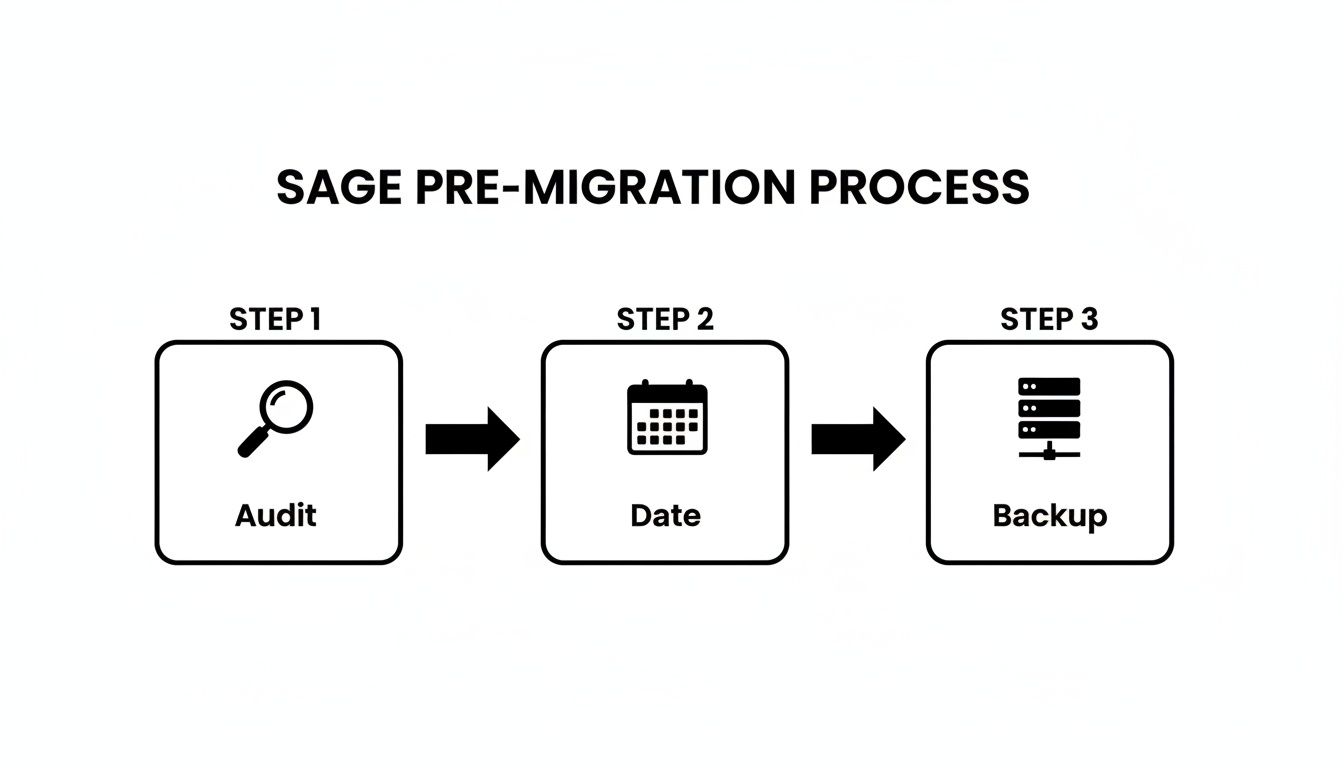
A thorough audit, a smart migration date, and a solid backup are the non-negotiable foundations for a smooth data transfer.
Entering Your Opening Balances
Think of your opening balances as a financial snapshot of your business on the day you switch over. Getting these numbers absolutely spot-on is critical; the integrity of your future accounts depends on it. They must match your closing balances from Sage down to the very last penny.
The main balances you need to bring across are:
- Bank Account Balances: The closing balance for every single one of your business bank accounts as of your migration date.
- Accounts Receivable: The total sum of money owed to you from all outstanding customer invoices.
- Accounts Payable: The total sum you owe to your suppliers from all unpaid bills.
You’ll input these figures directly into Xero's Conversion Balances screen. Xero has a neat feature here – it forces the balances to actually balance. This means your total debits must equal your total credits, giving you an immediate sanity check against simple typos.
A Quick Tip from Experience: To enter your Accounts Receivable and Payable, you have to add each outstanding invoice and bill one by one, complete with its original date, due date, and amount. It sounds like a chore, I know, but it’s the only way to ensure your credit control and payment runs in Xero will work correctly from day one.
What to Do with Historical Transactions
This is always a big question: "How much of my old data do I really need to bring over?" You've basically got two choices – do it manually or use an automated tool.
Manually keying in years of historical data is incredibly tedious and, frankly, often a waste of time. For most businesses, just bringing over the transactions from the current financial year is more than enough for management reporting. You can keep your old Sage backup safely archived for compliance or if you ever need to look up something from the past.
The other route is to use a third-party migration app. These services can be a massive time-saver, pulling across years of transaction data for you, but they do come at a cost. They’re usually best for businesses with a huge volume of transactions or those who have a specific legal reason to need several years of history in their live system. You’ll want to weigh up the cost versus the benefit carefully here.
The shift from Sage to Xero is part of a much bigger trend. Xero's dominance in the UK's digital marketing space for accounting software is telling. It captured a huge 64.36% share of clicks in December 2025 PPC campaigns, while Sage trailed at just 12.53%. This preference clearly shows businesses are actively looking for smarter, more user-friendly cloud accounting. You can read more on these UK market share trends in Adthena's research.
UK-Specific Setups: VAT and Payroll
For any UK business, getting VAT and payroll configured properly is non-negotiable. HMRC doesn't mess about, and your new system has to be fully compliant from the moment you start using it.
Configuring VAT in Xero
When you first set up your company in Xero, you'll be asked for your VAT details. It's a simple process, but one that demands precision.
- Enter Your VAT Number: Double and triple-check it’s correct.
- Select Your VAT Scheme: Tell Xero if you’re on a standard accrual, cash, or flat rate scheme. This has to be an exact match to what you used in Sage.
- Set Your VAT Return Periods: Define your VAT quarters (e.g., ending March, June, September, and December).
Xero is fully Making Tax Digital (MTD) compliant, which is great. Once set up, you can file your VAT returns directly with HMRC. The most important thing is ensuring your first VAT return in Xero picks up exactly where the final one in Sage left off, leaving no gaps or overlaps.
Migrating Payroll Information
Payroll data is both sensitive and complex, so you can't just import a simple file of employee details. Every employee needs to be set up from scratch in Xero Payroll to meet PAYE and auto-enrolment rules.
You'll need the final Sage payslip for each employee to get this information:
- Personal details (Name, Address, DOB, NI Number)
- Their current Tax Code
- Year-to-date figures for earnings, tax paid, and National Insurance
- Pension scheme details and all contributions to date
Getting these year-to-date figures right is absolutely vital. It ensures that when you run your first payroll in Xero, all tax and NI calculations are correct for the rest of the tax year. This is one step where you really have to be meticulous – a tiny error here can create big headaches for both your employees and HMRC down the line.
Post-Migration Checks And Getting Your Team On Board
You’ve moved your data across. That’s a huge milestone, but what you do next is just as crucial. Before you pop the champagne, you need to run a series of checks to make sure everything has landed exactly where it should.
Think of it as the final snagging list. This is your chance to dot the i's and cross the t's before your team starts using Xero for real. Getting this bit right is about more than just numbers; it's about making sure your team feels confident and ready to hit the ground running. A flawless technical switch is useless if your people don't know how to use the new system.
Confirming Your Financial Starting Point
First things first: your opening balances in Xero must be a perfect mirror of your closing balances in Sage. This is non-negotiable. Even a penny's difference here can spiral into a massive headache down the line.
The best way to verify this is by running a Trial Balance report. Run one in Sage for your migration date, then run the same report in Xero. Every single line item must match, right down to the last penny.
Pay close attention to these key areas:
- Bank Accounts: Do the balances in Xero line up perfectly with your final bank statements from the Sage period?
- Aged Receivables: Is the total of your outstanding customer invoices in Xero exactly the same as the figure on your Sage Aged Debtors report?
- Aged Payables: On the flip side, does the total of unpaid supplier bills in Xero match your Sage Aged Creditors report to the letter?
If you spot a mismatch, stop. Don't go any further until you’ve found the cause. It’s often something simple like a typo or a missed invoice during the setup. Trust me, it’s a thousand times easier to fix now than to unpick three months later when you're trying to file a VAT return.
The goal here is a clean, flawless handover. Your Xero Trial Balance is the ultimate proof that your financial data has survived the journey from Sage intact, giving you a solid foundation to build on.
The Human Side of The Switch
With the numbers locked down, it’s time to shift your focus to your team. No matter how intuitive Xero is, it's a new environment. Just handing over a login and expecting everyone to figure it out is a recipe for disaster.
A proper onboarding process is essential. This isn't just a quick tour of the software; it's about connecting Xero to each person's specific role and showing them how it will make their life easier.
This shift from a system like Sage to a cloud platform like Xero is a common story for businesses looking to become more agile. While Sage has adapted, Xero’s impressive 23% operating revenue growth in FY25 highlights its powerful appeal to ambitious businesses. For our clients, this move unlocks powerful integrations for payroll, CIS, and VAT, and gives them the real-time KPI reports needed to scale effectively. You can dig deeper into the financial performance of Sage vs Xero here.
Empowering Your Team For Success
Great team training isn't a one-off meeting. It should be a supportive process that caters to different learning styles and job requirements.
Set Up User Permissions Thoughtfully
Not everyone on your team needs access to the entire system. Xero’s user roles are brilliant for this, letting you control precisely what each person can see and do.
- Invoice Only: Ideal for your sales team who just need to raise invoices.
- Read Only: Great for managers or directors who need to check reports but shouldn't be editing transactions.
- Standard User: The go-to for most accounts staff who handle bills, expenses, and bank reconciliation.
- Adviser: The top-level access, usually reserved for your accountant or financial controller.
Setting these up correctly from day one protects your data and stops people from feeling overwhelmed by menus and options they'll never use.
Run Role-Specific Training Sessions
A one-size-fits-all demo rarely works. Instead, build your training around specific, real-world workflows.
- For the Sales Team: Walk them through creating a new contact, raising an invoice from their phone, and seeing when a customer has opened it.
- For the Operations or Projects Team: Show them how to raise purchase orders and submit supplier invoices for approval.
- For the Accounts Team: Dive deep into the bank reconciliation screen, batch payment runs, and customising key reports.
By making the training directly relevant to their day-to-day jobs, you’ll get buy-in almost immediately. When they see how features like automatic bank feeds save them hours compared to Sage, they'll become the biggest champions of the new system.
Unlocking Growth With Xero Apps and Integrations

Finalising your move from Sage to Xero is a huge step, but it’s only the beginning. The real magic happens when you start exploring Xero’s ability to connect with over 1,000 other business apps. This is where Xero goes from being a great accounting tool to the central hub of your entire business operation.
Think of the Xero App Marketplace as a way to create a seamless, automated workflow. Instead of having information locked away in different programs, integrations allow data to flow freely between them. This slashes the time you spend on manual data entry and gives you one clear, accurate view of your company’s finances.
Core Apps For Every UK Business
While the marketplace is massive, there are a few standout apps that we find ourselves recommending to nearly every UK business, regardless of their industry. These are the tools that solve the most common headaches and deliver an immediate return on investment.
Here are some of the most popular and impactful apps we see day-to-day:
- Receipt Capture (Dext or AutoEntry): Ditch the shoebox of receipts for good. These apps let you snap a photo of a receipt or forward an invoice from your email. The software then reads all the key details and sends it straight into Xero, ready for you to approve. It’s a huge time-saver.
- Payment Gateways (Stripe or GoCardless): By connecting a payment gateway, you can add a simple "Pay Now" button to your invoices. This makes it incredibly easy for customers to pay you online, which can drastically improve cash flow and cut down on the time you waste chasing payments.
- Cash Flow Forecasting (Fluidly or Futrli): These apps sync with your Xero data to give you a powerful, real-time look at your future cash position. They help you move from being reactive to proactive, letting you see the financial impact of business decisions before you make them.
Industry-Specific Solutions That Solve Real Problems
Beyond the basics, the app marketplace is filled with specialist tools designed for the unique challenges of specific industries. This is where Xero really shines compared to older, one-size-fits-all software.
For example, we’ve helped clients implement:
- Construction and Trades: For anyone working under the Construction Industry Scheme (CIS), dedicated apps can manage all your CIS calculations, deductions, and submissions directly within Xero. It takes a massive compliance burden off your shoulders.
- Property Management: Landlords can integrate software to track rent payments, log maintenance costs, and generate reports for each property, with all the financial data syncing perfectly with their accounts.
- E-commerce: If you sell through platforms like Shopify or Amazon, you can connect an app to automatically pull in your daily sales, platform fees, and stock levels. No more painstaking manual reconciliations at the end of the month.
Choosing the right combination of apps creates a bespoke system perfectly aligned with your business's unique workflows. It’s not about adding complexity; it’s about automating processes to free up your time for growth-focused activities.
Building this connected system is a strategic process. For a deeper dive, take a look at our comprehensive guide to building your app stack, which offers a more detailed roadmap. By taking advantage of these powerful integrations, you can turn Xero into the engine that drives your business forward.
Partner With Experts For a Flawless Migration
Tackling a Sage to Xero migration on your own is definitely an option, especially with a solid guide to follow. But let's be realistic—this isn't just another admin task. You're fundamentally changing how your business's finances are managed, and the stakes are high.
Even a small mistake in mapping your data or a slight miscalculation in your opening balances can snowball into a massive headache. These aren't just frustrating issues; they can be incredibly costly and time-consuming to unravel down the line.
This is exactly where bringing in an expert partner pays for itself. A professional migration service does far more than just shuttle data from point A to point B. It’s about preserving the integrity of your financial history, setting up your new system to work for you, and taking all that stress and risk off your plate.
The True Cost of a DIY Migration Gone Wrong
When a migration goes sideways, it can trigger a whole host of problems. Inaccurate VAT returns could lead to a very unwelcome conversation with HMRC. Flawed payroll data is a fast track to an unhappy team. And if your financial reports are off, you could end up making critical business decisions based on the wrong numbers.
Think about the time you'd lose trying to fix these things—time that should be spent running and growing your business.
Engaging a specialist transforms the migration from a potential minefield into a strategic move. Accountants who live and breathe these systems day-in and day-out know all the common pitfalls and tricky nuances that a written guide can't always prepare you for.
A professional migration isn't just about avoiding mistakes. It’s about leveraging expert knowledge to configure Xero in a way that aligns perfectly with your specific business goals, setting you up for success from day one.
Beyond Just Moving the Data
A technically perfect data transfer is just one piece of the puzzle. The real magic of working with an expert is the strategic oversight they bring to the table. For something as critical as moving your entire financial system, specialist cloud migration consulting can provide invaluable expertise and ensure a truly seamless process.
Here’s what a managed migration offers that a simple software tool just can't match:
- A Custom Chart of Accounts: We don't just copy and paste your old Sage nominal codes. We’ll work with you to build a clean, modern Chart of Accounts in Xero that actually gives you meaningful business insights.
- Optimal App Stack Advice: We can take a close look at your workflows and recommend the perfect Xero integrations to automate tasks, boost efficiency, and solve some of your biggest operational headaches.
- Hands-On Team Training: We provide practical, role-specific training for your team. This is crucial for getting everyone on board, ensuring they feel confident and ready to use the new system from day one.
- Ongoing Support: Our relationship doesn't end the moment the migration is finished. We’re here to answer questions and help you get the most out of Xero as your business evolves.
Choosing to partner with an expert for your Sage to Xero transition is an investment in peace of mind. It’s a commitment to getting it right the first time, freeing you and your team to focus on what you do best—running your business—knowing your financial foundation is solid, accurate, and ready for the future.
Ready to make the switch from Sage to Xero with confidence and expert support? At Stewart Accounting Services, we specialise in seamless migrations that set your business up for success. Contact us today for a no-obligation chat about your migration needs.
Recent Posts
09 Oct, 2026
09 Oct, 2026
08 Oct, 2026
07 Oct, 2026
1 comment