
At the end of every tax year, if you're an employee in the UK, a crucial document lands in your inbox or on your doormat: your P60. But what exactly is it?
Think of it as your official annual report card from your employer. It neatly summarises everything you've earned and all the tax you've paid throughout the tax year, which runs from 6 April to 5 April. It’s more than just a piece of paper; it’s a vital record of your financial year.
Your P60 Explained in Simple Terms
If your payslip is a weekly or monthly snapshot of your earnings, then your P60 is the complete photo album for the entire year. It’s the official, government-recognised document that proves exactly how much you earned and how much you contributed through tax and National Insurance.
This isn't just a document for your files. It’s a powerful tool with very real-world uses, serving as definitive proof of your income when you need it most. Getting to grips with what it shows is the first step towards taking full control of your finances.
Why Your P60 Is So Important
The P60 has been a cornerstone of the UK's Pay As You Earn (PAYE) system for decades. It's the mandatory year-end certificate that employers are legally required to give every employee on their payroll as of 5 April. The deadline for them to do this is 31 May.
This isn't optional—every employee who had tax and National Insurance deducted from their pay needs to get one. You can find out more about employer duties from this business insights guide from Wallester.com.
So, why should you keep it safe? Here’s why it matters:
- Proof of Income: It's the gold-standard document for mortgage lenders, banks, and loan providers to verify your earnings.
- Tax Management: It's essential for anyone who needs to complete a Self Assessment tax return. It’s also what you’ll need to prove you’ve overpaid tax and claim a refund from HMRC.
- Financial Health Check: It allows you to cross-reference the total tax you've paid against your personal tax code to make sure everything adds up correctly.
Think of your P60 as your financial passport for the year. It provides official validation of your earnings and tax contributions, unlocking access to loans, mortgages, and accurate tax assessments.
This guide will walk you through every part of the P60, helping you understand how to read it, use it effectively, and make sure all the details are spot on.
To get started, here's a quick rundown of the most important things to know about your P60.
Your P60 at a Glance
| Key Detail | What It Means for You |
|---|---|
| What it is | An official summary of your pay and the tax you've paid in a single tax year. |
| Who issues it | Your employer. |
| When you get it | By 31 May each year, following the end of the tax year on 5 April. |
| Why you need it | For applying for mortgages or loans, claiming tax rebates, and filing a tax return. |
This table covers the basics, but there’s much more to understand about how this form works alongside other key HMRC documents.
How to Read and Understand Your P60
Getting your P60 can feel a bit like being handed a complex puzzle. It's a page full of boxes, codes, and figures that, at first glance, might not make much sense. But don't worry, it's much simpler to decode than it looks.
Think of it as the financial story of your last year at work. Every number has a role, from your total earnings to the tax you've paid. Getting to grips with this story is a key step in managing your money well. Let's break it down.
Decoding Your Gross Pay and Taxable Income
The first figure that usually jumps out is your total pay for the year. You'll see it labelled something like 'total pay in this employment' or 'gross pay'. This is the headline number – every penny your employer paid you before anything was taken off. It includes your salary, but also any bonuses or overtime you might have earned.
But that's not the figure HMRC uses to calculate your tax bill. For that, you need to find your 'taxable income'. This is simply your gross pay with your tax-free Personal Allowance taken off. For the 2024/25 tax year, the standard Personal Allowance is £12,570, which means most of us don't pay a penny of income tax on the first £12,570 we earn.
- Gross Pay: Your total earnings before any deductions.
- Taxable Income: The portion of your pay that you actually pay tax on (gross pay minus your Personal Allowance).
Understanding Tax and National Insurance Contributions
Once you’ve found your earnings, the next bits to check are the deductions. The 'tax deducted' figure is a big one. It shows the total income tax your employer has collected from your pay and sent to HMRC over the year through the PAYE system.
Right next to it, you'll find your 'National Insurance contributions' (NICs). This is what you've paid towards state benefits, such as the State Pension. The exact amount depends on how much you earn and your NI category letter (most employees are on category 'A').
A Quick Check: A great way to quickly verify your P60 is to compare it with your final payslip of the tax year (usually your March or Week 52/53 payslip). The 'year-to-date' figures on that payslip should match your P60 perfectly. If they don't, it's a sign that something might be amiss.
Finding Other Important Details
Your P60 isn't just about pay and tax. It's a complete summary holding other vital bits of information that you should always double-check.
Here are the other key details to look for:
- Your Personal Details: Make sure your name is spelled correctly and, most importantly, that your National Insurance number is spot on. A simple typo here can cause all sorts of headaches with your tax records down the line.
- Employer Details: Your employer's name and their PAYE reference number should be clearly stated.
- Tax Code: This little code is a big deal. It tells your employer how much tax-free pay you're allowed. For most people in the 2024/25 tax year, the code will be 1257L.
- Student Loan Deductions: If you're paying back a student loan through your salary, the total amount deducted over the year will be listed here.
By familiarising yourself with these sections, you can read your P60 with confidence, spot any errors, and use it as the valuable financial tool it's meant to be.
P60 vs. P45 and P11D: Clarifying Common Tax Forms
When you’re employed, you’ll come across a few different tax forms, and it’s easy to get them mixed up. They all come from your employer and relate to your pay, but each one has a very specific job to do. Knowing what’s what is crucial for keeping your tax affairs in order.
A great way to think about it is like this: your P60 is your annual summary, like a report card for the entire tax year. Your P45 is what you get when you leave a job, acting as a transfer document for your next role. And the P11D? That’s for any extra perks you might get on top of your salary.
This infographic gives you a quick visual breakdown of what your P60 covers – the three core figures that make up your annual earnings statement.
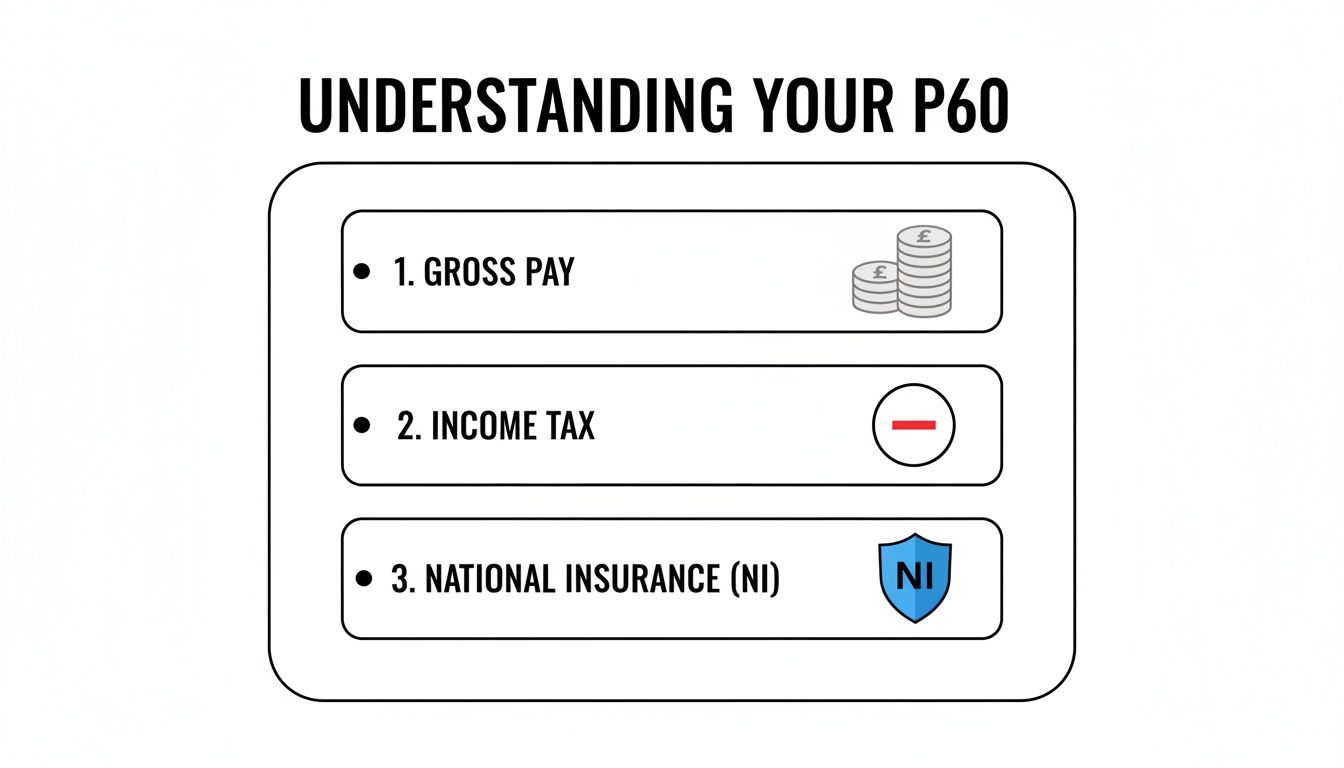
It really boils down to your total gross pay, how much income tax was taken off, and your National Insurance contributions for the year.
The P45 Explained
Your P45, officially called 'Details of employee leaving work', is handed to you by your employer only when you leave their company. It’s a final snapshot of your earnings and the tax you’ve paid with them from the start of the tax year up to your last day.
This form is essential for your next step. You’ll give it to your new employer so they can put you on the correct tax code right away. If you’re not starting a new job immediately, you'll need it for Jobcentre Plus. Getting this right from day one prevents any nasty surprises with over or underpaid tax.
The P11D for Benefits in Kind
Now, the P11D is a different beast altogether. Employers use this form to tell HMRC about any 'benefits in kind' they've provided. These are essentially non-cash perks that have a monetary value and might be taxable.
You’ll receive a P11D if you’ve had benefits such as:
- A company car for personal use
- Private medical insurance
- An interest-free loan
HMRC uses this information to see if you owe any extra tax on these benefits. If you do, they'll usually adjust your tax code for the following year to collect what's owed. To get the full picture, you can learn more about what a P11D is and how it works.
Key Takeaway: The P60 looks back at the whole year, the P45 is for moving forward to a new job, and the P11D covers the taxable extras you received along the way.
To make things even clearer, here’s a quick comparison to help you distinguish between these key PAYE forms.
Comparing Key UK Tax Forms
| Form | What It Is For | When You Receive It |
|---|---|---|
| P60 | An annual summary of all pay and tax from one employer for a full tax year. | Annually, by 31 May, if you are employed on the last day of the tax year (5 April). |
| P45 | A record of your pay and tax up to the point you leave a job. | When you cease employment with a company. |
| P11D | A statement detailing the cash value of any taxable benefits or expenses. | Annually, by 6 July, if you have received taxable benefits. |
Once you understand these simple distinctions, you'll know exactly what each form is for and what action to take when one lands on your desk or in your inbox.
Putting Your P60 to Work in the Real World

So, you’ve received your P60. Don't just file it away and forget about it. This document is far more than an annual summary for your records; it’s a vital piece of financial evidence that proves your standing in some of life's most important moments.
Think of it less as a historical document and more as a practical tool. From buying a home to sorting out your taxes, that single piece of paper carries a lot of weight. Knowing how and when to use it is key.
Proving Your Income for Mortgages and Loans
When you're applying for something big like a mortgage or a significant personal loan, the lender needs solid, undeniable proof of your income. While your monthly payslips offer a snapshot, your P60 gives them the complete, official picture of your earnings over a full tax year.
For lenders, it’s a trusted, HMRC-recognised statement of your financial stability. A first-time homebuyer, for example, will almost certainly be asked to show their P60s from the last two or three years. This gives the bank a clear and reliable history of your earnings, which directly impacts how much they’re prepared to lend you.
Key Insight: Lenders often consider the P60 the gold standard for income verification. It consolidates a whole year's earnings into one official document, making it a much more reliable indicator of long-term affordability than a stack of individual payslips.
Completing Your Self Assessment Tax Return
If you have other income on top of your main job – perhaps from freelance projects, rental properties, or investments – you’ll probably need to file a Self Assessment tax return. This is where your P60 becomes absolutely essential. It provides the exact figures for your employment income and the tax you’ve already paid through PAYE.
Trying to complete your return without it means painstakingly adding up 12 months of payslips, which is a recipe for mistakes. Your P60 gives you the definitive totals you need to fill out the employment section accurately, helping you avoid underpaying or, just as importantly, overpaying tax.
Claiming a Tax Refund
Ever had a feeling you might have paid too much tax? It happens more often than you’d think, especially if you’ve changed jobs, worked for multiple employers in one year, or simply ended up on the wrong tax code. Your P60 is the first document you'll need to check for any discrepancies and start the process of claiming a refund from HMRC.
The form is the go-to evidence for clawing back overpaid tax. Because it covers the standardised period from 6 April to 5 April, it provides a clear and official summary for the year. Remember, each employer you worked for during the tax year is legally required to give you a separate P60. You can find more detail on the specifics of P60s on the official GOV.UK website.
Your P60 Responsibilities as an Employer
If you're a business owner, issuing P60s isn't just a courtesy—it's a legal requirement. Getting it right is a cornerstone of good payroll management, ensuring you stay on the right side of HMRC and maintain trust with your team.
The rule is simple: you must give a P60 to every single person on your payroll on the very last day of the tax year, which is 5 April. It doesn't matter if they started yesterday or have been with you for years; if they're an employee on that date, they get a P60.
The Deadline You Can’t Afford to Miss
Circle 31 May in your calendar. This is the absolute deadline for getting P60s out to your staff for the tax year that just finished.
Missing this deadline isn't taken lightly by HMRC. The penalties for late issuance start at a hefty £300 and can climb with each day you fail to comply. It's not just about timing, either. Submitting incorrect information can also land you in hot water, which highlights just how important it is to keep your payroll records spot-on throughout the entire year.
Think of the P60 as the final page in your payroll story for the year. Its accuracy hinges entirely on the quality of the Real Time Information (RTI) you've sent to HMRC every time you paid your employees.
How Real Time Information (RTI) Feeds the P60
The numbers that appear on a P60—the total pay, tax, and National Insurance—aren't just plucked out of thin air at the year's end. They are the sum total of all the payroll data you've been reporting to HMRC through the Real Time Information (RTI) system.
Because of this direct link, a correct P60 is simply the natural result of a well-run payroll. Any mistake made in a weekly or monthly RTI submission will snowball and show up on that final summary. The only way to guarantee compliant P60s is to be meticulous with your payroll from the very first day of the tax year. For a deeper dive into managing employee tax documents effectively, a good guide to HR document management can be a lifesaver.
Outsourcing Payroll: The Smart Move for SMEs
Let’s be honest, for many small and medium-sized businesses, running payroll in-house is a massive headache. Juggling tax codes, student loan deductions, and reporting deadlines is a minefield where one small error can cause big problems.
This is exactly why so many businesses choose to outsource. Handing over your payroll to a specialist means your PAYE system is managed by experts all year round. They take care of every RTI submission, calculate everything precisely, and ensure fully compliant P60s land with your employees on time, every time. It’s more than just ticking a box; it’s about freeing up your time and giving you total peace of mind.
To get a better handle on your duties, it's worth understanding what PAYE for employers entails by reading our comprehensive guide.
What to Do If Your P60 Is Missing or Incorrect
It’s a moment of mild panic for many: you need your P60, but it’s nowhere to be found. Or maybe you have it, but the numbers just don’t look right. Don't worry. There’s a straightforward path to getting it sorted. The most important thing is to act quickly.
Your first stop should always be your employer. They have a legal duty to provide you with a P60 by 31 May following the end of the tax year on 5 April. If that deadline has come and gone, get in touch with your HR or payroll department. It's also worth checking if your company uses an online portal, as your digital P60 might be sitting there waiting for you.
My P60 Has Incorrect Details
You’ve got your P60, but something feels off with the figures. Before you do anything else, grab your final payslip of the tax year (which is typically your March one) and compare the "year-to-date" totals. They should match your P60 exactly.
If you spot a mismatch, here's what to do:
- Tell Your Employer: Contact your payroll department right away and point out the error. It’s their job to look into it and make things right.
- Ask for a New One: Once they’ve corrected the mistake, they must issue you a new, replacement P60. It should be clearly marked as a replacement.
- Keep Everything: Make sure you hold onto both the wrong P60 and the corrected version for your own records.
Dealing with payroll errors can sometimes be tricky. If you're running into difficulties, it might be helpful to understand some of the common pitfalls by reading about fixing problems with running payroll and how to resolve them.
What If My Employer Won't Help?
In the rare case that your employer is unwilling or unable to fix the error, your next call is to HMRC. They can help, but you'll need to have your payslips and any other evidence ready to hand so they can amend your tax record correctly.
Finally, remember that you can always see your pay and tax details for the last five years online through your Government Gateway personal tax account. While it’s not an official P60, it’s an incredibly useful backup for checking your figures and accessing historical information.
P60 FAQs: Your Questions Answered
Even after getting to grips with the basics, a few specific scenarios often trip people up. Let's run through some of the most common questions we hear about P60s.
Do I Get a P60 if I’m Self-Employed?
Simply put, no. A P60 is purely for employees who are part of a company's PAYE (Pay As You Earn) payroll system.
If you’re self-employed, you're in charge of your own tax affairs. You’ll track your income through invoices and bank statements, and you report everything to HMRC by filing a Self Assessment tax return each year. There's no employer to issue you a P60.
What if I Changed Jobs During the Tax Year?
This is a really common point of confusion. You will only get a P60 from the employer you were working for on the very last day of the tax year, which is 5 April.
Any employer you left earlier in the tax year won't send you a P60. Instead, they should have given you a P45 when you left, which shows your earnings and tax paid up to your leaving date. If you happened to have more than one job on 5 April, you should receive a separate P60 from each of those employers.
For instance, imagine you left a job with Company A in October and started at Company B, where you were still employed on 5 April. You’ll get a P45 from Company A and a P60 from Company B.
Can HMRC Give Me a Copy of My P60?
HMRC doesn't actually issue P60s, so they can't provide you with a copy. The legal duty to provide you with a P60 rests entirely with your employer.
If you've misplaced yours, the first thing to do is ask your employer for a replacement. If that’s not an option (perhaps the company has since closed), you can find a summary of your pay and tax history by logging into your personal tax account on the GOV.UK website.
Navigating payroll, year-end reporting, and the specifics of documents like the P60 can be a real headache for any business owner. Stewart Accounting Services specialises in taking care of all aspects of payroll and PAYE for SMEs, freeing you up to concentrate on what you do best. Let our experts handle the details with the precision and care your business deserves. Visit us at https://stewartaccounting.co.uk to see how we can support you.